
通常来说,小游戏的用户数据都会保存在本地,一旦用户把包删掉了,里面的游戏数据也会跟着没掉,一切都要从头再来。而想要把用户的数据保存下来就得用到服务器,把数据存在服务器里面,这样就不怕用户数据丢失了。
下面我用本地简单模拟下游戏客户端和服务端的交互流程。
用node.js简单搭建个本地服务器,然后连接一下数据库。
const mysql = require('mysql');
const express = require("express");
const bodyParser = require('body-parser');
const server = express();//服务器地址http://127.0.0.1:3003/
server.use(bodyParser.urlencoded({ extended: false }))
//设置跨域访问
server.all("*", function (request, response, next) {
    //设置允许跨域的域名,*代表允许任意域名跨域
    response.header("Access-Control-Allow-Origin", "*");
    //允许的header类型
    response.header("Access-Control-Allow-Headers", "content-type");
    //跨域允许的请求方式
    response.header("Access-Control-Allow-Methods", "DELETE,PUT,POST,GET,OPTIONS");
    switch (request.url) {
        case '/login':
            break;
        default:
            break;
    }
})
/**绑定端口 */
server.listen(3003, () => {
});
/**数据库处理 */
const connection = mysql.createConnection({
    host: 'localhost',
    database: 'test',
    user: 'root',
    password: '123'
});
connection.connect();
/**对数据库进行操作*/
function connectionQuery(sql, value, callback) {
connection.query(sql, value, (error, results, fields) => {
if (error) {
callback(error, null);
    return;
}
callback(null, results);
});
}
然后我们进入游戏之前,请求一下服务器,把服务器的数据赋值到本地。服务器添加登录接口的请求处理,下发服务端数据,我们用个最简单的金币数据为例子。
    case '/login':
     connectionQuery('select * from coin', null, (error, res) => {
      if (error) {
        throw error;
    }
       response.send(JSON.stringify(res[0]));
       })
     break;
客户端就会接受到服务端下发下来的金币数据,对界面进行刷新。
  StartScreen.singleton.sendRequerst('GET', 'login', {}, null, (err,res) => {
                if(err) {
                    //本地数值直接赋值或者让其禁止进入游戏
                }
                console.log(res, '服务器数据');
                //进行界面刷新
                StartScreen.singleton.serverData = res;
                this.coinNode.getChildByName('text').getComponent(cc.Label).string =  StartScreen.singleton.serverData.num;
                cc.assetManager.loadBundle('panel',(error,res) => {
                    if(error) {return cc.log('资源加载失败',error,res)};
                    res.load('HomePanel',cc.Prefab, (error,prefab:cc.Prefab) => {
                        if(error) {return cc.log('资源加载失败',error,res)};
                        const node = cc.instantiate(prefab);
                        node.parent = this.node;
                    })
                })
            });
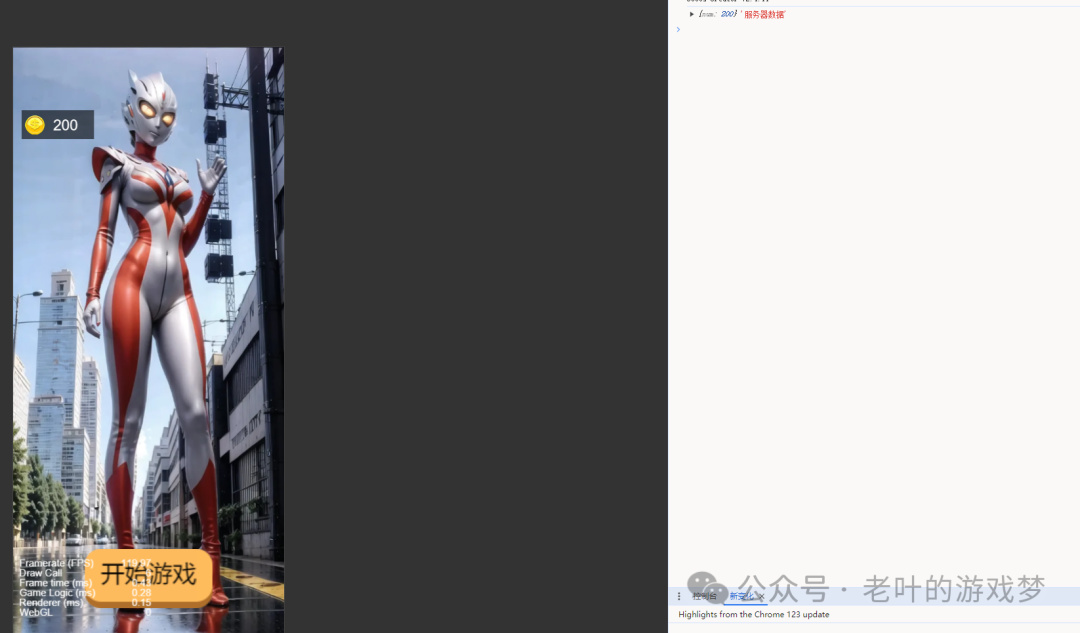
更改数据也是同理,更改数据的时候,把要跟新的数据上传到服务端,服务端那边根据客户端的数据对数据库的数据进行更新处理,再返回给客户端,客户端进行ui界面的刷新。
case '/update':
            let data = '';
            request.on("data", function (chunk) {
                data += chunk;
            });
            request.on("end", function () {
                if (data != '') {
                    connectionQuery(`update coin set num=?`, [JSON.parse(data).num], (error, res) => {
                        if (error) {
                            throw error;
                        }
                        connectionQuery('select * from coin', null, (error, res) => {
                            if (error) {
                                throw error;
                            }
                            response.send(200, JSON.stringify(res[0]));
                        })
                    })
                } else {
                    response.send(200);
                }
            });
            break;
通过post上传数据到服务端,这样我们就能实现数据的同步 。
StartScreen.singleton.sendRequerst('POST', 'update', {num: 3600}, null, (err,res) => {
                if(err) {
                    //本地数值直接赋值或者让其禁止进入游戏
                }
                console.log(res, '更新后服务器数据');
                //进行界面刷新
                StartScreen.singleton.serverData = res;
                this.coinNode.getChildByName('text').getComponent(cc.Label).string =  StartScreen.singleton.serverData.num;
            });
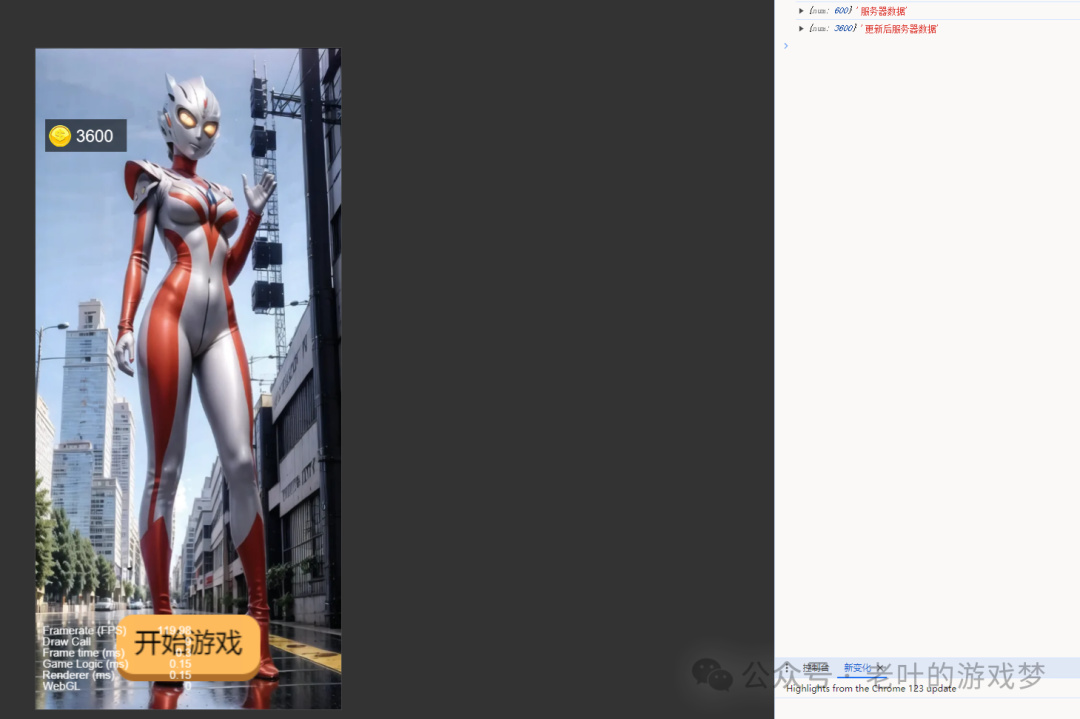
通过服务端对数据的存放,可以做到数据的校验及保存,这样用户把本地的包删掉了,但是用户身上的数据仍然存在服务器上面,下次用户进来,他的数据仍然没变。
数据存在服务端可以对用户的交互行为进行校验,避免用户开挂刷数据。分析用户行为,为游戏的下一次更新和改进做准备。