
改的妙啊,传统不能丢,,
好的,马上验证,并给出结果
验证通过,如果使用this.node.on方式还是没有结果,不知怎么样才能让他可以在早前的版本中
破案了,使用这种方式可以完美运行,但仍然留下了一个未解之谜那就是使用this.node.on()这种方式还没有通过,以下是参考代码使用的是 eventtarget方式
========= parentNode.ts ===========
import { _decorator, Component, Node,EventTarget } from ‘cc’;
const { ccclass, property } = _decorator;
export const eventTarget =new EventTarget();
@ccclass(‘parentNode’)
export class parentNode extends Component {
start() {
eventTarget.on(‘aaa’, this.onCustomEvent, this);
console.log(“onstart”);
}
update(deltaTime: number) {

}


// 定义事件处理函数
onCustomEvent(event) {
    console.log("oncustomevent() aaa:"+JSON.stringify(event));
    console.log("oncustomevent() aaa:"+event.ok);

}
}
========= childNode.ts =============
import { _decorator, Component, Node,EventTarget} from ‘cc’;
import {eventTarget} from ‘./parentNode’;
const { ccclass, property } = _decorator;
@ccclass(‘childNode’)
export class childNode extends Component {
start() {
eventTarget.on(‘aa’, this.onCustomEvent2, this);
eventTarget.emit(‘aa’, { “ok”:“ok4”});
eventTarget.emit(‘aaa’, { “ok”:“ok5”});
console.log(“child onstart”);
}
update(deltaTime: number) {
}
onCustomEvent2(event) {
    console.log("oncustomevent2 aa():"+JSON.stringify(event));
    console.log("oncustomevent2 aa():"+event.ok);
}
}
结果:
onstart
childNode.ts:25 oncustomevent2 aa():{“ok”:“ok4”}
childNode.ts:26 oncustomevent2 aa():ok4
parentNode.ts:27 oncustomevent() aaa:{“ok”:“ok5”}
parentNode.ts:28 oncustomevent() aaa:ok5
childNode.ts:17 child onstart
完全正确达到预期
那么有谁知道使用这种方式来实现的请回复,谢谢,
this.node.on()
emit事件不会向上冒泡,父节点收不到。要用dispatchEvent
4赞
3.x是不建议在node上监听自定义事件的, 每个node都有一个自己的NodeEventProcessor,Node.on Node.emit 都是这个对象在处理的,你要跨节点发消息就得找到这个节点的NodeEventProcessor, 虽然可以用Node.dispatchEvent(new Event(“name”, isBubble)) 的是否冒泡参数为true来自动查找父节点的NodeEventProcessor, 但是最多只能子节点发消息给父节点,父节点发消息给子节点就不行了,而且这样效率也很低。
我们的做法是封装一个类比如叫AppNotification, 是一个单例 继承EventTarget, 所有系统级的自定义事件就又它来处理。
如果嫌麻烦实际上还可以在game 或者director这些对象上注册和发射事件,这两个对象也都是单例 继承了EventTarget,不过这种方式一定要在节点或者组件destroy的时候off掉
1赞
感谢回复,
可是剧我所知,3。8。2版本中没有对dispatchEvent方法,能否给出用例,谢谢
感谢回复,
能否给出用例,NodeEventProcessor,谢谢,我相信以后很多人看到我们的答案回感谢我们的,
是不是要先生成一个eventProcessor对象再调用它的dispatchEvent()方法?
在onLoad里面监听试一下
那个NodeEventProcessor是Node的属性,按道理应该不用它, 这是封装一个AppNotification的例子
import { EventTarget } from "cc";

export class AppNotification extends EventTarget {
    private constructor() {
        super();
    }

    private static instance: AppNotification;
    public static getInstance() {
        if (!this.instance) {
            this.instance = new AppNotification();
        }

        return this.instance;
    }

    public static on(eventName: string, cb: (arg: any)=>void, target: any) {
        this.getInstance().on(eventName, cb, target);
    }

    public static off(eventName: string) {
        this.getInstance().off(eventName);
    }

    public static targetOff(target: any) {
        this.getInstance().targetOff(target);
    }


    public static emit(eventName: string, arg: any) {
        this.getInstance().emit(eventName, arg);
    }
}
用法
@ccclass('Child')
export class Child extends Component {
    protected onLoad(): void {
        AppNotification.on("MyEvent1", (arg)=>{
            console.log("child收到MyEvent1事件:" + arg);
        }, this);
    }

    start() {
        AppNotification.emit("MyEvent1", "子节点发送")
    }

    protected onDestroy(): void {
        AppNotification.targetOff(this);
    }
}

@ccclass('Parent')
export class Parent extends Component {
    protected onLoad(): void {
        AppNotification.on("MyEvent1", (arg)=>{
            console.log("parent收到MyEvent1事件:" + arg);
        }, this);
    }

    start() {
        AppNotification.emit("MyEvent1", "父节点发送")
    }

    protected onDestroy(): void {
        AppNotification.targetOff(this);
    }
}
用 game就是这样,但是game的on方法被重写了,回调签名是()=>void,不过实际上一样能拿到参数,game换成director一样的,但是这样做好不好我就不知道了
@ccclass('Parent')
export class Parent extends Component {
    protected onLoad(): void {
        //@ts-ignore
        game.on("MyEvent",(arg)=>{
            console.log("收到MyEvent事件:" + arg);
        }, this);
    }

    start() {
        game.emit("MyEvent", "事件参数")
    }

    protected onDestroy(): void {
        game.targetOff(this);
    }
}

1赞
node.emit发送事件又不冒泡,谁发送谁接收,
你父节点监听aaa,子节点发送aaa,两者毫无关联
你的需求可以用EventBus模型实现,
简单点处理就用director或者game节点去收发事件也行
1赞
这个最好用一个全局变量 发送 接收 !
1赞
参考这个
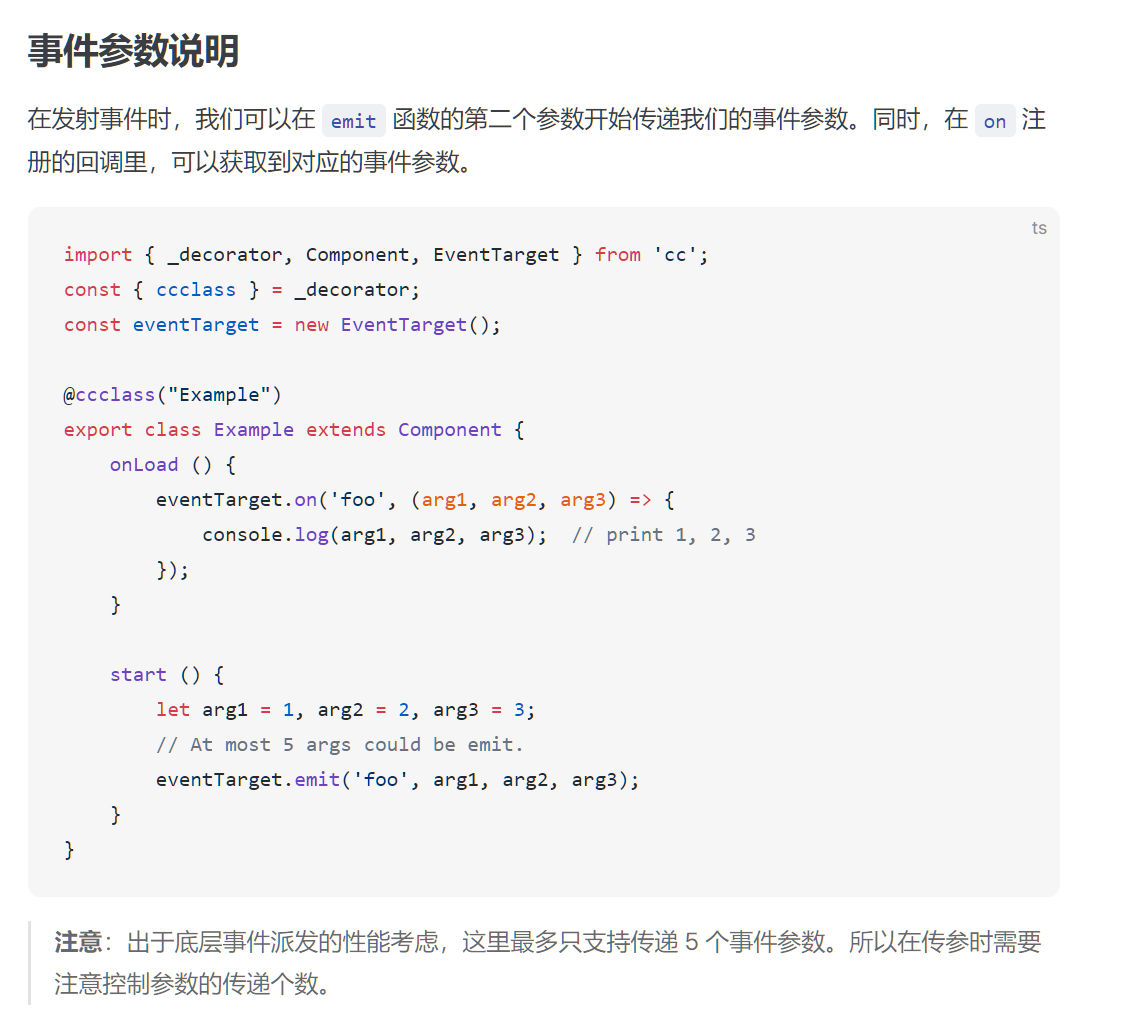
这个设置成全局变量,
eventTarget = new EventTarget();
在需要的场景的代码中用
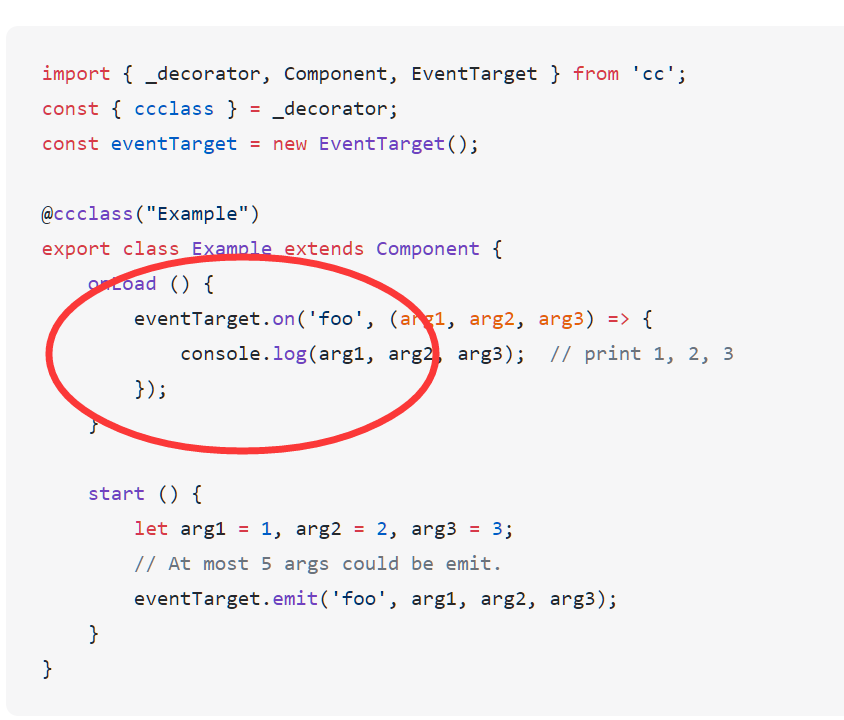
这个做监听,还得记得
在onDestroy方法中 撤销监听
eventTarget.off
试试吧 骚年!
为什么想不开用自带的事件广播系统,自己用观察者模式实现个事件通知模块不香么。所有引擎都能用。 
引擎有为啥不用引擎的 一般全局事件用eventTarget就够用了
1赞
习惯问题吧,以前用unity也是自己写的,几行代码代码就搞定,不容易踩坑,而且知道底层加定制化功能也方便。
1赞
帮大忙了, 谢谢.
3.x的确实让人疑惑. 用习惯了this.node.emit后发现跨节点怎么都监听不到, 同一个节点能监听.
那这种全局单例才是最优解了.