Shader学习案例,2D翻转/伪3D效果

// Copyright © 2017-2018 Xiamen Yaji Software Co., Ltd.

CCEffect %{
techniques:

  • passes:
    • vert: vs
      frag: fs
      blendState:
      targets:
      • blend: true
        rasterizerState:
        cullMode: none
        properties:
        texture: { value: white }
        alphaThreshold: { value: 0.5 }
        }%

CCProgram vs %{
precision highp float;

#include
#include

in vec3 a_position;
in vec4 a_color;
out vec4 v_color;

#if USE_TEXTURE
in vec2 a_uv0;
out vec2 v_uv0;
#endif
#if USE_FAKE3D
varying vec3 camera_pos;
varying vec2 offset;

uniform Fake3D_vs {
vec2 textureSize;
float FOV;
float y_rot;
float x_rot;
};
#endif
void main () {
vec4 pos = vec4(a_position, 1);

#if USE_FAKE3D
  vec2 UV = a_uv0;
  float sin_b = sin(y_rot / 180. * PI);
  float cos_b = cos(y_rot / 180. * PI);
  float sin_c = sin(x_rot / 180. * PI);
  float cos_c = cos(x_rot / 180. * PI);

  // Y轴旋转矩阵
  mat3 inv_rot_mat_y = mat3(
    vec3(cos_b, 0.0  , sin_b),
    vec3(0.0  , 1.0  , 0.0),
    vec3(-sin_b, 0.0  , cos_b)
  );

  // X轴旋转矩阵
  mat3 inv_rot_mat_x = mat3(
    vec3(1.0  , 0.0  , 0.0),
    vec3(0.0  , cos_c  , -sin_c),
    vec3(0.0  , sin_c  , cos_c)
  );

  // 合成的旋转矩阵
  mat3 inv_rot_mat = inv_rot_mat_y * inv_rot_mat_x;

  // 计算投影角度的正切
  float t = tan(FOV / 360. * PI);
  float v = (0.5 / t) + 0.5;

  // 计算模拟的摄像机位置 和 偏移量
  camera_pos = inv_rot_mat * vec3(UV - 0.5, 0.5 / t);
  camera_pos.xy *= inv_rot_mat[2].z * v;
  offset = inv_rot_mat[2].xy * v;

  pos.x += (UV.x - 0.5) * textureSize.x;
  pos.y -= (UV.y - 0.5) * textureSize.y;

#endif

#if CC_USE_MODEL
pos = cc_matViewProj * cc_matWorld * pos;
#else
pos = cc_matViewProj * pos;
#endif

#if USE_TEXTURE
v_uv0 = a_uv0;
#endif

v_color = a_color;

gl_Position = pos;

}
}%

CCProgram fs %{
precision highp float;

#include
#include

in vec4 v_color;
#if USE_FAKE3D
varying vec3 camera_pos;
varying vec2 offset;

uniform Fake3D_fs {
int cull_back;
};
#endif
#if USE_TEXTURE
in vec2 v_uv0;
uniform sampler2D texture;
#endif

void main () {
vec4 o = vec4(1, 1, 1, 1);

#if USE_TEXTURE
  CCTexture(texture, v_uv0, o);
#endif

#if USE_FAKE3D

  // 启用背面剔除 && 摄像机位置在背面 => 丢弃片段
  if (cull_back != 0 && camera_pos.z <= 0.) discard;

  // 将摄像机位置转换为屏幕上的 UV 坐标, 减去偏移量
  vec2 uv = (camera_pos.xy / camera_pos.z).xy - offset;

  // 纹理采样, 加上 0.5 以调整偏移
  o = texture(texture, uv + 0.5);

  // 控制纹理的透明度,使超出范围的部分透明
  o.a *= step(max(abs(uv.x), abs(uv.y)), 0.5);

#endif

o *= v_color;

gl_FragColor = o;

}
}%
这样发给你 可以嘛

不知道,是不是复制漏掉和显示的原因哦

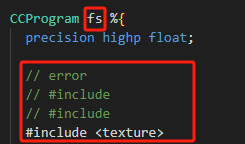
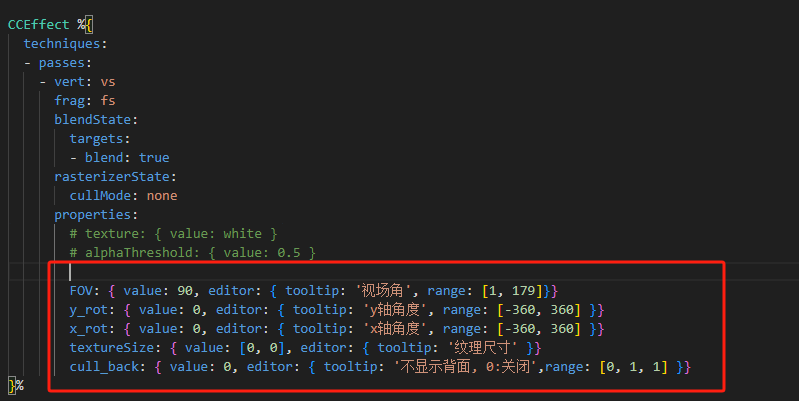
1、 参数 properties,没有添加

2、#include,错误

image

image

顺便一提,发代码时,可以用 ``` 符,在代码前后,显示会像下面这样:

test code

更多这种语法,可以了解了解 Markdown

好滴好滴 谢谢大大

哥 我如果想改变卡牌旋转的中心点应该改哪呀

还没想过这种需求诶,实现这个还要改挺多的。

你可以看看这个 CocosCreator Assembler 2D实现3D透视翻转,试试别的方案。

nice,mark一下

Great job.
Can this extends to rotate like 3d? :slight_smile:

Like this ?:thinking:

mark,shader翻转学习

CCEffect %{

techniques:

  • passes:

    • vert: vs

      frag: fs

      blendState:

      targets:

      • blend: true

      rasterizerState:

      cullMode: none

      properties:

      texture: { value: white, editor: { label: “Texture”, tooltip: “The main texture of the material” }}

      alphaThreshold: { value: 0.5, editor: { label: “Alpha Threshold”, range: [0, 1] }}

      FOV: { value: 90, editor: { label: “Field of View”, tooltip: ‘视场角’, range: [1, 179] }}

      y_rot: { value: 0, editor: { label: “Y Rotation”, tooltip: ‘y轴角度’, range: [-360, 360] }}

      x_rot: { value: 0, editor: { label: “X Rotation”, tooltip: ‘x轴角度’, range: [-360, 360] }}

      textureSize: { value: [0, 0], editor: { label: “Texture Size”, tooltip: ‘纹理尺寸’ }}

      cull_back: { value: 0, editor: { label: “Cull Backface”, tooltip: ‘不显示背面, 0:关闭’, range: [0, 1, 1] }}

}%

CCProgram vs %{

precision highp float;

#include

#include

#include

in vec3 a_position;

in vec4 a_color;

out vec4 v_color;

#if USE_TEXTURE

in vec2 a_uv0;

out vec2 v_uv0;

#endif

#if USE_FAKE3D

varying vec3 camera_pos;

varying vec2 offset;

uniform Fake3D_vs {

  vec2 textureSize;

  float FOV;

  float y_rot;

  float x_rot;

};

#endif

void main () {

vec4 pos = vec4(a_position, 1);

#if USE_FAKE3D

  vec2 UV = a_uv0;

  float sin_b = sin(y_rot / 180. * PI);

  float cos_b = cos(y_rot / 180. * PI);

  float sin_c = sin(x_rot / 180. * PI);

  float cos_c = cos(x_rot / 180. * PI);

  // Y轴旋转矩阵

  mat3 inv_rot_mat_y = mat3(

    vec3(cos_b, 0.0  , sin_b),

    vec3(0.0  , 1.0  , 0.0),

    vec3(-sin_b, 0.0  , cos_b)

  );

  // X轴旋转矩阵

  mat3 inv_rot_mat_x = mat3(

    vec3(1.0  , 0.0  , 0.0),

    vec3(0.0  , cos_c  , -sin_c),

    vec3(0.0  , sin_c  , cos_c)

  );

  // 合成的旋转矩阵

  mat3 inv_rot_mat = inv_rot_mat_y * inv_rot_mat_x;

  // 计算投影角度的正切

  float t = tan(FOV / 360. * PI);

  float v = (0.5 / t) + 0.5;

  // 计算模拟的摄像机位置 和 偏移量

  camera_pos = inv_rot_mat * vec3(UV - 0.5, 0.5 / t);

  camera_pos.xy *= inv_rot_mat[2].z * v;

  offset = inv_rot_mat[2].xy * v;

  pos.x += (UV.x - 0.5) * textureSize.x;

  pos.y -= (UV.y - 0.5) * textureSize.y;

#endif

#if CC_USE_MODEL

pos = cc_matViewProj * cc_matWorld * pos;

#else

pos = cc_matViewProj * pos;

#endif

#if USE_TEXTURE

v_uv0 = a_uv0;

#endif

v_color = a_color;

gl_Position = pos;

}

}%

CCProgram fs %{

precision highp float;

#include

#include

in vec4 v_color;

#if USE_TEXTURE

in vec2 v_uv0;

uniform sampler2D texture;

#endif

#if USE_FAKE3D

varying vec3 camera_pos;

varying vec2 offset;

uniform Fake3D_fs {

int cull_back;

};

#endif

void main () {

vec4 o = vec4(1, 1, 1, 1);

#if USE_TEXTURE

  CCTexture(texture, v_uv0, o);

#endif

#if USE_FAKE3D

  // 启用背面剔除 && 摄像机位置在背面 => 丢弃片段

  if (cull_back != 0 && camera_pos.z <= 0.) discard;

  // 将摄像机位置转换为屏幕上的 UV 坐标, 减去偏移量

  vec2 uv = (camera_pos.xy / camera_pos.z).xy - offset;

  // 纹理采样, 加上 0.5 以调整偏移

  o = texture(texture, uv + 0.5);

  // 控制纹理的透明度,使超出范围的部分透明

  o.a *= step(max(abs(uv.x), abs(uv.y)), 0.5);

#endif

o *= v_color;

gl_FragColor = o;

}

}%
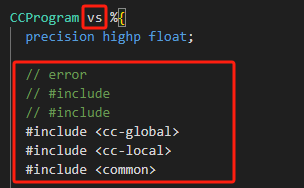
大佬看看漏了啥 效果没有 图片也不见了 :joy: :joy: :joy:

要不发个文件?

fake3DEffect.zip (1.6 KB)

2.4.13

你发的文件,我试的有效果呀。

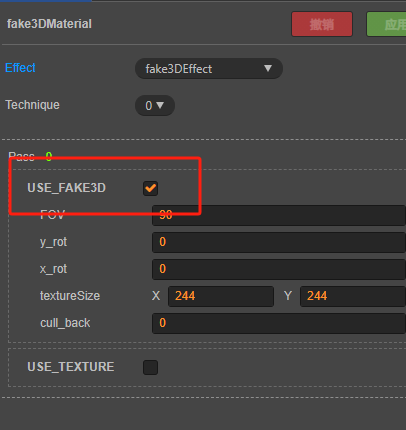
你可以检查一下,是否勾选了?

image

:thinking:

我勾选了 不然我说为什么图片都不见了
image
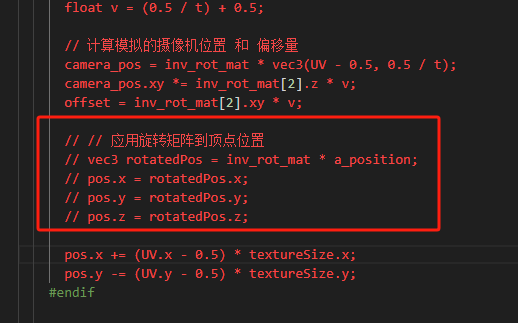
我还问了ai ai加了一个这个 图片会扭曲 说明值也起作用了 但是我删掉用源码 就是不行 :joy:

我搞个2.4.10试试

我测试的 2.4.13,你发的文件,没有修改代码;

我把 demo 发你试试?

Test2.4.13.zip (235.5 KB)

还有可能是,图片没取消自动合图,你可以检查看看。

啊 合图吖 我用的合图里面的图片 :rofl:

160EB4C3