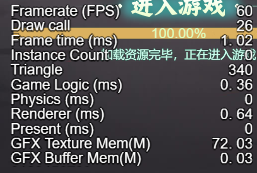
统计信息在浅色底很难看得清,引擎大佬们为啥不加个描边呢?
这里提供一个修改web下的显示:
修改文件:scripting\engine\cocos\profiler\profiler.ts
    public generateStats () {
        if (this._statsDone || !this._ctx || !this._canvas) {
            return;
        }

        this._stats = null;
        const now = performance.now();

        this._ctx.textAlign = 'left';
        let i = 0;
        for (const id in _profileInfo) {
            const element = _profileInfo[id];
            this._ctx.strokeText(element.desc, 0, i * this._lineHeight + 2);
            this._ctx.strokeText(element.desc, 0, i * this._lineHeight - 2);
            this._ctx.strokeText(element.desc, -2, i * this._lineHeight);
            this._ctx.strokeText(element.desc, 2, i * this._lineHeight);
            this._ctx.fillText(element.desc, 0, i * this._lineHeight);
            element.counter = new PerfCounter(id, element, now);
            i++;
        }
        this._totalLines = i;
        this._wordHeight = this._totalLines * this._lineHeight / this._canvas.height;
        for (let j = 0; j < _characters.length; ++j) {
            const offset = this._ctx.measureText(_characters[j]).width;
            this._eachNumWidth = Math.max(this._eachNumWidth, offset);
        }
        for (let j = 0; j < _characters.length; ++j) {
            this._ctx.strokeText(_characters[j], j * this._eachNumWidth, this._totalLines * this._lineHeight + 2);
            this._ctx.strokeText(_characters[j], j * this._eachNumWidth, this._totalLines * this._lineHeight - 2);
            this._ctx.strokeText(_characters[j], j * this._eachNumWidth + 2, this._totalLines * this._lineHeight);
            this._ctx.strokeText(_characters[j], j * this._eachNumWidth - 2, this._totalLines * this._lineHeight);
            this._ctx.fillText(_characters[j], j * this._eachNumWidth, this._totalLines * this._lineHeight);
        }
        this._eachNumWidth /= this._canvas.width;

        this._stats = _profileInfo as IProfilerState;
        this._canvasArr[0] = this._canvas;
        this._device!.copyTexImagesToTexture(this._canvasArr, this._texture!, this._regionArr);
    }
效果如下,不是很好。将就用一用吧。