
Creator 3.8 嵌套ScrollView里面的按钮无法滑动最外层ScrollView

Creator3.8.3与3.8.5下都出现这个问题。其它版本我没试过。以前的Cocos2dx没这个问题。
问题:创建两个ScrollView。一个横向ScrollView,横向ScrollView里面嵌套一个竖向ScrollView2。现在要求通过竖向ScrollView2横向滑动来带动外层那个横向ScrollView滑动。于是通过在ScrollView2上设置preventSwallow来实现这一点。实现后发现ScrollView2里的按钮只能带动ScrollView2竖向滑动,而不能带动外层的ScrollView横向滑动。以前的Cocos2dx是可以带动外层的ScrollView横向滑动的。
UI图:
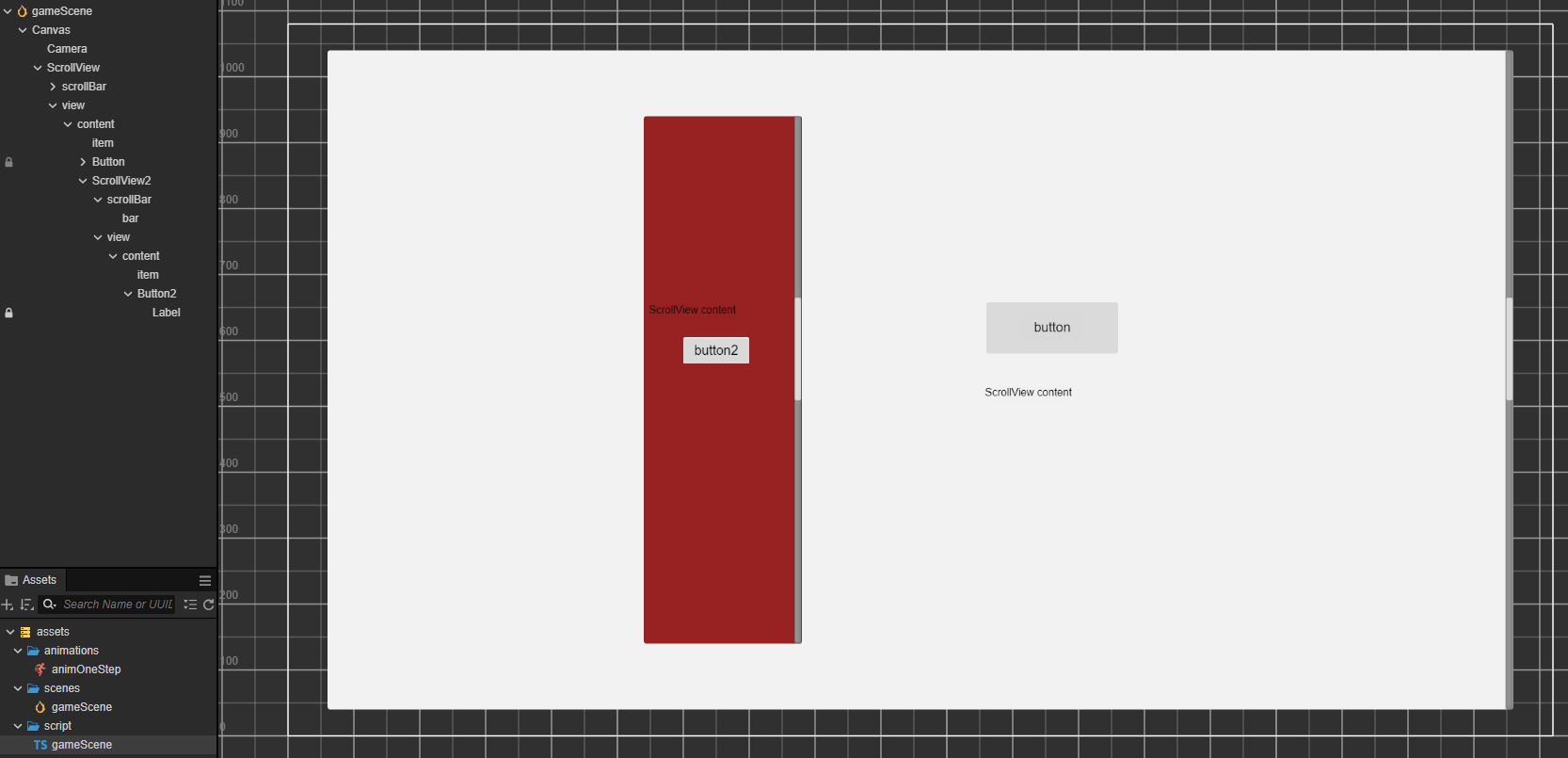

代码:
import { _decorator, Component, EventTouch, Node, ScrollView } from ‘cc’;
const { ccclass, property } = _decorator;

@ccclass(‘gameScene’)
export class gameScene extends Component {
start() {
let node = this.node.getChildByPath(‘ScrollView/view/content/ScrollView2’)
node.on(Node.EventType.TOUCH_START, this.onTouch, this)
node.on(Node.EventType.TOUCH_MOVE, this.onTouch, this)
node.on(Node.EventType.TOUCH_CANCEL, this.onTouch, this)
node.on(Node.EventType.TOUCH_END, this.onTouch, this)

    let node2 = this.node.getChildByPath('ScrollView')
    node2.on(Node.EventType.TOUCH_START, this.onTouch0, this)
    node2.on(Node.EventType.TOUCH_MOVE, this.onTouch0, this)
    node2.on(Node.EventType.TOUCH_CANCEL, this.onTouch0, this)
    node2.on(Node.EventType.TOUCH_END, this.onTouch0, this)
}

update(deltaTime: number) {
}

onTouch(event:EventTouch){
    console.log('onTouch')
    event.preventSwallow = true
}

onTouch0(event:EventTouch){
    console.log('onTouch0')
}

}

运行起来可以看到Button2的触摸事件是有到达ScrollView2与ScrollView的。但却无法带动外层的ScrollView横向滑动。不知是什么原因。在Creator 3.8下有办法让Button2的触摸事件带动外层的ScrollView横向滑动吗?

最外层的scrollview挂一下这个脚本试试
@ccclass

@menu(“Custom/UI/CCUiViewGroupNesting”)

export class CCUiViewGroupNesting extends UIComponent {

private events: EventTouch[] = [];

onLoad() {

    this.node.on(Node.EventType.TOUCH_START, this._onTouchHandle, this, true);

    this.node.on(Node.EventType.TOUCH_MOVE, this._onTouchHandle, this, true);

    this.node.on(Node.EventType.TOUCH_END, this._onTouchHandle, this, true);

    this.node.on(Node.EventType.TOUCH_CANCEL, this._onTouchHandle, this, true);

}

private _onTouchHandle(event: EventTouch) {

    if (event == null) {

        return;

    }

    try {

        if ((event as any).sham || event.simulate || event.target === this.node) {

            return;

        }

        const cancelEvent: EventTouch = new EventTouch(event.getTouches(), event.bubbles, event.type);

        cancelEvent.type = event.type;

        cancelEvent.touch = event.touch;

        (cancelEvent as any).sham = true;

        this.events.push(cancelEvent);

    } catch (error) {

        dd.log.error('touch err,', error)

    }

}

update() {

    if (this.events.length === 0) {

        return;

    }

    for (let index = 0; index < this.events.length; index++) {

        this.node.dispatchEvent(this.events[index]);

    }

    this.events.length = 0;

}

}

1赞

你好,这个脚本可以让外层ScrollView水平滑动,但有个问题就是它让ScrollView2里的水平滑动动作带动ScrollView水平滑动了两倍的距离。就是手指在ScrollView2里只水平移动了一小段距离但却带动ScrollView水平移动了一大段距离。不知这个问题有没有办法解决?

是这样的。水平滑动ScrollView2里的按钮区域速度是正常的。水平滑动ScrollView2里的非按钮区域速度至少翻倍了。

可以了。加了个全局变量inNestBtn。监听内层按钮TOUCH_START时将这个变量设为true。监听外层ScrollView的TOUCH_END将该变量设为false。另外监听外层ScrollView的TOUCH_CANCEL,如果间隔0.1秒没有TOUCH_MOVE事件触发则将该变量设为false。
CCUiViewGroupNesting里面判断变量inNestBtn不为true则跳过。最后还有个问题就是水平滑动过程中内层按钮无法带动外层ScrollView。这时只需要在内层按钮的TOUCH_START监听中调用外层ScrollView的stopAutoScroll方法就可以了。

gameScene脚本的修改部分:
onTouchBtnStart(event:EventTouch){
(window as any).inNestBtn = true;
let node = this.node.getChildByPath(‘ScrollView’)
node.getComponent(ScrollView).stopAutoScroll();
}

onTouchScrollMove(event:EventTouch){
this.toCloseNest = false;
}

onTouchScrollCancel(event:EventTouch){
this.toCloseNest = true;

    window.setTimeout(()=>{
        if(this.toCloseNest){
            (window as any).inNestBtn = false;
            this.toCloseNest = false;
        }
    }, 100)
}

onTouchScrollEnd(event:EventTouch){
(window as any).inNestBtn = false;
}

最终的CCUiViewGroupNesting脚本:
import { _decorator, Component, EventTouch, Node, ScrollView, UI } from ‘cc’;
const { ccclass, property, menu } = _decorator;

@ccclass

// @menu(“Custom/UI/CCUiViewGroupNesting”)

export class CCUiViewGroupNesting extends Component {

private events: EventTouch[] = [];

onLoad() {
    this.node.on(Node.EventType.TOUCH_START, this._onTouchHandle, this, true);
    this.node.on(Node.EventType.TOUCH_MOVE, this._onTouchHandle, this, true);
    this.node.on(Node.EventType.TOUCH_END, this._onTouchHandle, this, true);
    this.node.on(Node.EventType.TOUCH_CANCEL, this._onTouchHandle, this, true);
}

private _onTouchHandle(event: EventTouch) {
    if (event == null) {
        return;
    }

    try {
        if ((event as any).sham || event.simulate || event.target === this.node || !(window as any).inNestBtn) {
            return;
        }

        const cancelEvent: EventTouch = new EventTouch(event.getTouches(), event.bubbles, event.type);

        cancelEvent.type = event.type;
        cancelEvent.touch = event.touch;
        (cancelEvent as any).sham = true;
        this.events.push(cancelEvent);

    } catch (error) {
        console.log('touch err,', error)
    }
}

update() {
    if (this.events.length === 0) {
        return;
    }

    for (let index = 0; index < this.events.length; index++) {
        this.node.dispatchEvent(this.events[index]);
    }

    this.events.length = 0;
}

}

我这会儿刚入坑,就遇到这么个问题, 游戏开发好麻烦啊 :rofl:

我这样搞了,触点在按钮时还是会触发两倍内部view的滑动,导致移动距离和跳页触发两次,有没有什么更好的解决办法

我内部是pageView,只要pageView设置了preventSwallow = true,触点在page里设置了监听的按钮都会导致移动异常和跳页异常,都是两倍

可以了可以了,之前没用button组件的原因,这个需要使用button组件才能生效