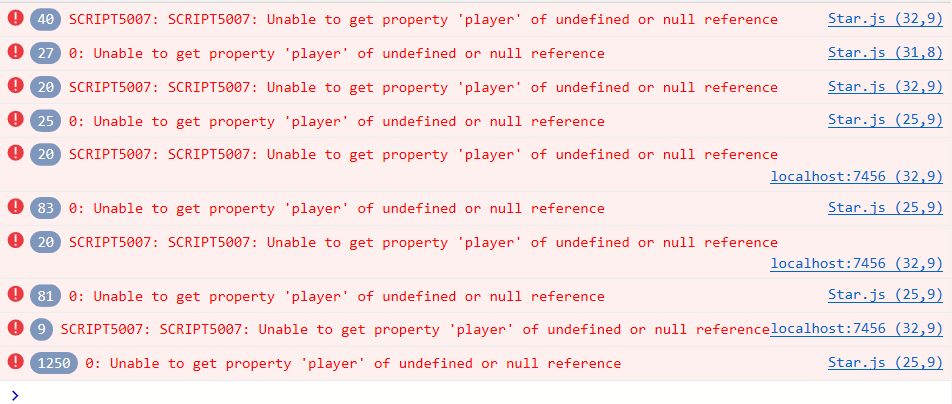
就是这段代码,它在属性里定义了game 然后在onPick里面直接调用了Game脚本中的方法,这个是怎么做到的?它说暂存Game对象的引用,可是Game对象是怎么存在里面的,难道我直接这样定义一下就可以用了吗? 我有一个附加在Canvas上的Game脚本,我想在其他脚本里调用Game脚本里的一个属性,我该怎么做呢?
cc.Class({
extends: cc.Component,
properties: {
    // foo: {
    //     // ATTRIBUTES:
    //     default: null,        // The default value will be used only when the component attaching
    //                           // to a node for the first time
    //     type: cc.SpriteFrame, // optional, default is typeof default
    //     serializable: true,   // optional, default is true
    // },
    // bar: {
    //     get () {
    //         return this._bar;
    //     },
    //     set (value) {
    //         this._bar = value;
    //     }
    // },

    // 星星和主角之间的距离小于这个数值时,就会完成收集
    pickRadius: 0,
    // 暂存 Game 对象的引用
    game: {
        default: null,
        serializable: false
    }
},

// LIFE-CYCLE CALLBACKS:

// onLoad () {},

getPlayerDistance: function () {
    // 根据 player 节点位置判断距离
    var playerPos = this.game.player.getPosition();
    // 根据两点位置计算两点之间距离
    var dist = cc.pDistance(this.node.position, playerPos);
    return dist;
},

onPicked: function() {
    // 当星星被收集时,调用 Game 脚本中的接口,生成一个新的星星
    this.game.spawnNewStar();
    // 调用 Game 脚本的得分方法
    this.game.gainScore();
    // 然后销毁当前星星节点
    this.node.destroy();
},


start () {

},

update: function (dt) {
    // 每帧判断和主角之间的距离是否小于收集距离
    if (this.getPlayerDistance() < this.pickRadius) {
        // 调用收集行为
        this.onPicked();
        return;
    }
    // 根据 Game 脚本中的计时器更新星星的透明度
    var opacityRatio = 1 - this.game.timer/this.game.starDuration;
    var minOpacity = 50;
    this.node.opacity = minOpacity + Math.floor(opacityRatio * (255 - minOpacity));
},
});