我写了个脚本,声明了一个audio-clip类型的变量

然后我手动拖拽赋值一个声音,发现变量值为:

我在组件的代码中想默认该变量的一个值,检索项目的音频资源

debug过程中发现没有相关的值和变量的值是对应的,
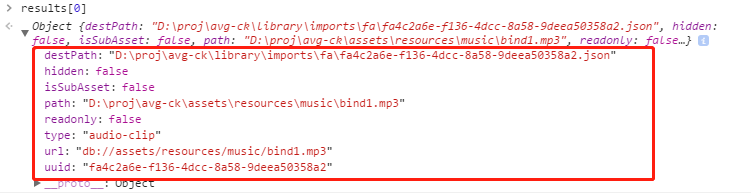
那么我该如何给组件的变量,默认一个项目中的资源呢?

我写了个脚本,声明了一个audio-clip类型的变量
然后我手动拖拽赋值一个声音,发现变量值为:
我在组件的代码中想默认该变量的一个值,检索项目的音频资源
debug过程中发现没有相关的值和变量的值是对应的,
定义一个 resetInEditor 方法哈,参考 http://docs.cocos.com/creator/api/zh/classes/Component.html?h=resetineditor
最终落地代码为:
cc.Class({
    extends: cc.Component,
    properties: {
        audio: {
            default: null, displayName: "声音", type: cc.AudioClip, notify() {
                Editor.log(this.audio);
            }
        },
        test: {
            default: 2,
            notify() {
                Editor.log(this.audio);
            }
        }
    },
    // 方式1
    resetInEditor() {
        this._setDefaultValue();
    },
    _setDefaultValue() {
        Editor.assetdb.queryAssets("db://assets/**\/*", 'audio-clip', function (error, results) {
            if (!error) {
                if (results.length > 0) {
                    let uuid = results[0].uuid;
                    cc.AssetLibrary.loadAsset(uuid, function (error, asset) {
                        debugger;
                        if (!error) {
                            // this.audio = asset.nativeUrl;
                            this.audio = asset;
                        }
                    }.bind(this));

                }

            }
        }.bind(this));
    },


    // editor: {
    //     executeInEditMode: true,
    // },
    onLoad() {
        // 方式2
        // todo 这种方式不优雅,需要和editor配合使用,推荐方式1
        // if (CC_EDITOR) {
        //     this._setDefaultValue();
        // }
    },

    start() {

    },
});