
克隆的帧动画监听【已解决,感谢白羊大佬】

var animation = this.node.getComponent(cc.Animation);
animation.on(‘finished’, this.onFinished, this);
var scene = cc.director.getScene();
var node = cc.instantiate(animation);
node.parent = scene;
node.setPosition(640,360);

克隆帧动画,发现父节点是场景名称,如改变父节点,比如为Canvas,克隆的对象会被遮住,不知道为什么?
克隆的对象,不触发animation.on(‘finished’, this.onFinished, this); ,只有原始对象才触发监听,有什么好的办法?
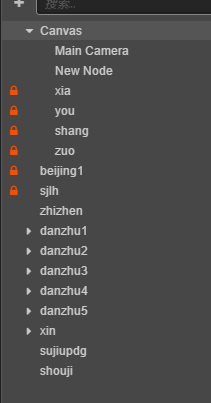
有大佬帮忙看看么,怎么解决?
用预制体的话,没法监听事件了

上述代码只是克隆了动画组件,而非动画组件依赖的完整节点,这一点需要清楚。
正确的应该是:
var node = cc.instantiate(animation.node);[quote=“liuyueyanfeng, post:1, topic:77435”]
克隆帧动画,发现父节点是场景名称
[/quote]

var scene = cc.director.getScene(); //这行代码获取到的是当前场景

层级之间会遮挡,想必是克隆的对象的层级不对,自己输出一下场景的节点数据看看,就知道了。

这句话是不对的,目前在2.0.9上效果是正常的。
你再试试。
预制体也能用。

感谢回答!~
newdh(x1, y1) {
let scene = cc.director.getScene(); //获取当前场景名称
this.sjnode = cc.instantiate(this.shouji.node) //获取动画节点
this.sjnode.parent = scene //设置父节点
this.sjnode.x = x1 //设置X
this.sjnode.y = y1 //设置Y

    this.sjnode.on(cc.Node.EventType.TOUCH_START,this.shoujidh1,this) //监听触摸
    // this.sjnode.on('finished',this.shoujidh1,this) //监听动画播放完成

}
shoujidh1(){
               this.sjnode.destroy()
            console.log("1")
}

以上代码问题:
1.我将父节点设置为 shouji、xin下面,都被遮挡;只有设置为场景名字时才不被遮挡,按层级来看,应该不会这样吧?
2. this.sjnode.on(cc.Node.EventType.TOUCH_START,this.shoujidh1,this) //监听触摸 ,我开启触摸监听,创建多个克隆帧动画时,点击其中克隆帧动画,只会销毁最后一次创建的帧动画打,再点击另外的克隆帧动画时,不影响日志输出“1”,但不会销毁;
3. // this.sjnode.on(‘finished’,this.shoujidh1,this) //监听动画播放完成 ,只会监听第一个帧动画事件,之后的不会再监听;
4.我把帧动画做成预制体时,发现无法开启监听…(.on这个)

目前效果:

卧槽,看硬了

。。低调。。这也可以?

const {ccclass, property} = cc._decorator;

@ccclass
export default class NewClass extends cc.Component {

@property(cc.Sprite)
beijing: cc.Sprite = null;
@property(cc.Animation)
 shouji:cc.Animation = null;

onLoad () {
    this.beijing.node.on(cc.Node.EventType.TOUCH_START,this.shoujidh,this)
     this.shouji.on(cc.Animation.EventType.FINISHED,this.xiaohui,this)
}

shoujidh(event:cc.Event.EventTouch){
let chumo = event.getLocation();
let newsj = cc.instantiate(this.shouji.node)
newsj.parent = this.node
newsj.position = this.node.convertToNodeSpaceAR(cc.v2(chumo.x,chumo.y))
newsj.on(cc.Animation.EventType.FINISHED,this.xiaohui,this)
console.log(chumo)
}
xiaohui(){
this.shouji.node.removeFromParent(false)
}

@jon

已解决,感谢白羊大佬!~

const {ccclass, property} = cc._decorator;

@ccclass
export default class NewClass extends cc.Component {

@property(cc.Sprite)
beijing: cc.Sprite = null;
@property(cc.Animation)
shouji: cc.Animation = null;
onLoad() {
    this.beijing.node.on(cc.Node.EventType.TOUCH_START, this.shoujidh, this) //触摸开始事件
    this.shouji.getComponent(cc.Animation).on(cc.Animation.EventType.FINISHED, this.xiaohui, this) //动画播放结束回调
}
shoujidh(event: cc.Event.EventTouch) {
       let chumo = event.getLocation(); //获取触摸坐标
    //   let newsj = cc.instantiate(this.shouji.node)  //克隆节点
    //   newsj.parent = this.node //设置父节点
    //   newsj.position = this.node.convertToNodeSpaceAR(cc.v2(chumo.x,chumo.y)) //设置父节点坐标,将触摸世界坐标转换成该对象的局部坐标;
    this.shouji.node.x = chumo.x //X坐标
    this.shouji.node.y = chumo.y //Y坐标
    this.shouji.node.active = true; // 隐藏开关
    this.shouji.play() //播放默认动画
    //   newsj.getComponent(cc.Animation).on(cc.Animation.EventType.FINISHED,()=>{newsj.destroy()},this) //克隆动画监听并销毁
}
xiaohui() {
    //    this.shouji.node.removeFromParent(false) //删除节点
    this.shouji.node.active = false; //隐藏开关
}
// start() {
// }
// update (dt) {}

}

想想什么情况需要 clone node ?

请教一下楼主,点击事件不会被触发可能会是什么原因呢,this.sprite.node.on(cc.Node.EventType.TOUCH_START,this.OnClickCloth,this);
该sprite是动态添加的组件,添加完sprite和animation组件之后添加的事件,节点不在Canvas节点下面。

已经解决: 使用New出来的 node,有问题,不能捕获事件。