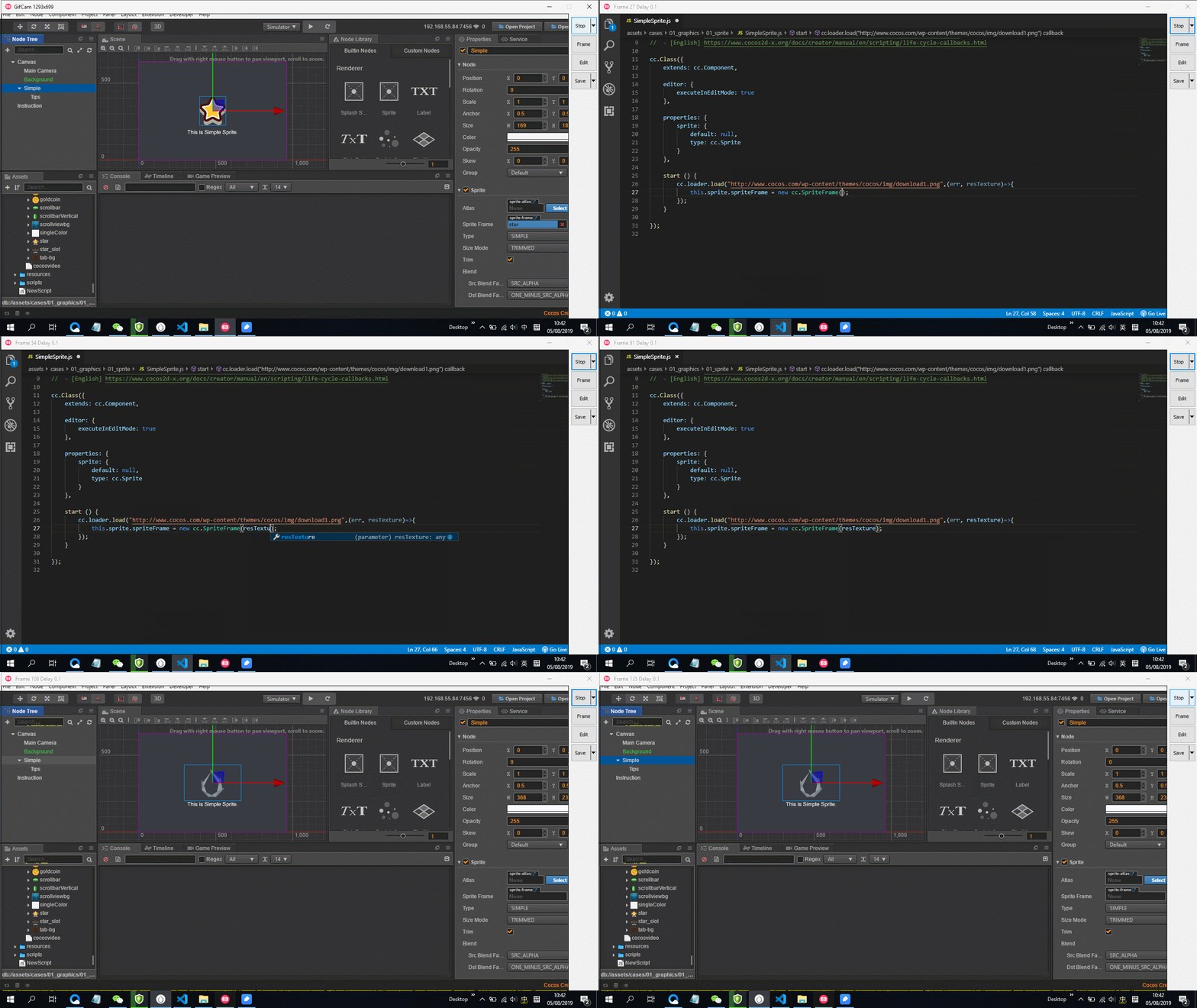
现在需要一个prefab来远程加载,因为图片也是使用的网络图片,所以希望在编辑这个prefab时,能就从面板上看到这张图片,而不是要运行时才看到。
附上在游戏中远程加载的方法
cc.loader.load({url:this.remoteUrl,type:‘png’},cc.SpriteFrame,function(err,res){
cc.log(‘res:’,res)
})
但是不知道在编辑中如何修改。比如说我有一个RemoteSprite,同node下还有Sprite,当其参数url发生改变时,编辑器上的图片直接改变。
有道兄知道麻烦给点提示
可以先了解一下Editor这个属性参数:
https://docs.cocos.com/creator/manual/zh/scripting/reference/class.html#editor-参数
下面是示范代码:
cc.Class({
    extends: cc.Component,

    editor: {
        executeInEditMode: true
    },

    properties: {
        sprite: {
            default: null,
            type: cc.Sprite
        }
    },

    start () {
        cc.loader.load("http://www.cocos.com/wp-content/themes/cocos/img/download1.png",(err, resTexture)=>{
            this.sprite.spriteFrame = new cc.SpriteFrame(resTexture);
        });
    }

});
预览效果: