
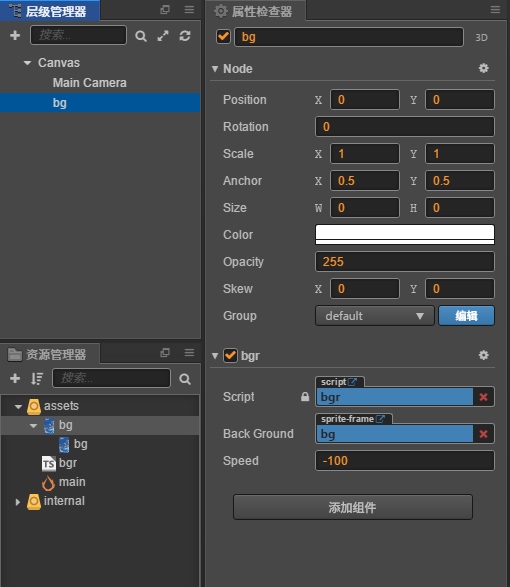
新建一个空节点,添加脚本,设置背景图片和速度就可以了。注意:脚本是TS脚本
const { ccclass, property } = cc._decorator;

@ccclass
export default class NewClass extends cc.Component {

    @property(cc.SpriteFrame)
    BackGround: cc.SpriteFrame = null;

    @property
    speed: number = -100;


    node1: cc.Node;
    node2: cc.Node;
    winHeight: number;


    onLoad() {
        this.node1 = this.addnode();
        this.node2 = this.addnode();
        this.winHeight = cc.director.getWinSize().height;
        this.node1.y = 0;
        if (this.speed > 0) {
            this.node2.y = -this.winHeight;
        }
        else {
            this.node2.y = this.winHeight;
        }

    }

    start() {

    }

    update(dt) {
        this.node2.y += this.speed * dt;
        this.node1.y += this.speed * dt;
        if (this.speed > 0) {
            if (this.node1.y >= this.winHeight) this.node1.y = this.node2.y - this.winHeight;
            if (this.node2.y >= this.winHeight) this.node2.y = this.node1.y - this.winHeight;
        }
        else {
            if (this.node1.y <= -this.winHeight) this.node1.y = this.node2.y + this.winHeight;
            if (this.node2.y <= -this.winHeight) this.node2.y = this.node1.y + this.winHeight;
        }

    }


    addnode() {
        var node = new cc.Node("BG");
        var sp = node.addComponent(cc.Sprite);
        sp.spriteFrame = this.BackGround;
        node.parent = this.node;
        node.width = cc.director.getWinSize().width;
        node.height = cc.director.getWinSize().height;
        return node;
    }

}