
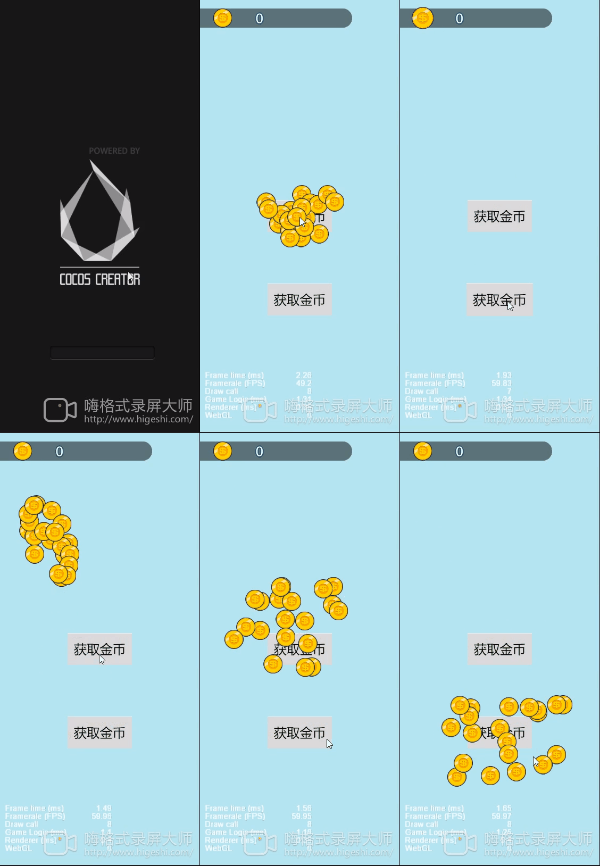
直接贴代码 注释写好了 每个阶段都可调整 做出你想要的的效果
/**
 * 飞的金币预制
 */
@property(cc.Prefab)
private coinpre: cc.Prefab = null;
/**
 * 目标节点
 */
@property(cc.Node)
coinNode: cc.Node = null;
/**
 * 生成金币个数
 */
private createcoin: number = 20
/**
 * 随机范围(random1~random2之间)
 */
private random1: number = -200
private random2: number = 200
/**
 * 生成到赋予位置的时间
 */
private createTime: number = 0.15
/**
 * 停留时间
 */
private standingTime: number = 0.2
/**
 * 金币移动速度
 */
private coinSpeed: number = 1000

onPlayCoinAni(touchPos: cc.Vec2, callback: Function) {
    let tempPlayer = this.node.convertToNodeSpaceAR(touchPos)
    for (let i = 0; i < this.createcoin; i++) {
        let pre = cc.instantiate(this.coinpre)
        pre.parent = this.node
        pre.setPosition(tempPlayer)
        let rannumx = Math.floor(Math.random() * (this.random2 - this.random1 + 1) + this.random1)
        let rannumy = Math.floor(Math.random() * (this.random2 - this.random1 + 1) / 1.5 + this.random1 / 1.5)
        pre.runAction(cc.moveBy(this.createTime, rannumx, rannumy))
        this.scheduleOnce(() => {
            pre.stopAllActions()
            let finshend = cc.callFunc(function () {
                pre.destroy()
                this.coinNode.getComponent(cc.Animation).play()
                if (i == this.createcoin - 1) {
                    //结束
                    this.scheduleOnce(() => {
                        callback()
                    }, 0.5)
                }
            }, this);
            let pos = pre.getPosition()
            let coinpos = this.coinNode.getPosition()
            let playTime = pos.sub(coinpos).mag() / this.coinSpeed
            pre.runAction(cc.sequence(cc.moveTo(playTime, coinpos.x, coinpos.y), finshend))
        }, this.standingTime + this.createTime);

    }
} 这里接收的是点击位置的世界坐标哈。
 这个coinnode因为是获取的局部坐标 所以要和生成的金币是同级的,如果您要像demo一样把这个节点放在上一层的话,这里需要转换一下坐标哈。 我刚测试过了,这两个问题修改后就可以正常运行了。