
在构建开始前结束后会调用填写的脚本
https://github.com/aztack/cc-custom-build
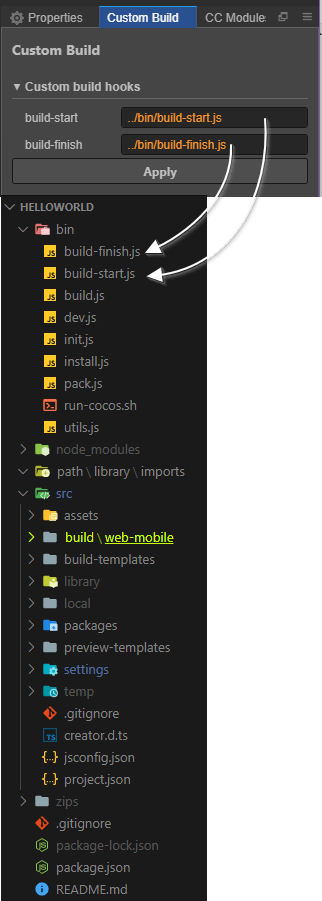
构建脚本示例:
build-start.js:
module.exports = function(options /* see above cocos docs*/) {
  Editor.log(`Build start with options:`)
  Editor.warn(options);
  // return a promise if you need to do something asynchronous
  //return new Promise((resolve, reject) => {resolve()})
}
build-finish.js:
module.exports = function(options) {
  const ejs = require('ejs');
  const fs = require('fs');
  const path = require('path');
  // 读取index.html模板,注入参数
  const htmlPath = path.resolve(options.project, 'build/web-mobile/index.html')
  const tpl = fs.readFileSync(htmlPath).toString()
  const result = ejs.render(tpl, {
    project: options.title,
    orientation: options.webOrientation,
    webDebugger: ''
  });
  fs.writeFileSync(path.resolve(options.dest, 'index.html'), result);
  Editor.log(`Post-process index.html finished!`);
}