#####也真的是头疼,Box2d好好的功能非得阉割掉,又不想修改引擎内的代码,于是就扩展解决。
1.创建extensions文件夹,放置在assets下的任意目录。
2.把以下的Extensions.ts和AABBQueryCallback.ts放入extensions文件夹内。
Extensions.ts
/**
 * 需要在程序第一个执行的.ts导入此文件,如:
 * ```
 * import "../extensions/Extensions";
 * const {ccclass, property} = cc._decorator;
 * @ccclass
 * export default class Main extends cc.Component{ }
 */
import AABBQueryCallback from "./AABBQueryCallback";

const b2=window["b2"];
var b2_aabb_tmp=new b2.AABB();
var b2_vec2_tmp1=new b2.Vec2();
var aabbQueryCallback=new AABBQueryCallback();

cc.PhysicsManager.prototype['testPoint2']=function(point){
	const PTM_RATIO=cc.PhysicsManager.PTM_RATIO;
	var x=b2_vec2_tmp1.x=point.x/PTM_RATIO;
	var y=b2_vec2_tmp1.y=point.y/PTM_RATIO;

	var d=0.2/PTM_RATIO;
	b2_aabb_tmp.lowerBound.x=x-d;
	b2_aabb_tmp.lowerBound.y=y-d;
	b2_aabb_tmp.upperBound.x=x+d;
	b2_aabb_tmp.upperBound.y=y+d;

	var callback=aabbQueryCallback;
	callback.init(b2_aabb_tmp,b2_vec2_tmp1);
	this._world.QueryAABB(callback,b2_aabb_tmp);

	var fixtures=callback.getFixtures();
	var colliders=fixtures.map(function(fixture){
		return fixture.collider;
	});
	return colliders;
}

cc.PhysicsManager.prototype['testAABB2']=function(rect){
	const PTM_RATIO=cc.PhysicsManager.PTM_RATIO;
	b2_aabb_tmp.lowerBound.x=rect.xMin/PTM_RATIO;
	b2_aabb_tmp.lowerBound.y=rect.yMin/PTM_RATIO;
	b2_aabb_tmp.upperBound.x=rect.xMax/PTM_RATIO;
	b2_aabb_tmp.upperBound.y=rect.yMax/PTM_RATIO;

	var callback=aabbQueryCallback;
	callback.init(b2_aabb_tmp);
	this._world.QueryAABB(callback,b2_aabb_tmp);

	var fixtures=callback.getFixtures();
	var colliders=fixtures.map(function(fixture){
		return fixture.collider;
	});
	return colliders;
}
AABBQueryCallback.ts
const b2=window["b2"];
export default class AABBQueryCallback{

	_aabb=null;
	_point=new b2.Vec2();
	_isPoint=false;
	_fixtures=[];

	init(aabb,point?){
		this._aabb=aabb;
		if(point){
			this._isPoint=true;
			this._point.x=point.x;
			this._point.y=point.y;
		}else {
			this._isPoint=false;
		}
		this._fixtures.length=0;
	}

	ReportFixture(fixture){
		if (this._isPoint){
			if (fixture.TestPoint(this._point)){
				this._fixtures.push(fixture);
			}
		}else{
			var isOverlap=false;
			var shape=fixture.GetShape();
			var childCount=shape.GetChildCount();
			for (var childIndex=0;childIndex<childCount;childIndex++){
				var aabb=fixture.GetAABB(childIndex);
				const aabbOverlap=b2.TestOverlapAABB(this._aabb,aabb);
				if(aabbOverlap){
					isOverlap=true;
					break;
				}
			}
			if(isOverlap){
				this._fixtures.push(fixture);
			}
		}
		return true;
	}

	getFixture(){
		return this._fixtures[0];
	}

	getFixtures(){
		return this._fixtures;
	}
}
3.在你项目中第一个运行的ts文件导入Extensions,如:
import "../extensions/Extensions";//Extensions的相对位置(根据实际位置修改)

const {ccclass, property} = cc._decorator;
@ccclass
export default class Main extends cc.Component{

}
完成以上操作就可以使用了:
let collidesA:cc.PhysicsCollider[]=cc.director.getPhysicsManager()['testAABB2'](aabb);
let collidesB:cc.PhysicsCollider[]=cc.director.getPhysicsManager()['testPoint2'](point);
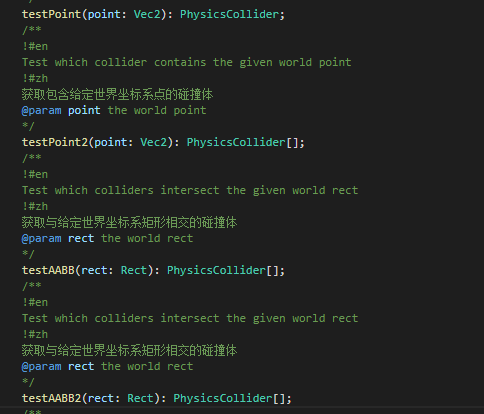
如果需要代码提示,在creator.d.ts原有的testAABB和testPoint下方分别加入以下代码即可,如图: