
记录开发过程中的小问题,请多指教
由于是直接从微信文制过来,文章样式格式有点乱·····
完整样式请阅读微信原文
更多笔记和源码请访问公众号

TS项目中经常会用到各种第三方JS库,如base64,md5,xxtea,axios,liquidfun等
这里以axios(一个基于 promise 的 HTTP 库)为例,关于axios,请参考:
https://github.com/axios/axios
1导入JS文件
将JS文件拖拽到编辑器的 资源管理器 面板中目标目录下
2引入JS模块
代码引入
import或者require:
import axios from “./net/axios.js”;
import axios = require("./net/axios.js");
import * as axios from “./net/axios.js”;
const axios = require("./net/axios.js");
上面四种方式均可以引入目标模块
关于其中的区别:
帖子里讲述很详细
Q1: import … = require(…) versus const … = require(…)
At runtime (or once the code is compiled), there is no difference between the two syntaxes, the first one is converted to the second one.
With import:
import x = require(‘x’)
This syntax is specific to TypeScript. The constant x is of type given by some typing defined in the imported package or in a package @types/x.
With const:
const x = require(‘x’)
This is a valid syntax in JavaScript and of course in TypeScript. In TypeScript, the constant x is of type any.
Q2: import … from … versus import … = require(…)
How about difference between import x from ‘x’ and import x = require(‘x’)
The syntax import … from … is from the ES6 standard. I suggest to read this introduction to ES6 modules and how to import and export them.
But, in short, the syntax import x from ‘x’ is equivalent to:
import x = require(‘x’).default
(Notice the .default member.)
How to convert import … = require(…) to the ES6 syntax
The ES6 standard states that all exported members can be imported into a single “namespace object module”.
Then the closest standard syntax of import x = require(‘x’) is:
import * as x from ‘x’
This syntax currently works well with the TypeScript transpilation because the code is converted to a const … = require(…).
However: This syntax should be used only in the context defined by the standard. Because, when your code will use a native version of ES6 modules, you won’t be able to import a function or a class that way.
关于require参数:
1.相对或者绝对路径
①路径中包含后缀名,直接根据路径去查找对应文件
②路径中不包含后缀名,则根据路径依次查找后缀为.js/.json/.node的文件。
如果都找不到,就会在路径下查找该名称的目录
2.模块名
①核心模块
②非核心模块
具体的不再赘述,搜索引擎才是最好的老师
编辑器引入
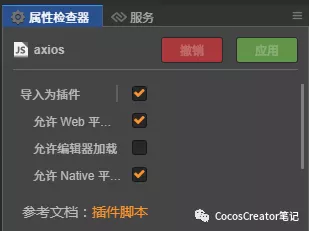
在编辑器中选中脚本文件,面板右侧勾选:导入为插件
ps:在导入JS文件时,编辑器会提示是否设置为插件,可直接选择是
这样Creator 会脚本中的变量和方法放置在全局命名空间
为了不让vs code报错, 需要在代码中添加声明:
declare const axios: any;
当然不添加声明也可以正常运行
只是vs code会提示错误
3使用库文件
成功引入后,就可以调用其方法了
axios.get(url, {
responseType: “arraybuffer”,
})
.then((response) => {
console.log(response);
})
.catch((error) => {
console.log(error);
});