// Learn TypeScript:
// - [Chinese] http://www.cocos.com/docs/creator/scripting/typescript.html
// - [English] http://www.cocos2d-x.org/docs/editors_and_tools/creator-chapters/scripting/typescript/index.html
// Learn Attribute:
// - [Chinese] http://www.cocos.com/docs/creator/scripting/reference/attributes.html
// - [English] http://www.cocos2d-x.org/docs/editors_and_tools/creator-chapters/scripting/reference/attributes/index.html
// Learn life-cycle callbacks:
// - [Chinese] http://www.cocos.com/docs/creator/scripting/life-cycle-callbacks.html
// - [English] http://www.cocos2d-x.org/docs/editors_and_tools/creator-chapters/scripting/life-cycle-callbacks/index.html
const {ccclass, property} = cc._decorator;
@ccclass
export default class NewClass extends cc.Component {
// @property(cc.Label)
// label: cc.Label = null;
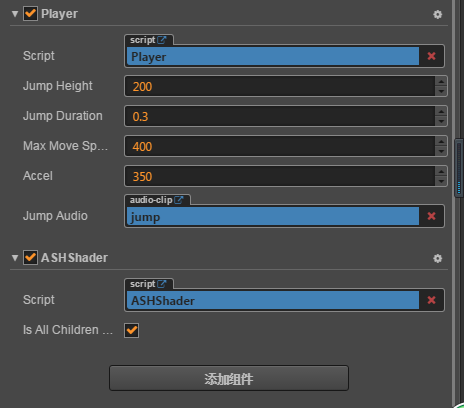
 // 主角跳跃高度
 @property
 jumpHeight:number =  0;
 // 主角跳跃持续时间
 @property
 jumpDuration:number = 0;
 // 最大移动速度
 @property
 maxMoveSpeed:number = 0;
 // 加速度
 @property
 accel:number = 0;

 accLeft:boolean = false;

 accRight:boolean = false;

 xSpeed:number = 0;
// LIFE-CYCLE CALLBACKS:

 onLoad () {
      // 初始化跳跃动作
    let jumpAction = this.setJumpAction();
    this.node.runAction(jumpAction);

     // 加速度方向开关
    this.accLeft = false;
    this.accRight = false;
     // 主角当前水平方向速度
    this.xSpeed = 0;
     // 初始化键盘输入监听
    this.setInputControl();
 }

start () {

}

setJumpAction() {
    // 跳跃上升
    let jumpUp = cc.moveBy(this.jumpDuration, cc.p(0, this.jumpHeight)).easing(cc.easeCubicActionOut());
    // 下落
    let jumpDown = cc.moveBy(this.jumpDuration, cc.p(0, -this.jumpHeight)).easing(cc.easeCubicActionIn());
    // 不断重复
    return cc.repeatForever(cc.sequence(jumpUp, jumpDown));
}

setInputControl () {
    console.log("setInputControl");
    // 添加键盘事件监听
    cc.eventManager.addListener({
        event: cc.EventListener.KEYBOARD,
        // 有按键按下时,判断是否是我们指定的方向控制键,并设置向对应方向加速
        onKeyPressed(keyCode, event) {
            switch(keyCode) {
                case cc.KEY.a:
                    this.accLeft = true;
                    this.accRight = false;
                    console.log("cc.KEY.a", this.accLeft, this.accRight);
                    break;
                case cc.KEY.d:
                    this.accLeft = false;
                    this.accRight = true;
                    console.log("cc.KEY.d", this.accLeft, this.accRight);
                    break;
            }
            console.log("onKeyPressed", this.accLeft, this.accRight);
        },
        // 松开按键时,停止向该方向的加速
        onKeyReleased(keyCode, event) {
            switch(keyCode) {
                case cc.KEY.a:
                    this.accLeft = false;
                    console.log("cc.KEY.a", this.accLeft, this.accRight);
                    break;
                case cc.KEY.d:
                    this.accRight = false;
                    console.log("cc.KEY.d", this.accLeft, this.accRight);
                    break;
            }
        }
    }, this.node);
}

update (dt) {
      // 根据当前加速度方向每帧更新速度
    console.log(this.accel, this.accLeft, this.accRight);

    if (this.accLeft) {
        this.xSpeed -= this.accel * dt;
        console.log(this.xSpeed, "this.accLeft");
    } else if (this.accRight) {
        this.xSpeed += this.accel * dt;
        console.log(this.xSpeed, "this.accRight");
    }
    // 限制主角的速度不能超过最大值
    if ( Math.abs(this.xSpeed) > this.maxMoveSpeed ) {
        // if speed reach limit, use max speed with current direction
        this.xSpeed = this.maxMoveSpeed * this.xSpeed / Math.abs(this.xSpeed);
    }

    // 根据当前速度更新主角的位置
    this.node.x += this.xSpeed * dt;
}
}
按下a或d后,this.accLeft, this.accRight改变了,但是update里的值并没有改变,求指教