
XMLHttpRequest在什么地方添加正在加载(loading)的提示?为什么xhr.onreadystatechange 这个方法一进来readyState 的值就是4,而且只执行一次,添加0-3状态的条件都不执行~!那正在加载的提示应该放在哪里写??

var xhr = new XMLHttpRequest();
xhr.onreadystatechange = function () {
if (xhr.readyState == 4 && (xhr.status >= 200 && xhr.status < 400)) {
console.log(“加载成功!!!”);
var response = xhr.responseText;
console.log(response);
}else{
console.log(“正在加载中。。。。”);
}
};
xhr.open(“GET”, url, true);
xhr.send();
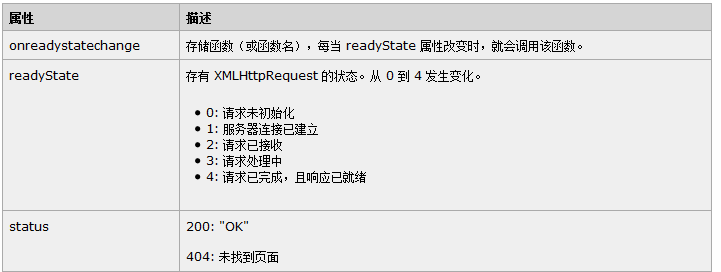

注释:onreadystatechange 事件被触发 5 次(0 - 4),对应着 readyState 的每个变化。

按理说onreadystatechange 应该根据readyState的状态,从0-4触发5次才对啊!
为什么cocoscreator里 xhr.onreadystatechange 这个方法一进来readyState 的值就是4,而且只执行一次,根本不进else,如果这样的话那要在哪里给用户提示正在加载中的状态哪?

我也踩过这个坑,我现在的做法是在send方法调用后就调用显示Loading对话框,然后请求响应完就取消显示loading对话框

你的意思是一进onreadystatechange 方法就添加loading弹框 ,
然后在进入if (xhr.readyState == 4 && (xhr.status >= 200 && xhr.status < 400)) 这个条件就去掉弹框吗?

类似这样
xmlhttp.onreadystatechange=function(){
if (xmlhttp.readyState == 4&&xmlhttp.status == 200&&!!obj.success){
obj.loading.getComponent(“DialogAction”).hide();
}
if(xmlhttp.readyState == 4&&xmlhttp.status != 200&&!!obj.error){
obj.loading.getComponent(“DialogAction”).hide();
}
};
if(type==‘POST’){
xmlhttp.open(type, obj.url, obj.async||true);
xmlhttp.send(_params(obj.data||null));
obj.loading.getComponent(“DialogAction”).show();
}else if(type==‘GET’){
xmlhttp.open(type, obj.url+’?’+_params(obj.data||null), obj.async||true);
xmlhttp.send(null);
obj.loading.getComponent(“DialogAction”).show();
}

如何做的 loading弹框