
啊,我就是想要这个效果,那可能是 我哪里没有弄对
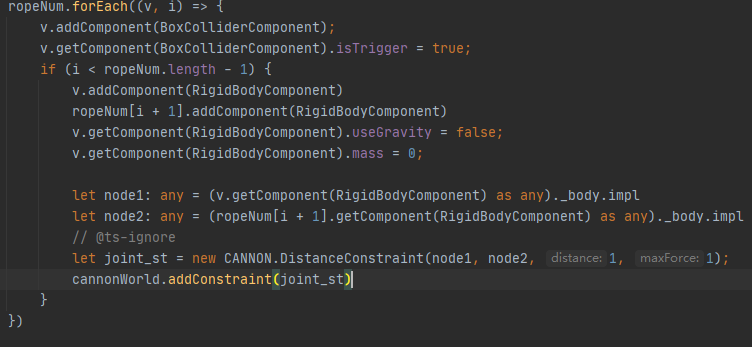

第一节移动,我是直接设置坐标的,这样操作,在几个物理引擎中表现是不一样的,在CANNON中,会无视约束跟随鼠标,看上去像bug,所以我把第一个节点隐藏了,第二个节点之后都是正常的
下面是我调的参数
createRope(nodes:number,staticTar_:Node,plugTar_:Node){
    this.staticTar = staticTar_
    this.plugTar = plugTar_
    let lastNode:Node = null
    let cannonWorld = cc.PhysicsSystem.instance.physicsWorld._world
    console.log('>>>0>>',cc.PhysicsSystem.instance)
    console.log('>>>>>',cannonWorld)

    let node_ = this.node
    node_.getComponent(RigidBodyComponent).allowSleep = false
    node_.getComponent(RigidBodyComponent).useGravity = false
    node_.setPosition(this.plugTar.getPosition())
    let nodec = node_.getComponent(ColliderComponent)
    nodec.setGroup(PHY_GROUP.Group1)
    nodec.setMask(PHY_GROUP.Group0)
    ///每个节点坐标位移
    let sx:number = this.plugTar.getPosition().x
    let sz:number = this.plugTar.getPosition().z
    let sy:number = this.plugTar.getPosition().y
    let mx:number = (this.staticTar.getPosition().x - this.plugTar.getPosition().x)/nodes
    let mz:number = (this.staticTar.getPosition().z - this.plugTar.getPosition().z)/nodes

    for(let i = 0 ;i<nodes;i++){
        let nod:Node = cc.instantiate(node_);
        this.node.parent.addChild(nod)
        nod.getComponent(RigidBodyComponent).allowSleep = false
        nod.getComponent(RigidBodyComponent).mass = 0.3
        nod.setPosition(new Vec3(sx+mx,sy+1,sz+mz))
        let nodec2 = nod.getComponent(ColliderComponent)
        nodec2.setGroup(PHY_GROUP.Group1)
        nodec2.setMask(PHY_GROUP.Group0)
        //由于cannon.js的bug,第一节有问题,只能作为受力点,所以隐藏,第二节是插头
        let fdis:number = 0.8
        if(i==0){
            this.fllowNode = nod
            this.fllowNode.getComponent(RigidBodyComponent).mass = 100
            fdis = 1.2
            ///表现节点增加插头模型,,插头跟随点
        }
        if(i == nodes -1){
            // nod.getComponent(RigidBodyComponent).mass = 100
            this.tail = nod
            ////与静态物体链接
            let stat_node:any = (this.staticTar.getComponent(RigidBodyComponent) as any)._body.impl
            let tl_node:any = (nod.getComponent(RigidBodyComponent) as any)._body.impl
            let joint_st = new CANNON.DistanceConstraint(stat_node, tl_node, fdis,1000)
            cannonWorld.addConstraint(joint_st)
            // let agt_st = new CANNON.ConeTwistConstraint(stat_node, tl_node,{
            //     pivotA: stat_node.position,
            //     pivotB: tl_node.position,
            //     axisA: new CANNON.Vec3(30,30,30),
            //     axisB: new CANNON.Vec3(30,30,30)
            //     })
            // cannonWorld.addConstraint(agt_st)
        }
        if(lastNode){
            let cn_lastNode:any = (lastNode.getComponent(RigidBodyComponent) as any)._body.impl
            let cn_node:any = (nod.getComponent(RigidBodyComponent) as any)._body.impl
            let joint = new CANNON.DistanceConstraint(cn_lastNode, cn_node, fdis,1000)
            cannonWorld.addConstraint(joint)
            // let agt = new CANNON.ConeTwistConstraint(cn_lastNode, cn_node,{
            //     pivotA: cn_lastNode.position,
            //     pivotB: cn_node.position,
            //     axisA: new CANNON.Vec3(30,30,30),
            //     axisB: new CANNON.Vec3(30,30,30)
            //     })
            // cannonWorld.addConstraint(agt)
        }else{
            this.head =  node_
            this.head.getComponent(RigidBodyComponent).mass = 1
            let cn_lastNode2:any = (node_.getComponent(RigidBodyComponent) as any)._body.impl
            let cn_node2:any = (nod.getComponent(RigidBodyComponent) as any)._body.impl
            let joint_ = new CANNON.DistanceConstraint(cn_lastNode2, cn_node2, 0,1000)  ///反正会隐藏,所以关节距离0
            cannonWorld.addConstraint(joint_)
            // let agt_ = new CANNON.ConeTwistConstraint(cn_lastNode2, cn_node2,{
            //     pivotA: cn_lastNode2.position,
            //     pivotB: cn_node2.position,
            //     axisA: new CANNON.Vec3(30,30,30),
            //     axisB: new CANNON.Vec3(30,30,30)
            //     })
            // cannonWorld.addConstraint(agt_)
        }
        lastNode = nod
    }
    node_.getComponent(ModelComponent).enabled = false
    return this.head
}
2赞
好滴,我研究研究,谢谢
实现了,谢谢大佬
大佬,请教你一下,我这边点击了一个3D物体,想要跟随鼠标移动,就是你那个插头的那个效果, 但是我这边位置有一点偏差,是我适配的问题吗
mark123
使用大量约束器,在ios微信小游戏里会很卡。慎重选择。
那有其他的方法吗,

节点连接 不应该是这样吗? 那应该是那样的?
你好, 3.0手动添加关节报错:Cannot read property ‘collideConnected’ of undefined
可否分享个demon?我用起来跟你们这个差别太大。莫名其妙的旋转。
暂时没有dome,有时间我会弄一个发出来
看需求,如果不需要把 旋转 关了
旋转是Axis吗?
这个方式做小游戏的话 多了会很卡,自行考虑实现方案,我是用这个方案实现的
我记得有一个禁止旋转的选项 ?
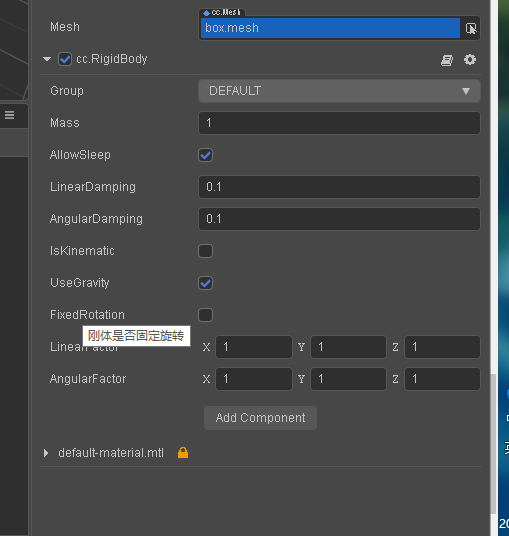
哦哦,我还以为是physics.world里面的参数了。