
跟着文章一步步做就行了
mark!
ios首屏渲染, 微信端没渲染出来,字节平台渲染了。。
mark,非常有用
请问这个问题怎么解决的
请问关于引擎分离, 是不是:最开始制作game-backup.js的时候把引擎分离关掉,得到不含有requirePlugin(“cocos”)的game.js并粘贴进game-backup.js, 之后加载可以正常打开引擎分离了?
1赞
还是说无论用方法1还是方法2,都不能使用引擎分离?
大佬,能不能给一个不拉伸图片的webgl渲染代码啊,在网上找半天也没找到,主要是完全不懂webgl,不知道怎们改。谢谢了!
另外老是提示:
first-screen.js? [sm]:197 WebGL: INVALID_OPERATION: uniform1i: location not for current program
这样的warning是什么意思?
还会偶发的出现微信直接崩溃的情况,跟这个warning有关系吗?
如果我没记错,引擎分离开启后,game.js 的区别就是 require('cocos/cocos2d-js-min.js'); 被替换成了 requirePlugin(“cocos”)
在制作 game-backup.js 时就要开启引擎分离(一直都开着)就可以了
引擎分离可以和“自行首屏渲染”一起使用,但是不能和“引擎文件放入子包”一起使用
正常情况下我记得应该不会出现任何警告和错误,除了有一个 canvas 的警告,可以用我给的模版构建一个空项目试一下
不拉伸:
1.在 first-screen.js 的 drawImg 函数里的 vertices 变量赋值前加上下面的内容
function drawImg(imgPath) {

        ......

        const data = wx.getSystemInfoSync();
        let d_h = data.screenHeight;
        let d_w = data.screenWidth;

        let t_h = 166;
        let t_w = 402;
        let scale = 2;

        let ratio1 = d_h / t_h;
        let ratio2 = d_w / t_w;
        let ratiomax = Math.min(ratio1, ratio2);

        let i_h = Math.round(t_h * ratiomax);
        let i_w = Math.round(t_w * ratiomax);

        let r_w = d_w / i_w;
        let r_h = d_h / i_h;

        r_w = r_w * scale;
        r_h = r_h * scale;

        let vertices = new Float32Array([
            -1 / r_w, 1 / r_h, 0.0, 1.0,
            -1 / r_w, -1 / r_h, 0.0, 0.0,
            1 / r_w, 1 / r_h, 1.0, 1.0,
            1 / r_w, -1 / r_h, 1.0, 0.0,
        ]);

        ......
2.上面这段是计算图片居中的顶点,要手动修改下面图片宽高的变量为你的图片的数值,scale 是缩放图片,需要自行调整数值以缩放到全屏大小(缩放是等比例)
        let t_h = 166;
        let t_w = 402;
        let scale = 2;
3.如果你的是带透明的图片,找到这句话
gl.texImage2D(gl.TEXTURE_2D, 0, gl.RGB, gl.RGB, gl.UNSIGNED_BYTE, IMAGE);
替换成
gl.texImage2D(gl.TEXTURE_2D, 0, gl.RGBA, gl.RGBA, gl.UNSIGNED_BYTE, IMAGE);
开启透明通道,否则背景可能是黑色
感谢。
另外补充一点,关于我提的第二个问题,出现“uniform1i: location not for current program”的报错,是因为:你最开始提供的shader代码,是基于只调用一次drawImage函数写的。但后来根据楼下的回复,我把drawImage的调用改为了每帧都调用(直到引擎启动后取消),而那个shader代码,在多次调用时,就会多次初始化,从而报错。
解决方法是把shader代码优化一下,参考如下:
var VSHADER_SOURCE =
“attribute vec4 a_Position;\n” +
“attribute vec2 a_TexCoord;\n” +
“varying vec2 v_TexCoord;\n” +
“void main() {\n” +
" gl_Position = a_Position;\n" +
" v_TexCoord = a_TexCoord;\n" +
“}\n”;
var FSHADER_SOURCE =
“#ifdef GL_ES\n” +
“precision mediump float;\n” +
“#endif\n” +
“uniform sampler2D u_Sampler;\n” +
“varying vec2 v_TexCoord;\n” +
“void main() {\n” +
" gl_FragColor = texture2D(u_Sampler, v_TexCoord);\n" +
“}\n”;
var gl = null;
var gProgram = null;
var gVerticesTexCoords = null;
var gVertexTexCoordBuffer = null;
var gTexture = null;
var gTextureSampler = null;
function initShaders(gl, vshader, fshader) {
var program = createProgram(gl, vshader, fshader)
if (!program) {
console.log(“Failed to create program”)
return false
}
gProgram = program;
return true
}
function createProgram(gl, vshader, fshader) {
// Create shader object
var vertexShader = loadShader(gl, gl.VERTEX_SHADER, vshader)
var fragmentShader = loadShader(gl, gl.FRAGMENT_SHADER, fshader)
if (!vertexShader || !fragmentShader) {
return null
}
// Create a program object
var program = gl.createProgram()
if (!program) {
return null
}
// Attach the shader objects
gl.attachShader(program, vertexShader)
gl.attachShader(program, fragmentShader)
// Link the program object
gl.linkProgram(program)
// Check the result of linking
var linked = gl.getProgramParameter(program, gl.LINK_STATUS)
if (!linked) {
var error = gl.getProgramInfoLog(program)
console.log("Failed to link program: " + error)
gl.deleteProgram(program)
gl.deleteShader(fragmentShader)
gl.deleteShader(vertexShader)
return null
}
return program;
}
function loadShader(gl, type, source) {
// Create shader object
var shader = gl.createShader(type)
if (shader == null) {
console.log(“unable to create shader”)
return null
}
// Set the shader program
gl.shaderSource(shader, source)
// Compile the shader
gl.compileShader(shader)
// Check the result of compilation
var compiled = gl.getShaderParameter(shader, gl.COMPILE_STATUS)
if (!compiled) {
var error = gl.getShaderInfoLog(shader)
console.log("Failed to compile shader: " + error)
gl.deleteShader(shader)
return null
}
return shader
}
function initVertexBuffers(gl) {
var info = wx.getSystemInfoSync();
var imageWidth = 428;
var imageHeight = 926;
var scale = info.screenWidth / imageWidth;
var left = -1;
var top = 1;
var bottom = -1;
var right = 1;
var policy = ‘fixed width’;
if (policy == ‘auto’) {
if (info.screenWidth / info.screenHeight < imageWidth / imageHeight) {
policy = ‘fixed width’;
}
else {
policy = ‘fixed height’;
}
}
if (policy == ‘fixed width’) {
var realHeight = info.screenHeight * imageWidth / info.screenWidth;
var scale = realHeight / imageHeight;
top = 1 + (1 - scale);
bottom = -top;
}
else if (policy == ‘fixed height’) {
var realWidth = info.screenWidth * imageHeight / info.screenHeight;
var scale = realWidth / imageWidth;
right = 1 + (1 - scale);
left = -right;
}
var verticesTexCoords =
//vertices ||
new Float32Array([
// Vertex coordinates, texture coordinate
left,
top,
0.0,
1.0,
left,
bottom,
0.0,
0.0,
right,
top,
1.0,
1.0,
right,
bottom,
1.0,
0.0,
])
var n = 4 // The number of vertices
// Create the buffer object
var vertexTexCoordBuffer = gl.createBuffer()
if (!vertexTexCoordBuffer) {
console.log(“Failed to create the buffer object”)
return -1
}
gVertexTexCoordBuffer = vertexTexCoordBuffer;
gVerticesTexCoords = verticesTexCoords;
return n
}
function initTextures(gl, n, imgPath) {
var texture = gl.createTexture() // Create a texture object
if (!texture) {
console.log(“Failed to create the texture object”)
return false
}
// Get the storage location of u_Sampler
var u_Sampler = gl.getUniformLocation(gProgram, “u_Sampler”)
if (!u_Sampler) {
console.log(“Failed to get the storage location of u_Sampler”)
return false
}
var image = wx.createImage() // Create the image object
if (!image) {
console.log(“Failed to create the image object”)
return false
}
// Register the event handler to be called on loading an image
image.onload = function () {
gTexture = texture;
//bind texture
gl.pixelStorei(gl.UNPACK_FLIP_Y_WEBGL, 1) // Flip the image's y axis
// Enable texture unit0
gl.activeTexture(gl.TEXTURE0)
// Bind the texture object to the target
gl.bindTexture(gl.TEXTURE_2D, gTexture)

// Set the texture image
gl.texImage2D(gl.TEXTURE_2D, 0, gl.RGB, gl.RGB, gl.UNSIGNED_BYTE, image);
}
// Tell the browser to load an image
image.src = imgPath;
gTextureSampler = u_Sampler;
return true
}
function loadTexture(gl, n, texture, u_Sampler, image) {
}
function init(gl, imgPath) {
if (!gProgram) {
;
}
// Initialize shaders
if (!initShaders(gl, VSHADER_SOURCE, FSHADER_SOURCE)) {
console.log(“Failed to intialize shaders.”)
return
}
// Set the vertex information
var n = initVertexBuffers(gl)
if (n < 0) {
console.log(“Failed to set the vertex information”)
return
}
// Set texture
if (!initTextures(gl, n, imgPath)) {
console.log(“Failed to intialize the texture.”)
return
}
// Specify the color for clearing
gl.clearColor(1.0, 1.0, 1.0, 1.0)
}
function drawImg(imagePath) {
const gl = wx.__first__canvas.getContext(“webgl”)
if (!gl) {
console.log(“Failed to get the rendering context for WebGL”)
return
}
init(gl, imagePath);
if (!gTexture) {
return;
}
//bind progream
gl.useProgram(gProgram)
// Bind the buffer object to target
gl.bindBuffer(gl.ARRAY_BUFFER, gVertexTexCoordBuffer)
gl.bufferData(gl.ARRAY_BUFFER, gVerticesTexCoords, gl.STATIC_DRAW)
var FSIZE = gVerticesTexCoords.BYTES_PER_ELEMENT
//Get the storage location of a_Position, assign and enable buffer
var a_Position = gl.getAttribLocation(gProgram, “a_Position”)
if (a_Position < 0) {
console.log(“Failed to get the storage location of a_Position”)
return -1
}
gl.vertexAttribPointer(a_Position, 2, gl.FLOAT, false, FSIZE * 4, 0)
gl.enableVertexAttribArray(a_Position) // Enable the assignment of the buffer object
// Get the storage location of a_TexCoord
var a_TexCoord = gl.getAttribLocation(gProgram, “a_TexCoord”)
if (a_TexCoord < 0) {
console.log(“Failed to get the storage location of a_TexCoord”)
return -1
}
// Assign the buffer object to a_TexCoord variable
gl.vertexAttribPointer(a_TexCoord, 2, gl.FLOAT, false, FSIZE * 4, FSIZE * 2)
gl.enableVertexAttribArray(a_TexCoord) // Enable the assignment of the buffer object
//bind texture
gl.pixelStorei(gl.UNPACK_FLIP_Y_WEBGL, 1) // Flip the image’s y axis
// Enable texture unit0
gl.activeTexture(gl.TEXTURE0)
// Bind the texture object to the target
gl.bindTexture(gl.TEXTURE_2D, gTexture)
// Set the texture parameters
// gl.texParameteri(gl.TEXTURE_2D, gl.TEXTURE_MIN_FILTER, gl.LINEAR);
gl.texParameteri(gl.TEXTURE_2D, gl.TEXTURE_MIN_FILTER, gl.LINEAR)
gl.texParameteri(gl.TEXTURE_2D, gl.TEXTURE_MAG_FILTER, gl.LINEAR)
gl.texParameteri(gl.TEXTURE_2D, gl.TEXTURE_WRAP_S, gl.CLAMP_TO_EDGE)
gl.texParameteri(gl.TEXTURE_2D, gl.TEXTURE_WRAP_T, gl.CLAMP_TO_EDGE)
// Set the texture unit 0 to the sampler
gl.uniform1i(gTextureSampler, 0);
gl.clear(gl.COLOR_BUFFER_BIT) // Clear
gl.clearColor(0.0, 0.0, 0.0, 0.0)
gl.drawArrays(gl.TRIANGLE_STRIP, 0, 4) // Draw the rectangle
}
exports.drawImg = drawImg
感谢,忘记了,我稍后补充上去
帖子没法修改了,如果改为了每帧调用 draw,需参考 @jh.pku 的回复把代码修改一下,也可以大概参考下面的代码用一个首次渲染标志位去判断是否需要初始化
var vertices;

function drawImg(imgPath) {

    if(!vertices){
        const data = wx.getSystemInfoSync();
        let d_h = data.screenHeight;
        let d_w = data.screenWidth;

        let t_h = 166;
        let t_w = 402;
        let scale = 2;

        let ratio1 = d_h / t_h;
        let ratio2 = d_w / t_w;
        let ratiomax = Math.min(ratio1, ratio2);

        let i_h = Math.round(t_h * ratiomax);
        let i_w = Math.round(t_w * ratiomax);

        let r_w = d_w / i_w;
        let r_h = d_h / i_h;

        r_w = r_w * scale;
        r_h = r_h * scale;

        vertices = new Float32Array([
            -1 / r_w, 1 / r_h, 0.0, 1.0,
            -1 / r_w, -1 / r_h, 0.0, 0.0,
            1 / r_w, 1 / r_h, 1.0, 1.0,
            1 / r_w, -1 / r_h, 1.0, 0.0,
        ]);
    }

    if (FIRST) {


        // Retrieve <canvas> element
        // var canvas = document.getElementById('webgl');

        // Get the rendering context for WebGL
        // var gl = getWebGLContext(canvas);
        GL = wx.__first__canvas.getContext("webgl");
        if (!GL) {
            console.log('Failed to get the rendering context for WebGL');
            return;
        }

        // Initialize shaders
        if (!initShaders(GL, VSHADER_SOURCE, FSHADER_SOURCE)) {
            console.log('Failed to intialize shaders.');
            return;
        }

        // Set the vertex information
        var n = initVertexBuffers(GL, vertices);
        if (n < 0) {
            console.log('Failed to set the vertex information');
            return;
        }

        // Specify the color for clearing <canvas>
        GL.clearColor(1.0, 1.0, 1.0, 1.0);

        GL.enable(GL.BLEND);

        GL.blendFunc(GL.SRC_ALPHA, GL.ONE_MINUS_SRC_ALPHA);

        // Set texture
        if (!initTextures(GL, n, imgPath)) {
            console.log('Failed to intialize the texture.');
            return;
        }

        FIRST = false;
    } else {
        // Just Draw


            // Set the vertex information
            var n = initVertexBuffers(GL, vertices);
            if (n < 0) {
                console.log('Failed to set the vertex information');
                return;
            }

            // Set texture
            if (!initTextures(GL, n, imgPath)) {
                console.log('Failed to intialize the texture.');
                return;
            }

    }

}
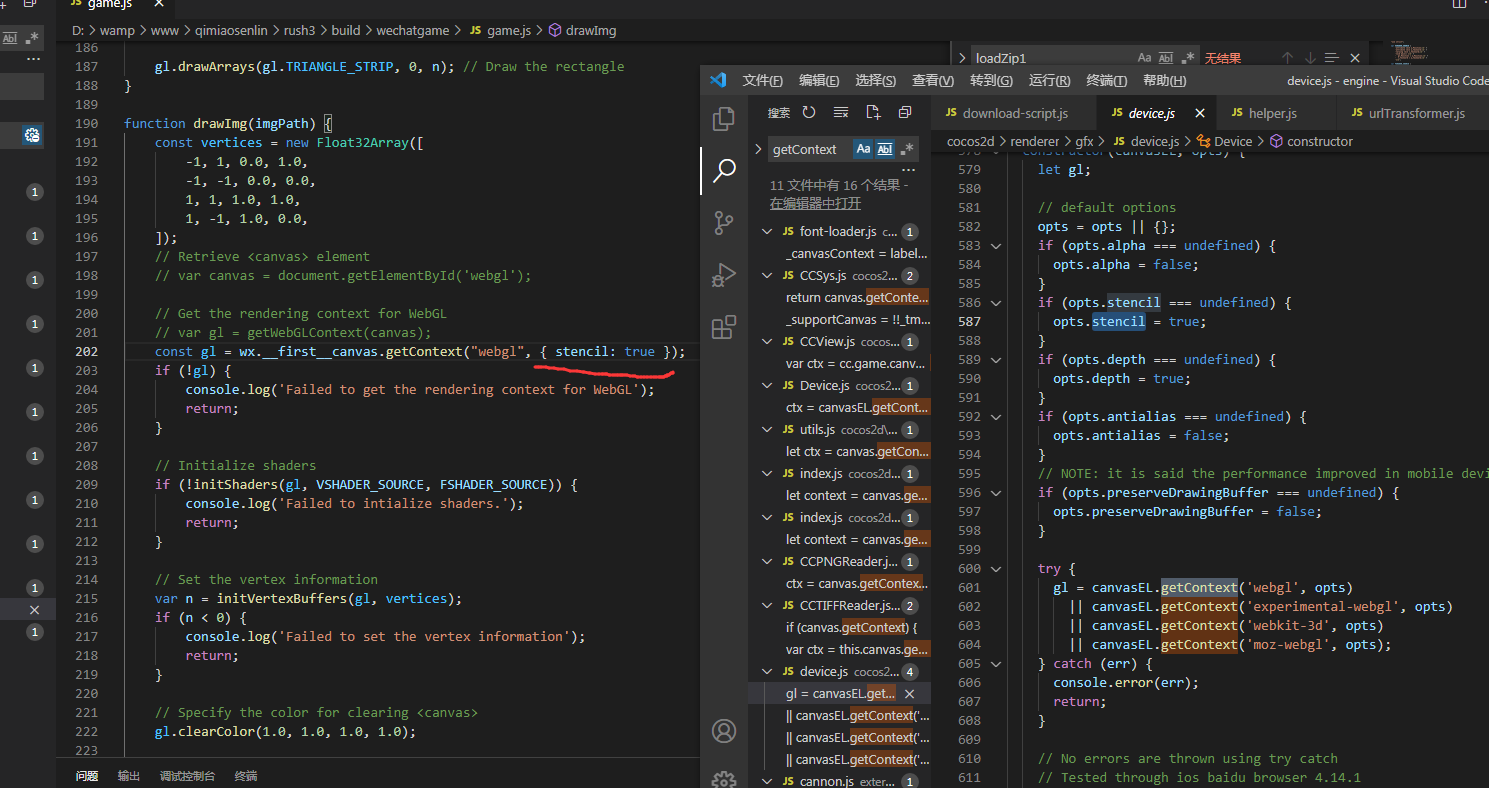
我根据这个方法来修改后,ios端首屏加载的速度快了一大截,从平均2s降到1.8s左右。感谢楼主。
但是安卓端首屏加载却上升了,从平均2.8s升到3.7s。
我认为是每帧渲染会加重安卓端的负担,从而导致加载时间上升了。
因此我改了一下game-backup渲染图片的方法。ios用每帧渲染的方式来渲染,避免了ios的白屏问题,而且渲染速度也提升。但是安卓端用原方法,速度会快很多。
具体代码:
if (data.platform != “devtools”) {
if (data.system.indexOf('Android') != -1) {

    const first_scene = require('./android-screen.js');

    first_scene.AndroidDrawImg('first.jpg');

} else {

    const first_scene = require('./first-screen.js')

    function render() {

        if (FIRSTRENDER) {

            first_scene.drawImg('first.jpg');

            requestAnimationFrame(render);

            console.log('YY')

        }

    }

    var FIRSTRENDER = true;

    requestAnimationFrame(render);

}
}
最后想问下:如果针对安卓端的首屏渲染,有什么更好的方法吗?
不勾选引擎分离,主包就超了4m
为什么首屏渲染出来的图片质量很差~~?
我都自己写出来了,才发现论坛已经有现成的了~~~~~
最近出现了新情况, 使用这套功能, IOS在第二次或者之后进入游戏时, 微信直接闪退…

Mark.