
D/AudioEngine-inl.mm (172): UIApplicationWillResignActiveNotification
JS: [WARN]: --------->game hide
2017-12-29 17:27:18.954551+0800 planewar-mobile[55417:1347123] error: CocosAnalytics ==> Please init SDK first!
2017-12-29 17:27:22.683852+0800 planewar-mobile[55417:1347123] error: CocosAnalytics ==> Please init SDK first!
D/AudioEngine-inl.mm (182): UIApplicationDidBecomeActiveNotification
D/AudioEngine-inl.mm (172): UIApplicationWillResignActiveNotification
JS: [WARN]: --------->game hide
2017-12-29 17:31:37.203327+0800 planewar-mobile[55417:1347123] error: CocosAnalytics ==> Please init SDK first!
2017-12-29 17:31:38.627943+0800 planewar-mobile[55417:1347123] error: CocosAnalytics ==> Please init SDK first!
D/AudioEngine-inl.mm (182): UIApplicationDidBecomeActiveNotification
D/AudioEngine-inl.mm (172): UIApplicationWillResignActiveNotification
JS: [WARN]: --------->game hide
2017-12-29 17:31:53.373778+0800 planewar-mobile[55417:1347123] error: CocosAnalytics ==> Please init SDK first!
2017-12-29 17:31:54.755996+0800 planewar-mobile[55417:1347123] error: CocosAnalytics ==> Please init SDK first!
D/AudioEngine-inl.mm (182): UIApplicationDidBecomeActiveNotification
上面是切换时,xcode 打印输出
hide调用, show未调用, 游戏内无法操作
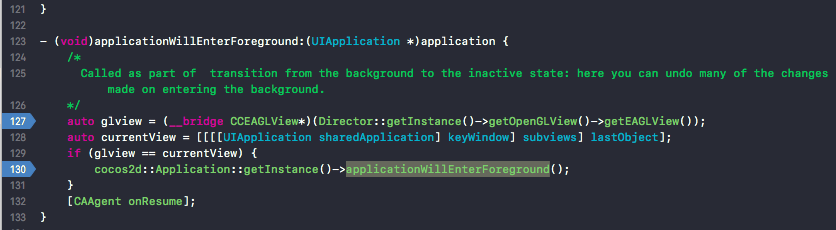
1.7 从后台显示到前台,glview与currentView不相等,applicationWillEnterForeground未执行.
cc.game.EVENT_SHOW 事件没有调用
