在导入liquidfun的时候,选择导入为插件,就能正常使用,但是微信小游戏提示未定义。
所以只能使用代码导入,但是无论是用import还是require,都无法用使用了,所以我在想是不是我导入的姿势不对。。。
具体请看下图:
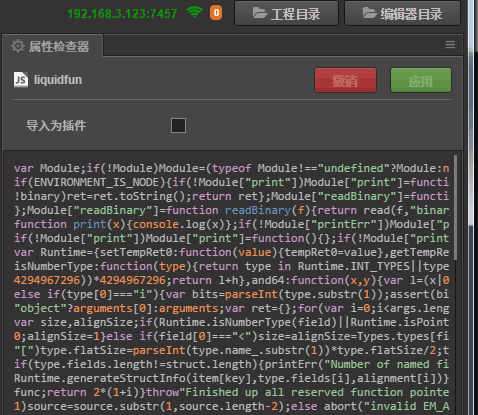
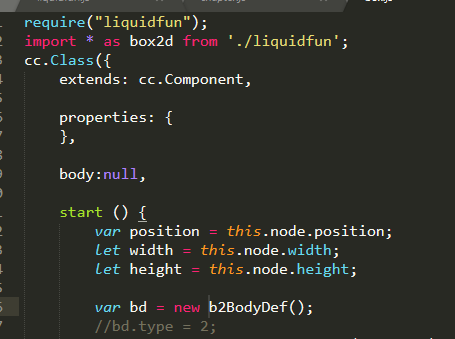

在导入liquidfun的时候,选择导入为插件,就能正常使用,但是微信小游戏提示未定义。
所以只能使用代码导入,但是无论是用import还是require,都无法用使用了,所以我在想是不是我导入的姿势不对。。。
具体请看下图:
已经用导入为插件的方式,已经成功导入了liquidfun。。。
去实现接口,要踩好多坑。。。
现在问题只是不知道如何用代码方式导入。。。
兄弟 你是如何 做出物理粒子的 ,把 物理世界全部换到 liquidfun中了吗?还是 只是应用了 liquidfun中的物理粒子?能给一部分代码 参考一下吗?
你理解错我意思了 你去搜索下liquidfun的api函数 再去引擎源码的box2d.js里面搜索!就会明白了 全都有!
包括(ParticleSystem ParticleDef ParticleGroup)
就是说你不再需要手动自己去集成liquidfun了
你需要做的就是b2.xxxx()去调用
恩确实 我找到了所有的需要的函数,应用之后也没有错误,现在需要的是如何把它 渲染到 内置的render中,liquidfun中的demo需要了Three.js 和 render.js 还需要 爬坑!!
liquidfun demo里面没有纹理相关的东西,如果你只是单纯要demo的那种效果的话 你可以把下面这段代码粘贴到一个空白的js文件里并导入为插件
开启物理引擎通过这个自定义拓展的start函数启动(启动粒子系统) 而不使用官方的enable setter接口
`
cc.PhysicsManager.prototype.start = function(){
if (CC_EDITOR) return;
if (!this._world) {
var world = new b2.World( new b2.Vec2(0, -10) );
world.SetAllowSleeping(true);
this._world = world;
        //liquid 粒子
        var psd = new b2.ParticleSystemDef();
        psd.radius = 0.035;
        this._particle = world.CreateParticleSystem(psd);

        this._initCallback();
    }
    this._enabled = true;
}

b2.Draw.prototype.DrawParticles = function( positionBuffer, radius, colorBuffer, particleCount){

    let temp_vec2 = cc.v2( 0, 0)
    let PTM_RATIO = 32;
    let drawer = this._drawer;
    for(let i= 0; i < particleCount; i+=3){

        b2.Transform.MulXV(this._xf, positionBuffer[i], temp_vec2);
        let x = temp_vec2.x * PTM_RATIO;
        let y = temp_vec2.y * PTM_RATIO;

        drawer.circle(x, y, 2);
    }
}
并同时开启物理引擎的debug模式 cc.PhysicsManager.DrawBits.e_particleBit
cc.director.getPhysicsManager().debugDrawFlags = cc.PhysicsManager.DrawBits.e_aabbBit |
cc.PhysicsManager.DrawBits.e_pairBit |
cc.PhysicsManager.DrawBits.e_centerOfMassBit |
cc.PhysicsManager.DrawBits.e_jointBit |
cc.PhysicsManager.DrawBits.e_shapeBit |
cc.PhysicsManager.DrawBits.e_particleBit
;
`
var shape = new b2PolygonShape;
shape.SetAsBoxXYCenterAngle(this.outfall.width/2/SCALE, this.outfall.height/2/SCALE, convertToPWorld(this.outfall.position), 0);
    var psd = new b2ParticleSystemDef();
    psd.radius = 0.05;
    //psd.dampingStrength = 0.01;
    var particleSystem = world.CreateParticleSystem(psd);

    var pd = new b2ParticleGroupDef();
    pd.shape = shape;
var group = particleSystem.CreateParticleGroup(pd);还是有一些没有搜到的,如 SetAsBoxXYCenterAngle,
creator 应该是不可能把liquidfun也放进去的。
而且,0.0,我找半天都不知道怎么用代码写cocos creator 的 box2d,真是太菜了
SetAsBoxXYCenterAngle 在creator中是SetAsBox。我不明白即使这些都写了,你怎么渲染的?还有你的world是谁的world 获取的内部的还是 liquidfun 中的??
他们整合在了一起是同一个world!
兄弟 果然是可以的 太厉害了,接下来我只需要沿着你的这个思路 去实现一个DrawParticles 估计就可以了
楼上的 做法 是正解,我觉得可以沿着他的思路做下去
drawPaticles 我上面贴的代码也有了 你可以试一下 重点是你有纹理数据的话 你的纹理映射 包括 软体和液体的)
大佬们,你们说的我是一脸懵逼啊0.0
大佬,留个联系方式,交流一下可以么
请问 如何添加一个流体粒子呢?
我也在尝试,如果有结果 我会贴出一个教程 专门说这件事!
参考liquidfun的官方demo
马克~~~
