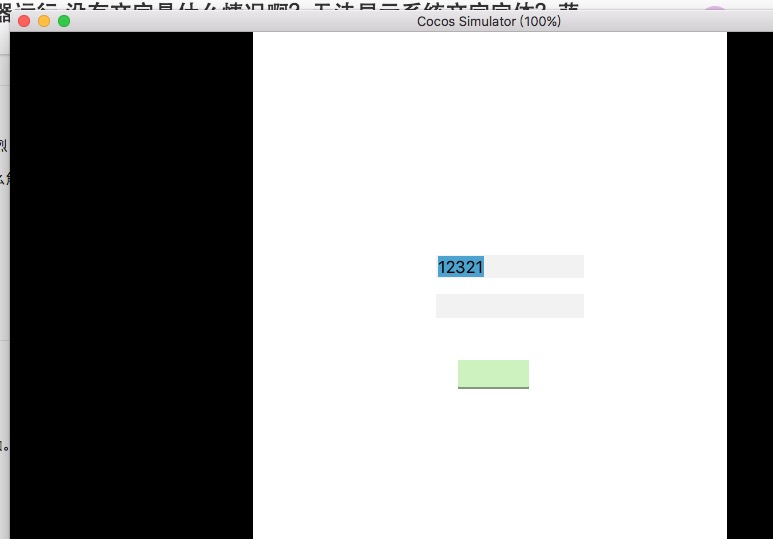
MAC 版CocosCreator 模拟器运行 没有文字是什么情况啊?无法显示系统文字字体?
- Creator 版本号:V1.5.2
- 目标平台:(模拟器)
- 详细报错信息,包含调用堆栈:
- 做了什么操作引起的 Bug:模拟器运行Example project!
- 之前是否有哪个版本是没问题的:
一直都有!!!
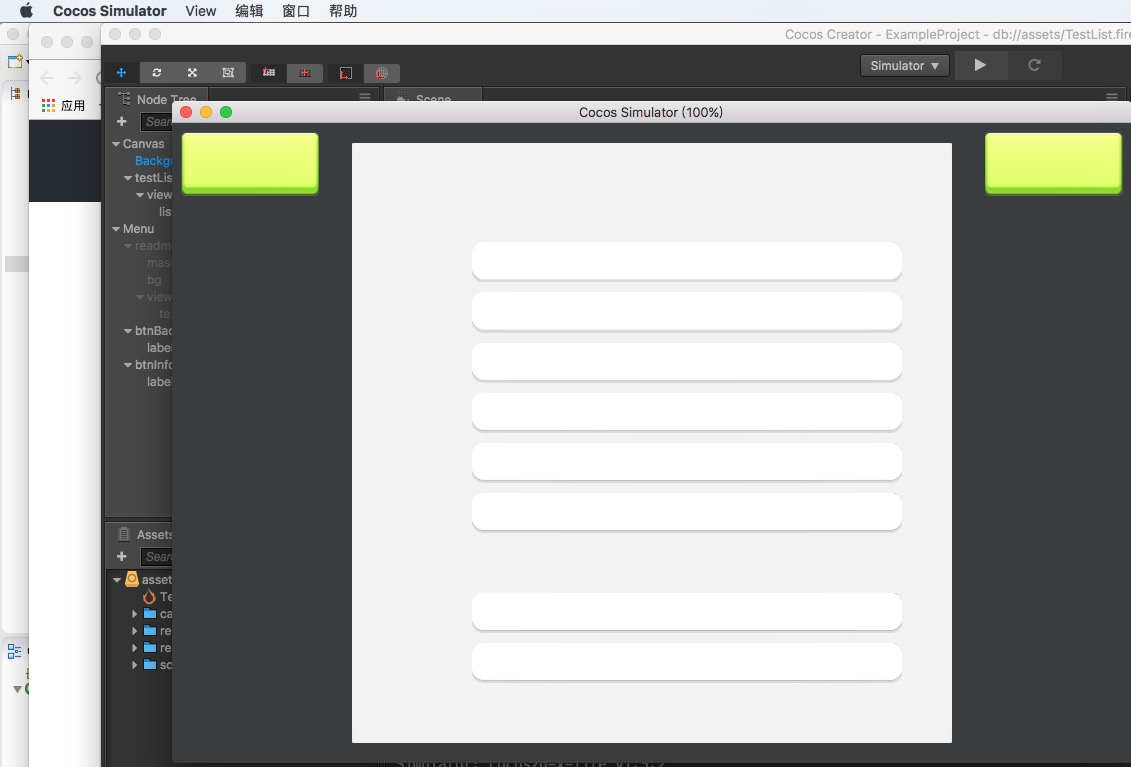
求解啊!! 萌新瑟瑟发抖~
为什么发帖总是没人给出答复。。。dead engine?
我需要模拟器这个环境才用的,求解!!!是什么设置问题吗?不至于 官方demo 都有这样的问题吧~~


MAC 版CocosCreator 模拟器运行 没有文字是什么情况啊?无法显示系统文字字体?
求解啊!! 萌新瑟瑟发抖~
为什么发帖总是没人给出答复。。。dead engine?
我需要模拟器这个环境才用的,求解!!!是什么设置问题吗?不至于 官方demo 都有这样的问题吧~~
MAC 版CocosCreator 模拟器运行 没有文字是什么情况啊?无法显示系统文字字体,求解!!!!!
有报错信息吗?
没有呀。。。你们mac 运行正常的吗????
我试过两台机子都是这样
2017-09-08T09:37:05.889Z - normal: Simulator: WORKAREA WIDTH 1920.00, HEIGHT 984.00
2017-09-08T09:37:05.916Z - normal: Simulator: FRAME SCALE = 1.00
2017-09-08T09:37:06.548Z - normal: Simulator: GLFWError #65544 Happen, Cocoa: Failed to retrieve display name
2017-09-08T09:37:12.683Z - normal: Simulator:
2017-09-08T09:37:12.728Z - normal: Simulator: {
2017-09-08T09:37:12.728Z - normal: Simulator: gl.supports_OES_map_buffer: false
2017-09-08T09:37:12.728Z - normal: Simulator: gl.supports_vertex_array_object: true
2017-09-08T09:37:12.728Z - normal: Simulator: cocos2d.x.version: 1.6.1
2017-09-08T09:37:12.729Z - normal: Simulator: gl.vendor: NVIDIA Corporation
2017-09-08T09:37:12.729Z - normal: Simulator: gl.supports_PVRTC: false
2017-09-08T09:37:12.729Z - normal: Simulator: gl.renderer: NVIDIA GeForce GT 640M OpenGL Engine
2017-09-08T09:37:12.729Z - normal: Simulator: cocos2d.x.compiled_with_profiler: false
2017-09-08T09:37:12.729Z - normal: Simulator: gl.max_texture_size: 16384
2017-09-08T09:37:12.730Z - normal: Simulator: gl.supports_ETC1: false
2017-09-08T09:37:12.730Z - normal: Simulator: gl.supports_BGRA8888: false
2017-09-08T09:37:12.730Z - normal: Simulator: cocos2d.x.build_type: DEBUG
2017-09-08T09:37:12.730Z - normal: Simulator: gl.max_texture_units: 16
2017-09-08T09:37:12.730Z - normal: Simulator: gl.supports_OES_packed_depth_stencil: false
2017-09-08T09:37:12.731Z - normal: Simulator: gl.supports_discard_framebuffer: false
2017-09-08T09:37:12.731Z - normal: Simulator: gl.supports_NPOT: true
2017-09-08T09:37:12.731Z - normal: Simulator: gl.version: 2.1 NVIDIA-10.17.5 355.10.05.45f01
2017-09-08T09:37:12.731Z - normal: Simulator: cocos2d.x.compiled_with_gl_state_cache: true
2017-09-08T09:37:12.731Z - normal: Simulator: gl.supports_OES_depth24: false
2017-09-08T09:37:12.732Z - normal: Simulator: }
2017-09-08T09:37:12.732Z - normal: Simulator:
2017-09-08T09:37:12.732Z - normal: Simulator:
2017-09-08T09:37:12.732Z - normal: Simulator: cocos2d: warning, Director::setProjection() failed because size is 0
2017-09-08T09:37:12.916Z - normal: Simulator: Project Config:
2017-09-08T09:37:12.916Z - normal: Simulator: project dir: /Applications/CocosCreator.app/Contents/Resources/cocos2d-x/simulator/mac/Simulator.app/Contents/Resources/
2017-09-08T09:37:12.916Z - normal: Simulator: writable path: (PROJDIR)/
2017-09-08T09:37:12.916Z - normal: Simulator: script file: (PROJDIR)/main.js
2017-09-08T09:37:12.917Z - normal: Simulator: frame size: 960 x 640
2017-09-08T09:37:12.917Z - normal: Simulator: frame scale: 1.00
2017-09-08T09:37:12.917Z - normal: Simulator: show console: NO
2017-09-08T09:37:12.917Z - normal: Simulator: write debug log: NO ()
2017-09-08T09:37:12.917Z - normal: Simulator: listen:
2017-09-08T09:37:12.918Z - normal: Simulator: debugger: none
2017-09-08T09:37:12.918Z - normal: Simulator: add searching path:
2017-09-08T09:37:13.202Z - normal: Simulator: ------------------------------------------------
2017-09-08T09:37:13.202Z - normal: Simulator: LOAD Js FILE: main.js
2017-09-08T09:37:13.203Z - normal: Simulator: ------------------------------------------------
2017-09-08T09:37:15.796Z - normal: Simulator: Cocos2d-x-lite v1.6.0
2017-09-08T09:37:17.972Z - normal: Simulator: iShow!
2017-09-08T09:37:20.461Z - normal: Simulator: The type of “ValueTypeProperties.myNumber” must be cc.Float or cc.Integer, not Number.
2017-09-08T09:37:20.517Z - normal: Simulator: The type of “ValueTypeProperties.myString” must be cc.String, not String.
2017-09-08T09:37:20.517Z - normal: Simulator: No need to specify the “type” of “ValueTypeProperties.myVec2” because cc.Vec2 is a child class of ValueType.
2017-09-08T09:37:20.518Z - normal: Simulator: No need to specify the “type” of “ValueTypeProperties.myColor” because cc.Color is a child class of ValueType.
2017-09-08T09:37:20.579Z - normal: Simulator: The type of “Instruction.text” must be cc.String, not String.
2017-09-08T09:37:21.472Z - normal: Simulator: InitScene: 51.61899999999969ms
2017-09-08T09:37:21.472Z - normal: Simulator: AutoRelease: 0.2889999999997599ms
2017-09-08T09:37:21.472Z - normal: Simulator: Destroy: 0.042999999999665306ms
2017-09-08T09:37:21.486Z - normal: Simulator: AttachPersist: 0.014000000000123691ms
2017-09-08T09:37:21.794Z - normal: Simulator: loadRes: should not specify the extname in readme/TestList .md
2017-09-08T09:37:21.858Z - normal: Simulator: Activate: 375.66399999999976ms
2017-09-08T09:37:06.548Z - normal: Simulator: GLFWError #65544 Happen, Cocoa: Failed to retrieve display name
到底是什么情况??
我回头看还是这个问题。。
这么明显的问题 难道就只有我遇到???
好伤心啊
没看到报错信息,也没人遇到过这个问题…… 要不你试试 1.6?
我的就是1.6.2
Failed to retrieve display name
这个不就是错误信息吗????
2017-09-08T09:37:06.548Z - normal: Simulator: GLFWError #65544 Happen, Cocoa: Failed to retrieve display name
为何没看到??
simulator 跑起来系统字体就是丢失,,我也是醉了。~
你试过重新下载 Creator 吗?这边没人遇到过,都是可以显示的…或者你说一下你在这之前做了什么操作,不然真的不知道怎么答复你
我的项目从1.4.2升级打1.5.2后,很多按钮的Label都是不可见的,在编辑器里选择一下就OK了。
是这个原因?
而且这种情况不会有报错的。
没报错信息?
没有报错。。我也贴了全部的日志了。
里面不是有一行 Error吗??
2017-09-08T09:37:06.548Z - normal: Simulator: GLFWError #65544 Happen, Cocoa: Failed to retrieve display name
为何没看见 我标注了引用了。
估计是这个问题 引起的。 求助啊。我需要simulator 环境比较多。
我之前也是用1.5.2 也是这样,现在升级到1.6 也还是这样,醉了。~
我是从1.5 特意升级到 1.6的。 两个版本都是这样,你是要我再重新下载一次 1.6的 cocoscreator?
这样没用,我重装过,我记忆中 ,1.4 是可以的。中间的操作只是把1.4 升级到了 1.5 然后升级到了1.6 没有别到操作了
在编辑器里选择一下 是指什么操作??
不是很明白。是 active 勾选下??
升级过程中有没有改动什么,或者报错?
你确保了 engine 跟 -lite 都是正确的版本吗?