Hello,大家好,最近经常有朋友们问我 Cocos Creator 里的 Matchvs 有什么用途,怎么使用,这两天有点小空,整理了一份DEMO,手把手跟大家分享一下使用全过程,希望大家喜欢~欢迎交流哈~
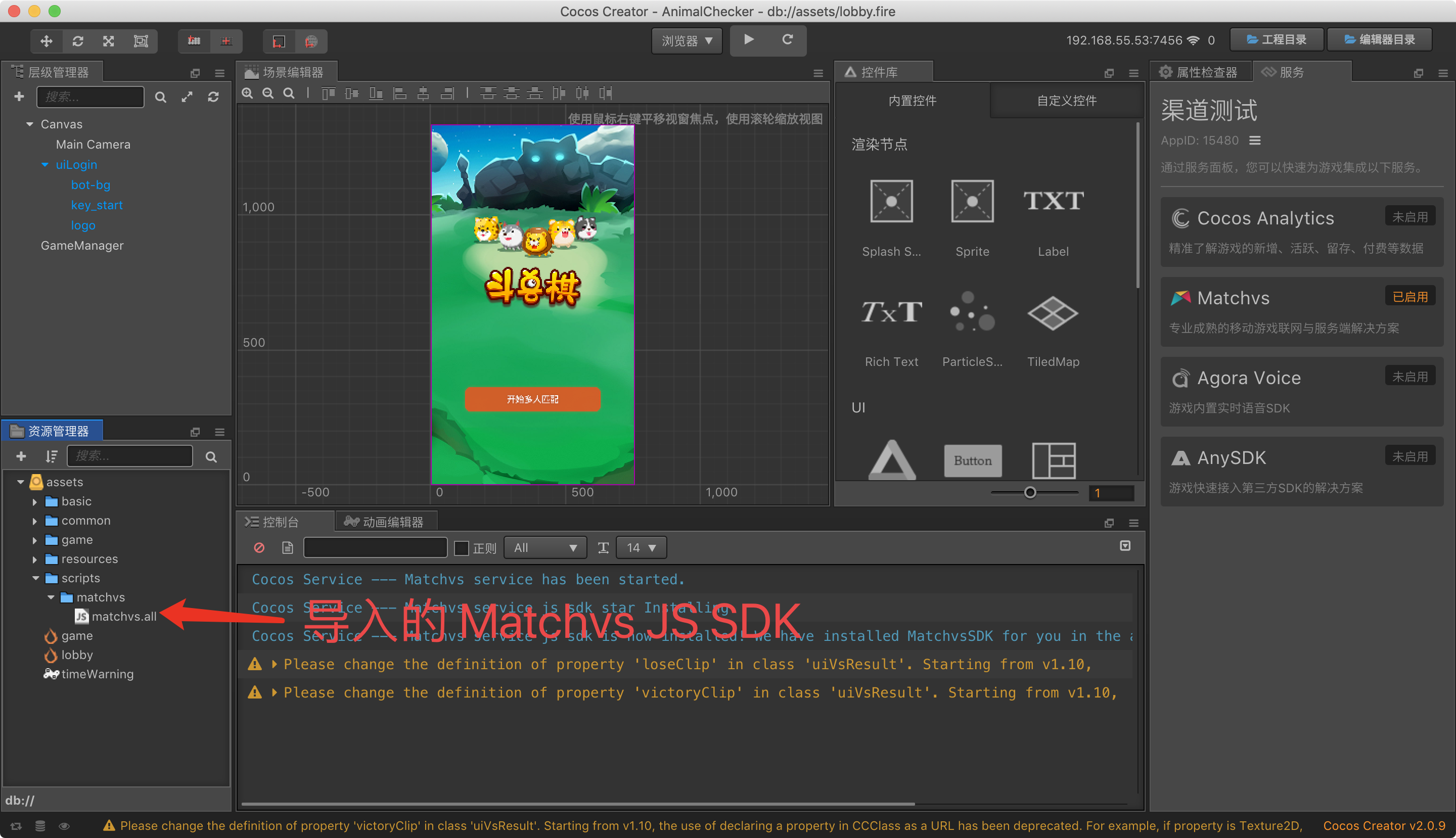
###1、打开需要将其改为联网游戏的项目,并关联好 Cocos AppID,开通 Matchvs 服务,如图
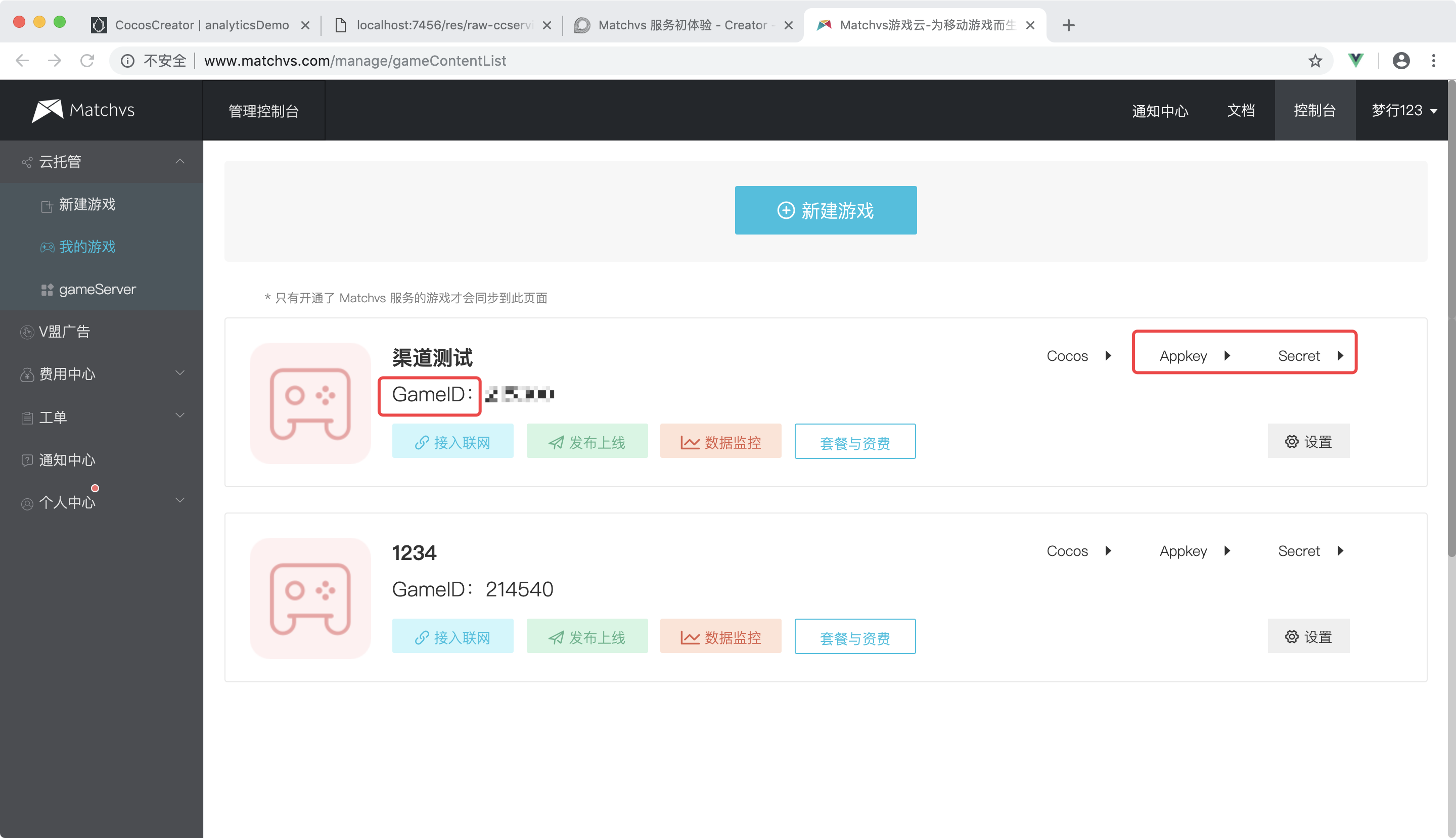
2、打开 Matchvs 服务详情页,点击 前往控制台获取 Matchvs SDK 所需要的三个参数
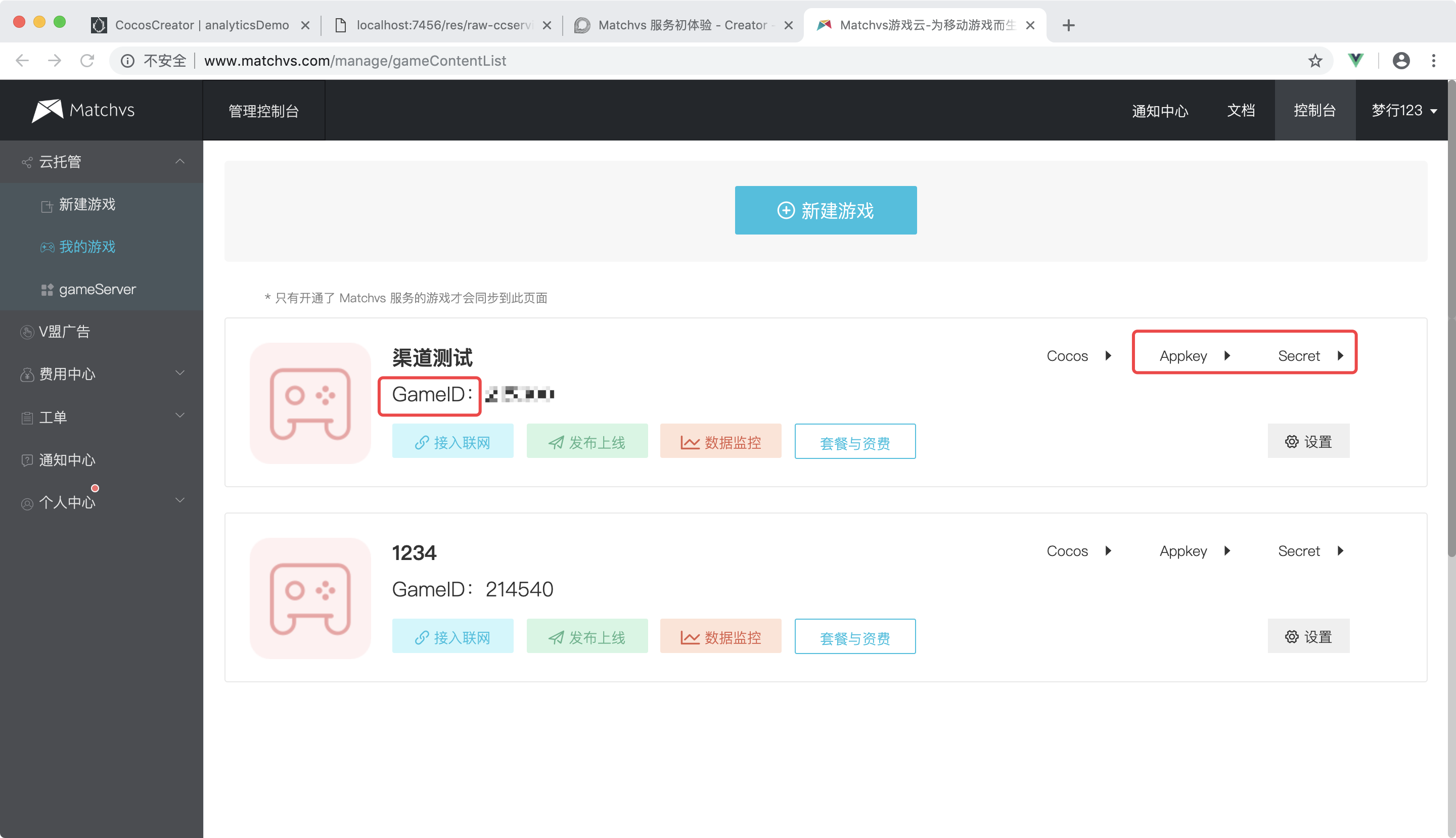
3、新建一个文件,Global.js 文件,用来存储项目中所有 Matvhvs 服务需要用到的参数
// Global.js
var obj = {
    RANDOM_MATCH: 1,   // 随机匹配
    PROPERTY_MATCH: 2, // 属性匹配
    MAX_PLAYER_COUNT: 2,
    PLAYER_COUNTS: [2],
    COOPERATION: 1,
    COMPETITION: 2,
    GAME_START_EVENT: "gameStart",
    GAME_TIME: "gameTime",
    GAME_OVER_EVENT: "gameOver",
    ROUND_START: "roundStart",
    READY: "ready",
    channel: 'MatchVS',
    platform: 'alpha',
    IP: "wxrank.matchvs.com",
    PORT: "3010",

    PLAYER_FLAG: { RED: 1, BLUE: 2 },

    ROUND_TIP: { OTHER: 2, SELF: 1 },

    gameVersion: 1,
    gameId: 000000,      // GameID
    appKey: 'APP_KEY',   // AppKey
    secret: 'SECRET',    // Secret

    gameType: 2,
    matchType: 1,
    tagsInfo: { "title": "A" },
    userInfo: null,
    playerUserIds: [],
    playerSet: new Set(),
    isRoomOwner: false,
    events: {},

    syncFrame: false,
    FRAME_RATE: 20,
    roomId: 0,
    playertime: 180,
    isGameOver: false,

    COUNT_TIME: "countTime",
    UPDATE_TIME: "updateTime",
    SEND_MAP_INFO: "sendMapInfo",
    SHOW_CHESS_INFO: "showChessInfo",
    CHESS_BOARD_LIST: "chessBoardList",
    CHANGE_FLAG: "changeFlag",
    OPEN_FOR_OTHER: "openForOther",
    EAT_FOR_OTHER: "eatForOther",
    CLEAR_CHESS: "clearChess",
    EXIT: "exit",

    // 连着6回合 12步都没有进行吃的操作
    needStepNoEat: 12
};
module.exports = obj;
参照官方使用指南,对 Matchvs 服务的初始化部分进行简单封装
// Matchvs.js
var engine;
var response = {};
var MsMatchInfo;
var MsCreateRoomInfo;
    try {
        engine = new window.MatchvsEngine();
        response = new window.MatchvsResponse();
        MsMatchInfo = window.MsMatchInfo;
        MsCreateRoomInfo = window.MsCreateRoomInfo;
    } catch (e) {
        console.warn("load matchvs fail,"+e.message);
    }
module.exports = {
    engine: engine,
    response: response,
    MatchInfo: MsMatchInfo,
    CreateRoomInfo: MsCreateRoomInfo,
};
4、接着在游戏的主要的管理文件中对 Matchvs 进行初始化,并设置 Matchvs 的事件回调
// gameManagers.js
var mvs = require("Matchvs");
var GLB = require("Global");
cc.Class({
    ...
    matchVsInit: function () {
        mvs.response.initResponse = this.initResponse.bind(this);
        mvs.response.errorResponse = this.errorResponse.bind(this);
        mvs.response.joinRoomResponse = this.joinRoomResponse.bind(this);
        mvs.response.joinRoomNotify = this.joinRoomNotify.bind(this);
        mvs.response.leaveRoomResponse = this.leaveRoomResponse.bind(this);
        mvs.response.leaveRoomNotify = this.leaveRoomNotify.bind(this);
        mvs.response.joinOverResponse = this.joinOverResponse.bind(this);
        mvs.response.createRoomResponse = this.createRoomResponse.bind(this);
        mvs.response.getRoomListResponse = this.getRoomListResponse.bind(this);
        mvs.response.getRoomDetailResponse = this.getRoomDetailResponse.bind(this);
        mvs.response.getRoomListExResponse = this.getRoomListExResponse.bind(this);
        mvs.response.kickPlayerResponse = this.kickPlayerResponse.bind(this);
        mvs.response.kickPlayerNotify = this.kickPlayerNotify.bind(this);
        mvs.response.registerUserResponse = this.registerUserResponse.bind(this);
        mvs.response.loginResponse = this.loginResponse.bind(this); // 用户登录之后的回调
        mvs.response.logoutResponse = this.logoutResponse.bind(this); // 用户登出之后的回调
        mvs.response.sendEventNotify = this.sendEventNotify.bind(this);
        mvs.response.networkStateNotify = this.networkStateNotify.bind(this);

        var result = mvs.engine.init(mvs.response, GLB.channel, GLB.platform, GLB.gameId, GLB.appKey, GLB.gameVersion);
        if (result !== 0) {
            console.log('初始化失败,错误码:' + result);
        }
        Game.GameManager.blockInput();

    },
    ...
    initResponse: function () {
        console.log('初始化成功,开始注册用户');
        var result = mvs.engine.registerUser();
        if (result !== 0) {
            console.log('注册用户失败,错误码:' + result);
        } else {
            console.log('注册用户成功');
        }
    },

    registerUserResponse: function (userInfo) {
        var deviceId = 'abcdef';
        var gatewayId = 0;
        GLB.userInfo = userInfo;
        console.log('开始登录,用户Id:' + userInfo.id)
        var result = mvs.engine.login(userInfo.id, userInfo.token, deviceId);
        if (result !== 0) {
            console.log('登录失败,错误码:' + result);
        }
    },

    loginResponse: function (info) {
        if (info.status !== 200) {
            console.log('登录失败,异步回调错误码:' + info.status);
        } else {
            console.log('登录成功');
            this.lobbyShow();
        }
    },
    ...
    // Matchvs 事件通知回调
    sendEventNotify: function (info) {
        console.log(info)
        var cpProto = JSON.parse(info.cpProto);
        if (info.cpProto.indexOf(GLB.GAME_START_EVENT) >= 0) {
            GLB.playerUserIds = [GLB.userInfo.id]
            var remoteUserIds = JSON.parse(info.cpProto).userIds;
            remoteUserIds.forEach(function (id) {
                if (GLB.userInfo.id !== id) {
                    GLB.playerUserIds.push(id);
                }
            });
            this.startGame();
        }

        if (info.cpProto.indexOf(GLB.GAME_OVER_EVENT) >= 0) {
            console.log('********收到了游戏结束的消息********')
            var winFlag = JSON.parse(info.cpProto).winFlag;
            clientEvent.dispatch(clientEvent.eventType.gameOver, winFlag);
        }

        if (info.cpProto.indexOf(GLB.EXIT) >= 0) {
            console.log('********对方退出了游戏********')
            uiFunc.openUI("uiTip", function (obj) {
                var uiTip = obj.getComponent("uiTip");
                if (uiTip) {
                    uiTip.setData("对方已退出");
                }
            });

            var winFlag;
            if (GLB.isRoomOwner) {
                winFlag = GLB.PLAYER_FLAG.RED;
            } else {
                winFlag = GLB.PLAYER_FLAG.BLUE;
            }
            clientEvent.dispatch(clientEvent.eventType.gameOver, winFlag);
        }

        if (info.cpProto.indexOf(GLB.READY) >= 0) {
            this.readyCnt++;
            if (GLB.isRoomOwner && this.readyCnt >= GLB.playerUserIds.length) {
                this.sendRoundStartMsg();
            }
        }

        if (info.cpProto.indexOf(GLB.ROUND_START) >= 0) {
            // setTimeout(function() {
            //     Game.GameManager.gameState = GameState.Play;
            // }.bind(this), 2000);
            console.log('------dispatch roundStart------');
            clientEvent.dispatch(clientEvent.eventType.roundStart);
        }

        if (info.cpProto.indexOf(GLB.COUNT_TIME) >= 0) {
            clientEvent.dispatch(clientEvent.eventType.updateTime, JSON.parse(info.cpProto));
        }
        if (info.cpProto.indexOf(GLB.CHANGE_FLAG) >= 0) {
            clientEvent.dispatch(clientEvent.eventType.changeFlag);
        }
        if (info.cpProto.indexOf(GLB.SEND_MAP_INFO) >= 0) {
            var param = JSON.parse(info.cpProto);
            clientEvent.dispatch(clientEvent.eventType.mapInit, param);
        }
        if (info.cpProto.indexOf(GLB.OPEN_FOR_OTHER) >= 0) {
            if (info.srcUserId == GLB.userInfo.id) return;
            var tag = JSON.parse(info.cpProto).sign;
            clientEvent.dispatch(clientEvent.eventType.openForOther, tag);
        }
        if (info.cpProto.indexOf(GLB.EAT_FOR_OTHER) >= 0) {
            if (info.srcUserId == GLB.userInfo.id) return;
            var eatInfo = JSON.parse(info.cpProto).eatInfo;
            clientEvent.dispatch(clientEvent.eventType.eatForOther, eatInfo);
        }
    },
    ...
});
5、到这里,Matchvs 的初始化工作已经完成,接下来只要游戏中调用 Matchvs 提供的 API 接口,即可快速体验无需自建服务器的联网游戏开发了,大大节省了服务器的运行维护成本
Matchvs接入演示视频
欢迎大家跟帖讨论~也可以来通过 Cocos Service交流群-Matchvs 沟通交流!
Cocos Service交流群-Matchvs
 822523258