
2.4 的Bundle 机制出来以后, 以前想实现的各种优化方案都可以高效解决了, 其中一大垢病就是有关APP热更新的方案, 官方文档中当前范例的manifest 版本更新生成方案, 使用起来自我感觉比较复杂,不够简单直观. 因此构思了一套基于Bundle的热更方案.
原理:
-
bundle 远程加载机制
bundle 可以实现功能模块的精细划分, 甚至可以细化到单独一个界面,一小段代码. 我们根据自己的业务逻辑将功能划分为几个相对独立的模块. 并配置为远程包. 此时bundle 即可以在远程进行加载. -
bundle 可根据md5不同, 加载相同bundle的不同版本. 具体API 参考: [https://docs.cocos.com/creator/api/zh/classes/AssetManager.html#loadbundle]
cc.assetManager.loadBundle('http://localhost:8080/test', {version:'md5xxx'}, (err, bundle) => console.log(err));
实现:
基于以上两点, 我们可以相像,如果在运行时能够动态更新远程服务器地址, 同时,告诉assetmanager 每个bundle 对应的md5版本, 则启动游戏时,可以无感的进行远程加载运行所有bundle内容.
第一步: 游戏运行时请求版本更新信息.
这一步,类似于官方范例中的 manifest 请求一样. 想要知道远程有无更新,应先请求一段简短的 版本描述信息.
这里我定义的版本描述信息如下:
{
 "versionCode":3,
 "versionName":"1.0.3",
 "server":"https://cdn-awdxc.8zy.com/dreamer_v3/",
 "bundles":{"internal":"c6215","guide":"739d5","resources":"437a7","systemOpen":"a62ad","test":"4a333","main":"ac6ac"}
}
其中: server 字段用于指定远程服务器地址, server+ versionCode 是远程更新资源的存放位置.
而 bundles 则是每次编译后生成的settings.js 中的bundleVers 信息. 也即所有bundle 的md5 映射.
请求到以上信息后, 我们就可以判定当前是否有版本更新, 可以让用户选择是否更新.
如果用户选择版本更新, 则我们会将版本描述信息存于 cc.sys.localStorage 中, 以便在游戏启动前读取新版本内容,并合并到setting对象中去.
通过研究编译后的main.js 我们可以知道, bundle 加载,以及bundle 的version选择是在 window.boot()中进行的.大概逻辑如下:
if (window.jsb) {
    var isRuntime = (typeof loadRuntime === 'function');
    if (isRuntime) {
        require('src/settings.js');
        require('src/cocos2d-runtime.js');
        if (CC_PHYSICS_BUILTIN || CC_PHYSICS_CANNON) {
            require('src/physics.js');
        }
        require('jsb-adapter/engine/index.js');
    } else {
        require('src/settings.js');
        require('src/cocos2d-jsb.js');
        if (CC_PHYSICS_BUILTIN || CC_PHYSICS_CANNON) {
            require('src/physics.js');
        }
        require('jsb-adapter/jsb-engine.js');
    }

    cc.macro.CLEANUP_IMAGE_CACHE = true;
    window.boot();
}

window.boot = function () {
    var settings = window._CCSettings;
    window._CCSettings = undefined;
    //...............
    cc.assetManager.init({
        bundleVers: settings.bundleVers,
        remoteBundles: settings.remoteBundles,
        server: settings.server
    });
    //................
    for (var i = 0; i < bundleRoot.length; i++) {
        cc.assetManager.loadBundle(bundleRoot[i], cb);
    }
};
因此我们需要在boot 之前 改变window._CCSettings对象的内容, 主要更新 cc.assetManager.init({}) 所传递的三个参数, server: 即远程服务器地址, remoteBundles: 即远程bundle 的列表, 这里通过尝试,发现在项目设置中无法将 main/ resources 两具主bundle 勾选设置为远程包, 但实际新版本发布时往往会伴随着主包的代码更新,因此,我们需要在这里将 main/resources 两个bundle 名push 到远程bundle列表中去.
bundlerVers : 即每个bundle 对应的md5映射,这里传递不同的md5,即可加载不同的bundle版本, 甚至可实现版本回退的功能,非常方便.
具体实现代码只有两段,非常简单:
- 在业务代码中实现更新检测功能,并在游戏启动后加载执行检测:
/**
 *
 * 版本更新管理器.
 *
 */
import AppConfig from "../AppConfig";
import {globalConfig} from "../storage/GlobalConfig";
import {Context} from "../../core/ui/Context";

export default class UpdateManager {
    public versionCode: number = 1;
    public versionName: string = "1.0.1";

    public newVersionCode: number = 1;
    public newVersionName: string = "1.0.1";

    private updateInfo = null;

    private constructor() {
        const updateInfo = cc.sys.localStorage.getItem("updateInfo")
        if (updateInfo) {
            const infoObj = JSON.parse(updateInfo);
            this.versionCode = infoObj.versionCode;
            this.versionName = infoObj.versionName;
        } else {
            this.versionCode = AppConfig.VERSION_CODE;
            this.versionName = AppConfig.VERSION;
        }
        this.newVersionCode = this.versionCode;
        this.newVersionName = this.versionName;
        console.log("当前游戏版本:", this.versionCode, this.versionName);
    }

    public async checkUpdate() {
        if (!globalConfig.updateFileUrl) {
            cc.warn("未配置更新检测地址");
            return;
        }
        let updateUrl = globalConfig.updateFileUrl;
        if (updateUrl.endsWith('/')) {
            updateUrl = updateUrl.concat(`update-${AppConfig.BUILD_TYPE}.json?_t=${Math.random()}`)
        } else {
            updateUrl = updateUrl.concat(`/update-${AppConfig.BUILD_TYPE}.json?_t=${Math.random()}`)
        }

        return Context.get().loadRemote(updateUrl).then(res => {
            this.updateInfo = res && res.json;
            if (this.updateInfo) {
                console.log("请求到新版本资源:", this.updateInfo);
                this.newVersionName = this.updateInfo.versionName;
                this.newVersionCode = this.updateInfo.versionCode;
            }
        })
    }

    // 确认更新. 更新需要重启游戏.
    public doUpdate() {
        if (this.updateInfo && this.hasNewVersion()) {
            cc.sys.localStorage.setItem("updateInfo", JSON.stringify(this.updateInfo));
            cc.game.end();
        }
    }

    public hasNewVersion(): boolean {
        return this.newVersionCode != this.versionCode;
    }

    private static _instance: UpdateManager = null;

    public static getInstance(): UpdateManager {
        if (!UpdateManager._instance) {
            UpdateManager._instance = new UpdateManager();
        }
        return UpdateManager._instance;
    }
}
代码没什么复杂的点, 启动时主动/被动调用 checkUpdate() 进行版本检测, 并将版本信息缓存在内存中, 检测发现当前版本与更新版本VersionCode不一致时,即认为有新版本. 此时可通过弹窗等形式告知用户,是否进行版本更新. 用户点击确认,即调用 [doUpdate() ] 将更新信息存于localStorage中, 并关闭游戏.等待用户重启即可.
二: main.js 脚本改造
从分析中我们可以看到, 需要改动main.js 才能完成bundle信息的注入, 因此我们可以进行编译流程定制, 对于android 打包来说, 则是在 build-templates目录中新建 jsb-link目录, 并放置一个main.js 即可.
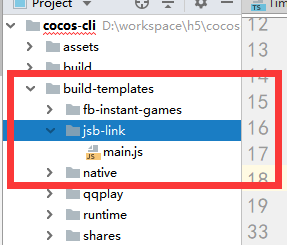
main.js 中为固定代码内容:
window.boot = function () {
    var settings = window._CCSettings;
    window._CCSettings = undefined;
    var onProgress = null;

    var RESOURCES = cc.AssetManager.BuiltinBundleName.RESOURCES;
    var INTERNAL = cc.AssetManager.BuiltinBundleName.INTERNAL;
    var MAIN = cc.AssetManager.BuiltinBundleName.MAIN;

    function setLoadingDisplay() {
        // Loading splash scene
        var splash = document.getElementById('splash');
        var progressBar = splash.querySelector('.progress-bar span');
        onProgress = function (finish, total) {
            var percent = 100 * finish / total;
            if (progressBar) {
                progressBar.style.width = percent.toFixed(2) + '%';
            }
        };
        splash.style.display = 'block';
        progressBar.style.width = '0%';

        cc.director.once(cc.Director.EVENT_AFTER_SCENE_LAUNCH, function () {
            splash.style.display = 'none';
        });
    }

    var onStart = function () {

        cc.view.enableRetina(true);
        cc.view.resizeWithBrowserSize(true);

        if (cc.sys.isBrowser) {
            setLoadingDisplay();
        }

        if (cc.sys.isMobile) {
            if (settings.orientation === 'landscape') {
                cc.view.setOrientation(cc.macro.ORIENTATION_LANDSCAPE);
            } else if (settings.orientation === 'portrait') {
                cc.view.setOrientation(cc.macro.ORIENTATION_PORTRAIT);
            }
            cc.view.enableAutoFullScreen([
                cc.sys.BROWSER_TYPE_BAIDU,
                cc.sys.BROWSER_TYPE_BAIDU_APP,
                cc.sys.BROWSER_TYPE_WECHAT,
                cc.sys.BROWSER_TYPE_MOBILE_QQ,
                cc.sys.BROWSER_TYPE_MIUI,
                cc.sys.BROWSER_TYPE_HUAWEI,
                cc.sys.BROWSER_TYPE_UC,
            ].indexOf(cc.sys.browserType) < 0);
        }

        // Limit downloading max concurrent task to 2,
        // more tasks simultaneously may cause performance draw back on some android system / browsers.
        // You can adjust the number based on your own test result, you have to set it before any loading process to take effect.
        if (cc.sys.isBrowser && cc.sys.os === cc.sys.OS_ANDROID) {
            cc.assetManager.downloader.maxConcurrency = 2;
            cc.assetManager.downloader.maxRequestsPerFrame = 2;
        }

        var launchScene = settings.launchScene;
        var bundle = cc.assetManager.bundles.find(function (b) {
            return b.getSceneInfo(launchScene);
        });

        bundle.loadScene(launchScene, null, onProgress,
            function (err, scene) {
                if (!err) {
                    cc.director.runSceneImmediate(scene);
                    if (cc.sys.isBrowser) {
                        // show canvas
                        var canvas = document.getElementById('GameCanvas');
                        canvas.style.visibility = '';
                        var div = document.getElementById('GameDiv');
                        if (div) {
                            div.style.backgroundImage = '';
                        }
                        console.log('Success to load scene: ' + launchScene);
                    }
                }
            }
        );

    };

    var option = {
        id: 'GameCanvas',
        debugMode: settings.debug ? cc.debug.DebugMode.INFO : cc.debug.DebugMode.ERROR,
        showFPS: settings.debug,
        frameRate: 60,
        groupList: settings.groupList,
        collisionMatrix: settings.collisionMatrix,
    };

    cc.assetManager.init({
        bundleVers: settings.bundleVers,
        remoteBundles: settings.remoteBundles,
        server: settings.server
    });

    var bundleRoot = [INTERNAL];
    settings.hasResourcesBundle && bundleRoot.push(RESOURCES);

    var count = 0;

    function cb(err) {
        if (err) return console.error(err.message, err.stack);
        count++;
        if (count === bundleRoot.length + 1) {
            cc.assetManager.loadBundle(MAIN, function (err) {
                if (!err) cc.game.run(option, onStart);
            });
        }
    }

    cc.assetManager.loadScript(settings.jsList.map(function (x) {
        return 'src/' + x;
    }), cb);

    for (var i = 0; i < bundleRoot.length; i++) {
        cc.assetManager.loadBundle(bundleRoot[i], cb);
    }
};

window.beforeBoot = function () {
    const settings = window._CCSettings;
    cc.log("游戏正在启动中.")
    const version = cc.sys.localStorage.getItem("updateInfo");
    if (!version) {
        cc.log("未记录更新版本");
        return;
    }

    let updateInfo = JSON.parse(version);
    if (settings.server) {
        if (updateInfo.server) {
            settings.server = updateInfo.server;
        }
        if (settings.server.endsWith("/")) {
            settings.server = settings.server + updateInfo.versionCode;
        } else {
            settings.server = settings.server + "/" + updateInfo.versionCode;
        }
    }
    console.log(">>>游戏服务器地址:", settings.server);

    const bundleVers = updateInfo.bundles
    if (bundleVers) {
        for (let b in bundleVers) {
            if (bundleVers[b] != settings.bundleVers[b]) {
                // 配置中的bundleVer版本不一致,则添加到remote列表中去,以供远程加载.
                if (settings.remoteBundles.indexOf(b) < 0) {
                    settings.remoteBundles.push(b);
                }
            }
        }
        settings.bundleVers = bundleVers;
        console.log("当前远程bundle列表:", JSON.stringify(settings.remoteBundles));
    }
}

const bootFun = window.boot;
window.boot = function () {
    window.beforeBoot();
    bootFun()
}

if (window.jsb) {
    var isRuntime = (typeof loadRuntime === 'function');
    if (isRuntime) {
        require('src/settings.js');
        require('src/cocos2d-runtime.js');
        if (CC_PHYSICS_BUILTIN || CC_PHYSICS_CANNON) {
            require('src/physics.js');
        }
        require('jsb-adapter/engine/index.js');
    } else {
        require('src/settings.js');
        require('src/cocos2d-jsb.js');
        if (CC_PHYSICS_BUILTIN || CC_PHYSICS_CANNON) {
            require('src/physics.js');
        }
        require('jsb-adapter/jsb-engine.js');
    }

    cc.macro.CLEANUP_IMAGE_CACHE = true;
    window.boot();
}
上述代码仅添加了一个 beforeBoot 函数, 用于根据localStroage中读取到的版本更新内容, 修改settings中的信息. 以达到版本替换目的.
核心代码为:
window.beforeBoot = function () {
    const settings = window._CCSettings;
    cc.log("游戏正在启动中.")
    const version = cc.sys.localStorage.getItem("updateInfo");
    if (!version) {
        cc.log("未记录更新版本");
        return;
    }

    let updateInfo = JSON.parse(version);
    if (settings.server) {
        if (updateInfo.server) {
            settings.server = updateInfo.server;
        }
        if (settings.server.endsWith("/")) {
            settings.server = settings.server + updateInfo.versionCode;
        } else {
            settings.server = settings.server + "/" + updateInfo.versionCode;
        }
    }
    console.log(">>>游戏服务器地址:", settings.server);

    const bundleVers = updateInfo.bundles
    if (bundleVers) {
        for (let b in bundleVers) {
            if (bundleVers[b] != settings.bundleVers[b]) {
                // 配置中的bundleVer版本不一致,则添加到remote列表中去,以供远程加载.
                if (settings.remoteBundles.indexOf(b) < 0) {
                    settings.remoteBundles.push(b);
                }
            }
        }
        settings.bundleVers = bundleVers;
        console.log("当前远程bundle列表:", JSON.stringify(settings.remoteBundles));
    }
}
const bootFun = window.boot;
window.boot = function () {
    window.beforeBoot();
    bootFun()
}
其中updateInfo 中存储的内容即为上次运行所记录的版本更新内容. 同时, 根据更新中配置的bundle版本与本地旧版本的bundle版本进行对比, 如果md5不一致,则自动将bundle添加到settings.remoteBundles列表中去,
以上即可实现bundle 自动更新替换功能, 不需要任何额外的操作.也不需要每次打包后进行各种版本差异包对比等步骤. 只需要将打包后的remote 目录+ assets目录中的main+resources 包合并后 放于远程即可.
具体版本更新信息文件存放于哪里,全由开发者自己决定, 并在每在启动游戏后,当做一个普通资源下载即可. 步骤非常简单.
问题:
当前以上方案也有其各种不足的地方,需要进行业务完善才能达到较好的使用效果.
- 比如main包和 resources包应包含尽可能少的业务逻辑, 甚至应只包含loading画面以及热更检测代码.
这样一旦main或resources包有更新并需要从远程下载时, 能够快速下载完成并显示更新内容. - 再比如 某个bundle过大, 每次有更新后, 都要临时从远程下载更新文件, 导致bundle的使用不够流畅, 此时需要在 loading过程中根据更新配置信息, 确定哪些bundle 有更新, 并显示一个更新中的画面,用于提示用户正在更新内容中. 直到bundle下载完成后, 才能进入游戏.
以上问题优化在本方案中暂未体现, 本次仅提供大家一个思路和参考. 同时在demo中也已验证Ok. 完全可以应用于项目中去.