
Creator3.4的tiledmap有没有像unity WorldToCell之类的api

版本: Creator 3.4.0

最近在把一个unity的PC端项目在cocos策划成手机端的游戏。因为想做一个点击地图,棋子在tiledmap地图上行走的功能,需要获取touch的位置,并将touch的位置转换成tiledlayer上对应地图块的位置。

论坛上有关于2dx点击获取地图块的帖子,基本实现方法是对touch位置做一个坐标转换

如果是正方形的地图当然比较方便,自己可以写个简单的坐标转换。
如果是菱形或者蜂巢型就会比较复杂,希望可以开发类似unity WorldToCell类似的api,这样会方便很多

最后,我想问问各位大佬有没有比较好的点击地图获取地图块的方法。尤其是针对蜂巢型和菱形的。谢谢。
起码2.2.1还没有,我自己做了一套你可以看看 https://forum.cocos.org/t/topic/113469/28,坐标换算见 https://github.com/genxium/CocosCreatorMapTypeDemo/blob/master/assets/scripts/TileCollisionManagerSingleton.js

unity 不是可以编译到手机端么???

可以,我只是这次想试试cocos来写这次手机端的项目而已。

嗯,反正我3.4也找不到有相关的api,我昨天自己也写了一个。挂在layer对应的node上就可以用了。

代码

@ccclass(‘layerTool’)

export class layerTool extends Component {

private layer : TiledLayer = null;

private map : TiledMap = null ;

private tileSize : Size = null;

private layerSize : Size = null;

private mapPos: Vec2 = null;

private mapScale: Vec3;

onLoad(){

    this.layer = this.node.getComponent(TiledLayer);

    this.map = this.node.parent.getComponent(TiledMap);

    this.tileSize = this.map.getTileSize();

    this.layerSize = this.layer.getLayerSize();

    this.mapPos = new Vec2(this.map.node.worldPosition.x, this.map.node.worldPosition.y)

    this.mapScale = this.map.node.scale;

}

start () {

    // [3]

}

public convertWorldPosToCell(pos:Vec2) {

    var a = this.tileSize.width / Math.sqrt(3); //正六边形边长

    var scale = a*2 / this.tileSize.height;     //Y轴缩放成正六边形的缩放比

    // 以左下角为原点,计算pos在layer坐标中的位置

    var Posx : number = pos.x - this.mapPos.x - this.tileSize.x/2; //地图会多计算半格,所以需要减掉

    var Posy : number = (pos.y - this.mapPos.y) * scale;


    // 基于六边形画出矩形网格

    var g_unitx = a * Math.sqrt(3);    

    var g_unity = a * 1.5;              


    //计算出pos点位于哪一个矩形网格中

    var grid : Vec2 = new Vec2();

    grid.y = Math.floor(Posy / g_unity);

    //如果pos位于偶数行(含第0行)

    if(grid.y % 2 == 0){

        grid.x = Math.floor(Posx / g_unitx);

    }

    //如果pos位于奇数行(奇数行开头空了半格)

    else{

        grid.x = Math.floor( (Posx- g_unitx/2) / g_unitx)

    }


    //根据矩形判断pos位于哪个六边形

    var _cell : Vec2 = new Vec2();

    //找到两个相接的六边形对应的矩形


    var points : Vec2[] = [grid, new Vec2(0,0), new Vec2(0,0)];

    if(grid.y % 2 == 0){

        points[1] = new Vec2(grid.x-1, grid.y-1)

        points[2] = new Vec2(grid.x, grid.y-1)

    }else{

        points[1] = new Vec2(grid.x, grid.y-1)

        points[2] = new Vec2(grid.x+1, grid.y-1)

    }

    //判断pos距离三个点之间的距离,选择距离最短的

    _cell = grid;

    var gridPos : Vec2 = this.getGridCenter(grid,a);

    var checkPos : Vec2 = new Vec2(Posx,Posy);

    var minDis : number = Vec2.distance(checkPos, gridPos);

    for (let i = 1; i < points.length; i++) {

        if(points[i].y < 0){

            continue

        }

        if(points[i].x < 0 || points[i].x >= this.layerSize.x){

            continue

        }

        var _gridPos = this.getGridCenter(points[i],a);

        var _dis = Vec2.distance(checkPos, _gridPos);

        if(_dis < minDis){

            console.log(points[i])

            _cell = points[i];

            minDis = _dis;

        }

    }

    //转换到以左上角为坐标原点

    var cell: Vec2 = new Vec2();

    cell.x = _cell.y % 2 == 0 ? _cell.x - 1 : _cell.x;

    cell.y = this.layerSize.y - 1 - _cell.y;

    console.log("Cell:",cell)

    return cell;

};

//内部使用,获取矩形对应六边形的中点

private getGridCenter(pos:Vec2, a:number){

    //以左下角为坐标原点,相对于父对象(map)的坐标系

    var row = pos.y;

    var col = pos.x;

    var h = a * 2

    var w = a * Math.sqrt(3);

    var c_pos : Vec2 = new Vec2();

    c_pos.y = a * (row + 0.5);

    //如果是偶数行(含第0行)

    if(row % 2 == 0){

        c_pos.y = (Math.floor(row/2) *3 + 1) * a

        c_pos.x = w * (col + 0.5);

    }else{

        c_pos.y = (Math.floor(row/2) *3 + 2.5) * a

        c_pos.x = w * (col + 1)

    }

    return c_pos;

}

}

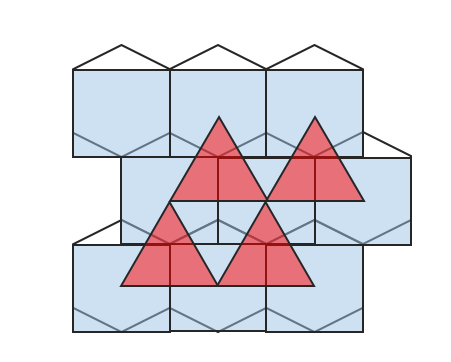
简单的示意图

微信截图_20220105104735