微信小游戏的云服务中存储和cocos creator的assetbundle兼容性问题

cocos creator的assetManager.loadBundle加载需要填写http前缀链接,拼接下载完成AB包
但是在微信小游戏云服务中,我将远程包放到存储中,下载方式改变,cocos的assetManager失效,无法下载远程包(因为云存储的下载链接为cloud://开头,api中封装了独特的下载方式).如何解决?

开发能力和搜索能力有限,找了两天好像想不到解决办法.

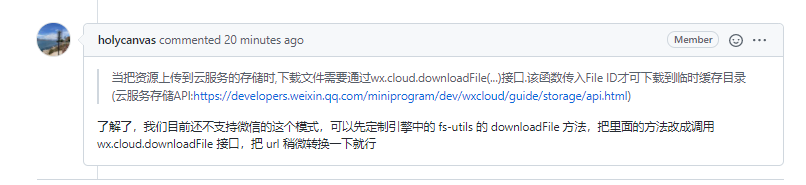
issue 上已回复:

按照issue 提示,已临时解决,以下是操作方式:
打开fs-utils.js,找到downloadFile方法


方法第一行加入:
var remoteStr = “/remote/”;
if(remoteUrl.concat(remoteStr)){
fsUtils.downloadFileByCloud(remoteUrl, filePath, header, onProgress, onComplete,remoteStr);
return;
}
在downloadFile同级,定义方法:
downloadFileByCloud(remoteUrl, filePath, header, onProgress, onComplete,remoteStr){
var cloudPre = “cloud://cloud1-XXX”;//这里填写云服务File ID前缀
var index = remoteUrl.indexOf("/remote/");
var cloudUrl =cloudPre + remoteUrl.substring(index);
console.log(“remoteUrl:”+remoteUrl+"\n cloudUrl:"+cloudUrl);
wx.cloud.downloadFile({
fileID: cloudUrl, // 文件 ID
success: res => {
// 返回临时文件路径
console.log(“加载完成:”+res.tempFilePath+" res.filePath:"+res.filePath);
onComplete && onComplete(null, res.tempFilePath || res.filePath);
},
fail: res => {
console.warn(Download file failed: path: ${remoteUrl} cloudUrl: ${cloudUrl});
onComplete && onComplete(new Error(“下载失败!”), null);
},
})

},

该方案为临时方案
后续会升级在构建内填写和选择.
鉴于刚研究cocos,本人编写的升级版本就要久等了

1赞

该主题在最后一个回复创建后14天后自动关闭。不再允许新的回复。