
cocos creator h5 渲染
废话不多说,我们直接看主循环部分
    //director.ts

    /**

     * @en Run main loop of director

     * @zh 运行主循环

     */

    public tick (dt: number) {

        if (!this._invalid) {

            this.emit(Director.EVENT_BEGIN_FRAME);

            if (!EDITOR) {

                // @ts-expect-error _frameDispatchEvents is a private method.

                input._frameDispatchEvents();

            }

            // Update

            if (!this._paused) {

                this.emit(Director.EVENT_BEFORE_UPDATE);

                // Call start for new added components

                this._compScheduler.startPhase();

                // Update for components

                this._compScheduler.updatePhase(dt);

                // Update systems

                for (let i = 0; i < this._systems.length; ++i) {

                    this._systems[i].update(dt);

                }

                // Late update for components

                this._compScheduler.lateUpdatePhase(dt);

                // User can use this event to do things after update

                this.emit(Director.EVENT_AFTER_UPDATE);

                // Destroy entities that have been removed recently

                CCObject._deferredDestroy();

                // Post update systems

                for (let i = 0; i < this._systems.length; ++i) {

                    this._systems[i].postUpdate(dt);

                }

            }


            this.emit(Director.EVENT_BEFORE_DRAW);

            this._root!.frameMove(dt);

            this.emit(Director.EVENT_AFTER_DRAW);

            Node.resetHasChangedFlags();

            Node.clearNodeArray();

            containerManager.update(dt);

            this.emit(Director.EVENT_END_FRAME);

            this._totalFrames++;

        }

    }
通过上面的代码我们可以看到 EVENT_BEFORE_DRAW 和 EVENT_AFTER_DRAW 之间只有一行代码,所以这里就是绘制的入口了。
    //root.ts

    /**

     * @zh

     * 每帧执行函数

     * @param deltaTime 间隔时间

     */

    public frameMove (deltaTime: number) {

        this._setFrameTime(deltaTime);

        ++this._frameCount;

        this._setCumulativeTime(deltaTime);

        this._fpsTime += deltaTime;

        if (this._fpsTime > 1.0) {

            this._fps = this._frameCount;

            this._frameCount = 0;

            this._fpsTime = 0.0;

        }

        //

        for (let i = 0; i < this._scenes.length; ++i) {

            this._scenes[i].removeBatches();

        }

        const windows = this._windows;

        const cameraList: Camera[] = [];


        //收集摄像机,所以从这里开始这一帧的绘制

        for (let i = 0; i < windows.length; i++) {

            const window = windows[i];

            window.extractRenderCameras(cameraList);

        }

        if (this._pipeline && cameraList.length > 0) {

            this._device.acquire([legacyCC.game._swapchain]);

            const scenes = this._scenes;

            const stamp = legacyCC.director.getTotalFrames();

            //_batcher的类型是Batcher2D,Batcher2D是负责更新canvas下ui组件的渲染数据

            if (this._batcher) {

                this._batcher.update();

                this._batcher.uploadBuffers();

            }

            for (let i = 0; i < scenes.length; i++) {

                //更新3D渲染数据

                scenes[i].update(stamp);

            }

            legacyCC.director.emit(legacyCC.Director.EVENT_BEFORE_COMMIT);

            cameraList.sort((a: Camera, b: Camera) => a.priority - b.priority);

            //渲染管线执行渲染

            this._pipeline.render(cameraList);

            this._device.present();

        }

        if (this._batcher) this._batcher.reset();

    }
    //batcher-2d.ts

    public update () {

        const screens = this._screens;

        let offset = 0;

        for (let i = 0; i < screens.length; ++i) {

            const screen = screens[i];

            const scene = screen._getRenderScene();

            if (!screen.enabledInHierarchy || !scene) {

                continue;

            }

            // Reset state and walk

            this._opacityDirty = 0;

            this._pOpacity = 1;

            //这个walk很明显在递归更新ui渲染数据

            this.walk(screen.node);


            this.autoMergeBatches(this._currComponent!);

            this.resetRenderStates();

            let batchPriority = 0;

            if (this._batches.length > offset) {

                for (; offset < this._batches.length; ++offset) {

                    const batch = this._batches.array[offset];

                    if (batch.model) {

                        const subModels = batch.model.subModels;

                        for (let j = 0; j < subModels.length; j++) {

                            subModels[j].priority = batchPriority++;

                        }

                    } else {

                        batch.descriptorSet = this._descriptorSetCache.getDescriptorSet(batch);

                    }

                    //在这里将ui的渲染合批对象提交给renderscene

                    scene.addBatch(batch);

                }

            }

        }

    }
整个update方法做的就是 更新ui渲染数据并合批、将合批逐个提交给renderscene,接下来再搞明白 walk方法是怎么更新渲染数据的并合批的,以及 this._batches 的数据是怎么来的就可以了。
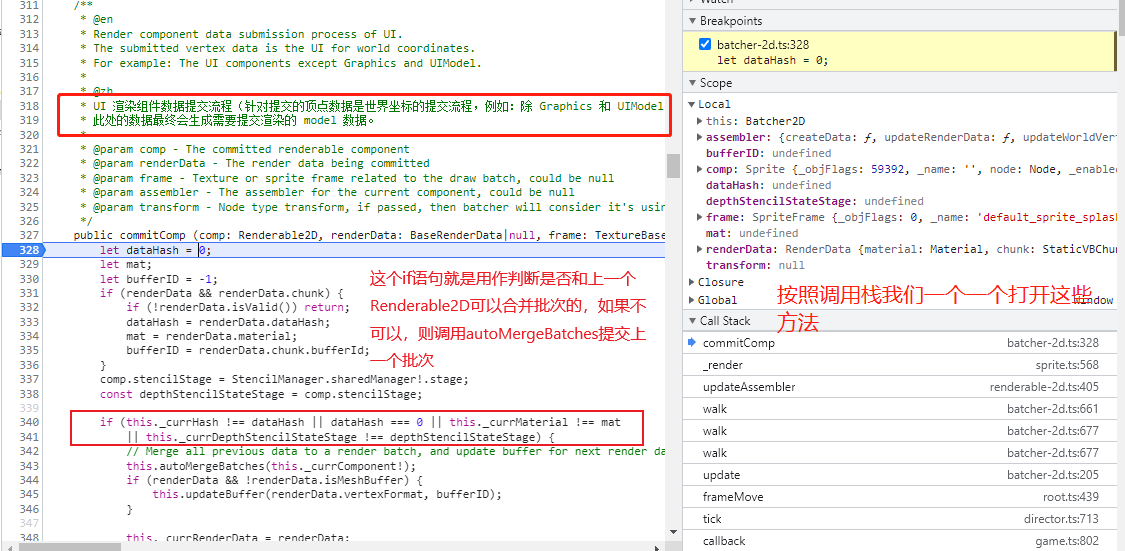
//batcher-2d.ts

    public walk (node: Node, level = 0) {

        //将当前组件置脏

        ...

        // Render assembler update logic

        if (render && render.enabledInHierarchy) {

            render.updateAssembler(this);

        }

        ...

        //递归走完所有节点

    }
//renderable-2d.ts

    public updateAssembler (render: IBatcher) {

        if (this._renderDataFlag) {

            //更新RenderData(顶点,材质,纹理,Assembler)

            this._assembler!.updateRenderData(this, render);

            this._renderDataFlag = false;

        }

        if (this._renderFlag) {

            //调用 batcher.commitComp方法向renderscene提交渲染批次

            this._render(render);

        }

    }
//batcher-2d.ts

   /**

     * @en

     * End a section of render data and submit according to the batch condition.

     *

     * @zh

     * 根据合批条件,结束一段渲染数据并提交。

     */

    public autoMergeBatches (renderComp?: Renderable2D) {

        const mat = this._currMaterial;

        if (!mat) {

            return;

        }

        let ia;

        const rd = this._currRenderData as MeshRenderData;

        const accessor = this._staticVBBuffer;

        // Previous batch using mesh buffer

        if (rd && rd.isMeshBuffer) {

            ia = rd.requestIA(this.device);

            if (this._meshDataArray.indexOf(rd) === -1) {

                this._meshDataArray.push(rd);

            }

        } else if (accessor) {

        // Previous batch using static vb buffer

            const bid = this._currBID;

            const buf = accessor.getMeshBuffer(bid);

            if (!buf) {

                return;

            }

            const indexCount = buf.indexOffset - this._indexStart;

            if (indexCount <= 0) return;

            assertIsTrue(this._indexStart < buf.indexOffset);

            buf.setDirty();

            // Request ia

            ia = buf.requireFreeIA(this.device);

            ia.firstIndex = this._indexStart;

            ia.indexCount = indexCount;

            // Update index tracker and bid

            this._indexStart = buf.indexOffset;

        }

        this._currBID = -1;

        // Request ia failed

        if (!ia) {

            return;

        }

        let blendState;

        let depthStencil;

        let dssHash = 0;

        let bsHash = 0;

        if (renderComp) {

            blendState = renderComp.blendHash === -1 ? null : renderComp.getBlendState();

            bsHash = renderComp.blendHash;

            if (renderComp.customMaterial !== null) {

                depthStencil = StencilManager.sharedManager!.getStencilStage(renderComp.stencilStage, mat);

            } else {

                depthStencil = StencilManager.sharedManager!.getStencilStage(renderComp.stencilStage);

            }

            dssHash = StencilManager.sharedManager!.getStencilHash(renderComp.stencilStage);

        }

        const curDrawBatch = this._currStaticRoot ? this._currStaticRoot._requireDrawBatch() : this._drawBatchPool.alloc();

        curDrawBatch.visFlags = this._currLayer;

        curDrawBatch.texture = this._currTexture!;

        curDrawBatch.sampler = this._currSampler;

        curDrawBatch.inputAssembler = ia;

        curDrawBatch.useLocalData = this._currTransform;

        curDrawBatch.textureHash = this._currTextureHash;

        curDrawBatch.samplerHash = this._currSamplerHash;

        curDrawBatch.fillPasses(mat, depthStencil, dssHash, blendState, bsHash, null, this);

        //拿到了一次合批,walk所有节点后就得到了所有2d渲染组件的合批,update方法在最后会把合批提交给renderscene

        this._batches.push(curDrawBatch);

    }
到这里所有的2d渲染批次就都提交给renderscene,下面要将3d的渲染批次也提交给renderscene ————renderscene.update()。
    //render-scene.ts

    public update (stamp: number) {

        ...

        //我们就先搞明白这些 model是怎么来的

        const models = this._models;

        for (let i = 0; i < models.length; i++) {

            const model = models[i];

            if (model.enabled) {

                model.updateTransform(stamp);

                model.updateUBOs(stamp);

            }

        }

    }

    ...

    //当3d物体添加到场景中,model就会相应的添加到renderscene中

    public addModel (m: Model) {

        m.attachToScene(this);

        this._models.push(m);

        if (JSB) {

            switch (m.type) {

            case ModelType.SKINNING:

                this._nativeObj!.addSkinningModel(m.native);

                break;

            case ModelType.BAKED_SKINNING:

                this._nativeObj!.addBakedSkinningModel(m.native);

                break;

            case ModelType.DEFAULT:

            default:

                this._nativeObj!.addModel(m.native);

            }

        }

    }
renderscene更新完毕后,root.update() 最后会调用 this._pipeline.render(cameraList);
cocos目前提供了两种渲染管线————延迟渲染管线和前向渲染管线,我们选择其中一种看看它是怎么实现的。
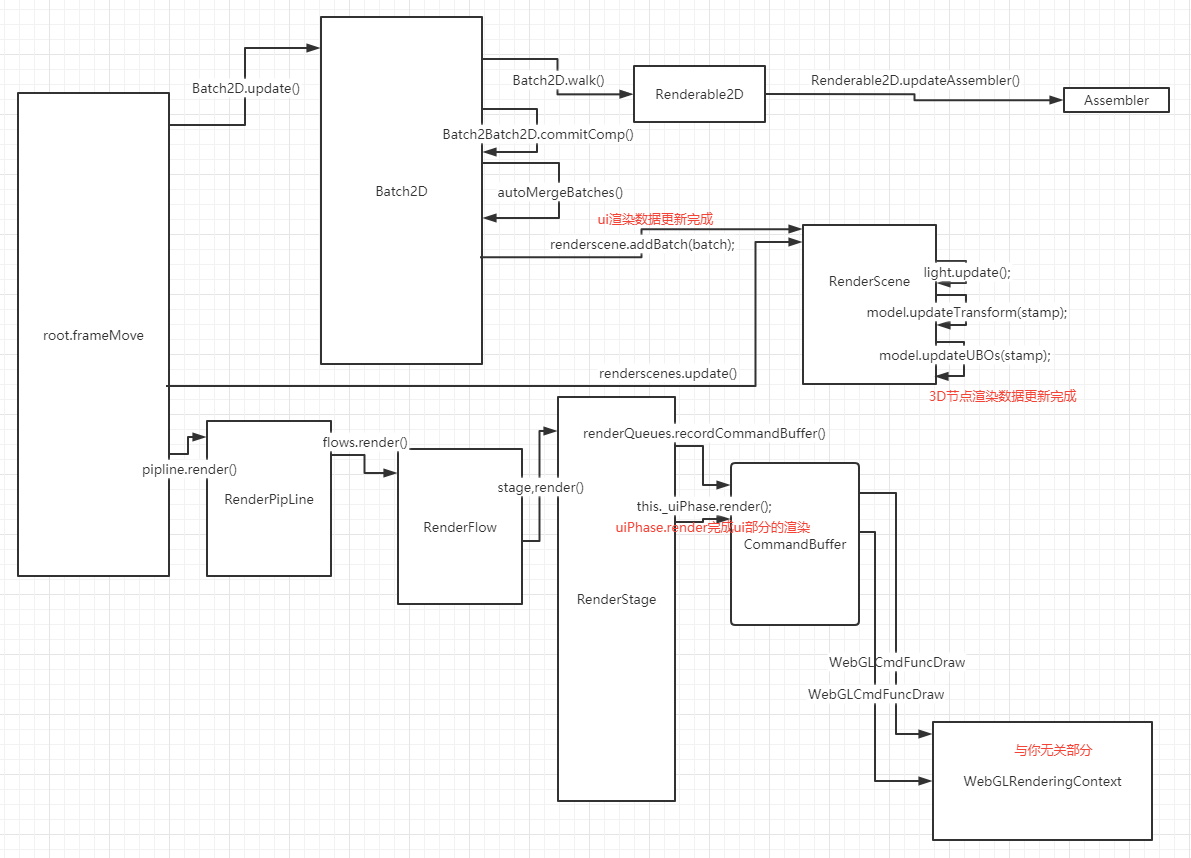
渲染管线会把任务派给渲染流,渲染流又把任务派给渲染阶段,渲染阶段将合批后的渲染数据交给commandbuffer,再最后通过commandbuffer调用 WebGL2CmdFuncDraw 方法完成
最后附上一张粗糙的时序图

 大佬大佬
大佬大佬