
01
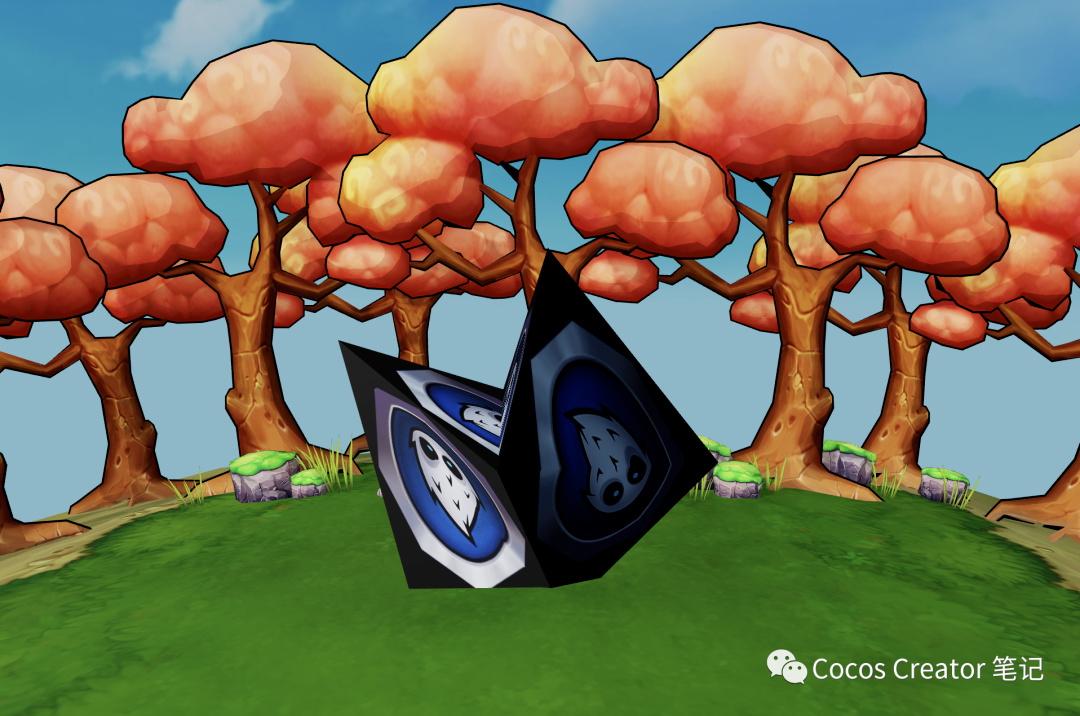
效果演示

02
实现方法
1获取点击的模型
根据触摸点获取 3D 空间中的模型,常用的方法是通过摄像机与触摸点构造一条射线,该射线命中的所有模型中,距离最近的即为点击的模型
利用摄像机与触摸点构造射线:
let ray = camera.screenPointToRay(location.x, location.y);
获取射线命中的模型,有两种方式
基于物理碰撞器:
需要手动给模型添加 PhysicsCollider,然后根据 api 可以直接获取距离最近的模型
if (PhysicsSystem.instance.raycastClosest(ray)) {
let result = PhysicsSystem.instance.raycastClosestResult;
}
基于模型网格:
遍历所有可能相交的模型网格,得到最近的距离,然后根据该距离计算出射线与模型网格的相交坐标
getTouchModel(location: Vec2): { hitNode: Node, hitPoint: Vec3 } {
let mesh: Component = null;
let camera = find(“Main Camera”).getComponent(Camera);
// 根据触摸坐标构造射线
let ray = camera.screenPointToRay(location.x, location.y);
let scene = director.getScene();
// 获得场景下的所有 MeshRenderer 组件
let comps = scene.getComponentsInChildren(MeshRenderer);
let distance = Number.MAX_VALUE;
for (const iterator of comps) {
if (!isValid(iterator.node, true) || !iterator.node.active || !iterator.model) {
continue;
}
// 射线和渲染模型的相交性检测 0: 不相交 非0: 相交坐标与射线起点的距离
let dis = geometry.intersect.rayModel(ray, iterator.model, { mode: geometry.ERaycastMode.CLOSEST, doubleSided: false, distance: Number.MAX_VALUE });
if (dis && dis < distance) {
// 取距离最近的相交模型
distance = dis;
mesh = iterator;
}
}
if (mesh == null) {
return null;
}
let hitPoint = v3();
// 根据给定距离计算出射线上的一点 即相交坐标
ray.computeHit(hitPoint, distance);
return { hitNode: mesh.node, hitPoint: hitPoint };
}
2获取触摸点的顶点索引
获得触摸点与模型的相交点后,对比相交坐标与模型网格顶点的距离,得到触摸点所在模型网格中顶点的索引
相交点是世界坐标,而顶点坐标是模型的本地坐标,所以对比的时候需要转换为统一坐标系,将相交点转为模型坐标或者将模型顶点转为世界坐标都可以
世界坐标转本地坐标
meshRenderer.node.inverseTransformPoint(position, position);
本地坐标转世界坐标
getVertexWorldPositions() {
let meshRenderer = this.node.getComponent(MeshRenderer);
let model = meshRenderer.model;
if (!model) {
return;
}
let mesh = meshRenderer.mesh;
// 获取顶点坐标 本地坐标
let positions = mesh.readAttribute(0, gfx.AttributeName.ATTR_POSITION);
// 获取世界变换矩阵
let worldMatrix = mat4();
meshRenderer.node.getWorldMatrix(worldMatrix);
let worldPositions: Vec3[] = [];
for (let pointOffset = 0; pointOffset < positions.length; pointOffset += 3) {
// 数组转向量 组装顶点坐标
let position = v3();
Vec3.fromArray(position, positions, pointOffset);
// 顶点的本地坐标坐标转世界坐标
let transform = v3();
Vec3.transformMat4(transform, position, worldMatrix);
worldPositions.push(transform);
}
return worldPositions;
}
3触摸移动时计算偏移量
触摸移动时,顶点坐标要做相应的偏移
摄像机提供了 screenToWorld 方法,可以将屏幕坐标转为世界坐标,与之对应的 worldToScreen 方法,可以将世界坐标转为屏幕坐标,该方法得到的屏幕坐标 x 和 y 值是正确的,但 z 值似乎有点问题,也许是我的用法不正确,希望大佬们可以指点下(理论上来讲,外部条件保持不变,用 worldToScreen 将一个模型的世界坐标转为屏幕坐标后,然后再将该屏幕坐标通过 screenToWorld 转为世界坐标,其值应该和模型的世界坐标保持一直)
简单了解下摄像机:
相机的可视范围是通过 6 个平面组成一个 视锥体(Frustum) 构成,近裁剪面(Near Plane) 和 远裁剪面(Far Plane) 用于控制近处和远处的可视距离与范围,同时它们也构成了视口的大小
再学习下 screenToWorld 源码:
/**
- transform a screen position (in oriented space) to world space
*/
public screenToWorld (out: Vec3, screenPos: Vec3): Vec3 {
const width = this.width;
const height = this.height;
const cx = this._orientedViewport.x * width;
const cy = this._orientedViewport.y * height;
const cw = this._orientedViewport.width * width;
const ch = this._orientedViewport.height * height;
const ySign = this._device.capabilities.clipSpaceSignY;
const preTransform = preTransforms[this._curTransform];
if (this._proj === CameraProjection.PERSPECTIVE) {
// calculate screen pos in far clip plane
Vec3.set(out,
(screenPos.x - cx) / cw * 2 - 1,
(screenPos.y - cy) / ch * 2 - 1,
1.0);
// transform to world
const { x, y } = out;
out.x = x * preTransform[0] + y * preTransform[2] * ySign;
out.y = x * preTransform[1] + y * preTransform[3] * ySign;
Vec3.transformMat4(out, out, this._matViewProjInv);
// lerp to depth z
if (this._node) { this._node.getWorldPosition(v_a); }
Vec3.lerp(out, v_a, out, lerp(this._nearClip / this._farClip, 1, screenPos.z));
} else {
Vec3.set(out,
(screenPos.x - cx) / cw * 2 - 1,
(screenPos.y - cy) / ch * 2 - 1,
screenPos.z * 2 - 1);
// transform to world
const { x, y } = out;
out.x = x * preTransform[0] + y * preTransform[2] * ySign;
out.y = x * preTransform[1] + y * preTransform[3] * ySign;
Vec3.transformMat4(out, out, this._matViewProjInv);
}
return out;
}
通过 screenToWorld 的源码可以知道,z 值为模型到近平面距离与远近平面之间距离的比例,即:在近平面,z 值为 0,在远平面,z 值为 1
事实上摄像机的远平面和屏幕尺寸相同,这里我们可以自己求出 z 值
// 方向向量 起点:摄像机位置 终点:相交位置
let dir = v3();
Vec3.subtract(dir, this.hitPosition, camera.node.worldPosition);
// 利用点乘获取方向向量在摄像机朝向方向的投影长度
let length = Vec3.dot(dir, camera.node.forward);
{
// 或者利用cocos提供api计算向量在指定向量上的投影
let project = v3();
Vec3.project(project, dir, camera.node.forward);
length = project.length();
}
// 计算该长度与近平面间的距离
length -= camera.near;
// 计算该距离在摄像机远近平面之间距离的比例
let z = length / (camera.far - camera.near);
计算出 z 值后,转换为世界坐标
let worldPosition = camera.screenToWorld(v3(location.x, location.y, z));
计算触摸偏移值
Vec3.subtract(dir, worldPosition, this.hitPosition);
4设置顶点数据
得到顶点坐标的偏移值后,将原本的顶点坐标加上偏移值,网格的其他属性不变,创建新的网格数据,就可以看到变形后模型
setMeshData(indexes: number[], offset: Vec3) {
let meshRenderer = this.node.getComponent(MeshRenderer);
let model = meshRenderer.model;
if (!model) {
return;
}
let mesh = meshRenderer.mesh;
// 获取所有的顶点坐标-本地坐标
let positions = mesh.readAttribute(0, gfx.AttributeName.ATTR_POSITION);
// 获取所有顶点的顶点索引
let indices = mesh.readIndices(0);
// 获取所有顶点的uv坐标
let uvs = mesh.readAttribute(0, gfx.AttributeName.ATTR_TEX_COORD);
// 获取所有顶点的法线
let normals = mesh.readAttribute(0, gfx.AttributeName.ATTR_NORMAL);
// 获取世界变换矩阵
let worldMatrix = mat4();
meshRenderer.node.getWorldMatrix(worldMatrix);
// 如果使用计算好的世界坐标 需要将世界坐标转为本地坐标
// 将世界坐标转换到本地坐标系中
// meshRenderer.node.inverseTransformPoint(position, position);
// 替换为目标坐标
for (let index = 0; index < indexes.length; index++) {
let element = indexes[index] * 3;
positions[element] += offset.x;
positions[element + 1] += offset.y;
positions[element + 2] += offset.z;
}
let geometry: primitives.IGeometry = {
positions: positions,
indices: indices,
uvs: uvs,
normals: normals,
doubleSided: true,
primitiveMode: gfx.PrimitiveMode.TRIANGLE_LIST,
}
let newMesh = utils.createMesh(geometry);
meshRenderer.mesh = newMesh;
}
最终效果:
完整 demo,请在公众号回复:
顶点拖动
更多笔记
请扫码关注


