1. ErrorEvent {isTrusted: true, message: 'Uncaught SyntaxError: Unexpected end of input', filename: 'http://localhost:7456/', lineno: 1, colno: 4, …}

  1. isTrusted: true
  2. bubbles: false
  3. cancelBubble: false
  4. cancelable: true
  5. colno: 4
  6. composed: false
  7. currentTarget: Window {window: Window, self: Window, document: document, name: '', location: Location, …}
  8. defaultPrevented: true
  9. error: SyntaxError: Unexpected end of input
  10. eventPhase: 0
  11. filename: "http://localhost:7456/"
  12. lineno: 1
  13. message: "Uncaught SyntaxError: Unexpected end of input"
  14. path: [Window]
  15. returnValue: false
  16. srcElement: Window {window: Window, self: Window, document: document, name: '', location: Location, …}
  17. target: Window {window: Window, self: Window, document: document, name: '', location: Location, …}
  18. timeStamp: 87911.60000002384
  19. type: "error"
  20. [[Prototype]]: ErrorEvent
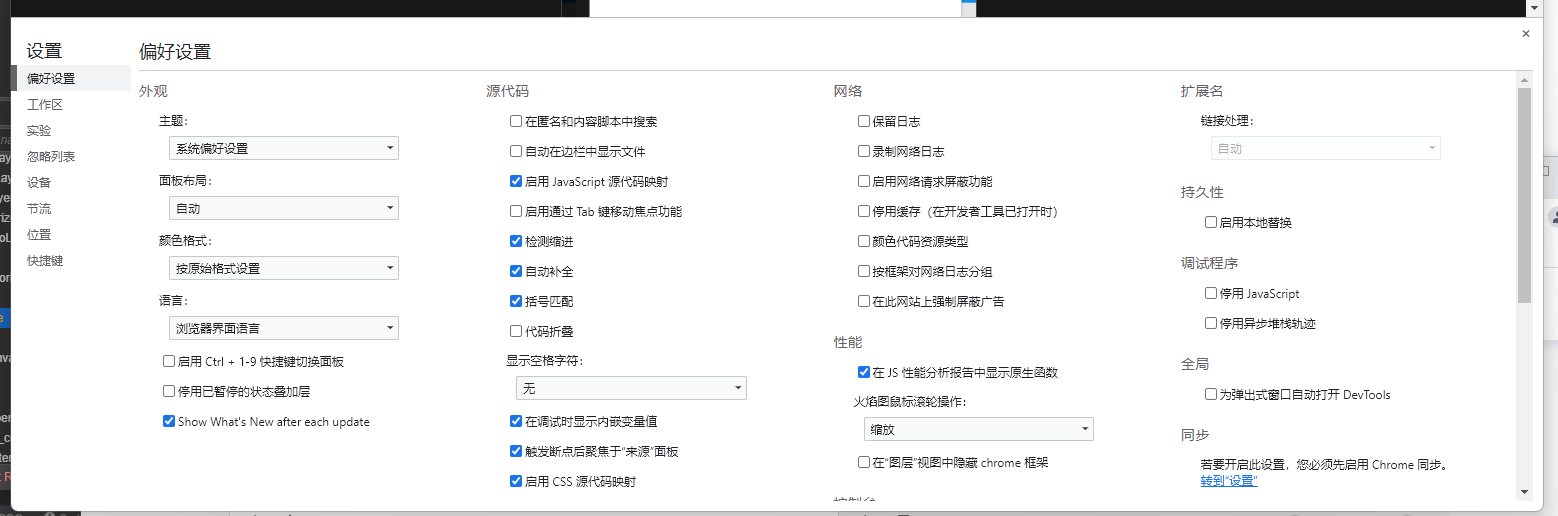
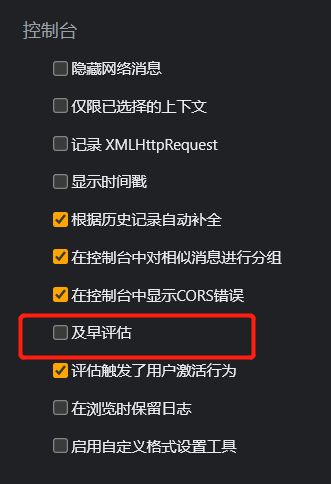
更新了新版本的浏览器,web调试时经常会出现报错。按下面方法可以去掉报错。