
如题,有没有教程或者指导一下?请大佬们指点。
目前只有 Creator 3.x 支持了原生鸿蒙。
中文补丁还能把系统逻辑给改了
1赞
感谢大佬回复。
你的意思是说cocos有bug,还是鸿蒙有bug?
鸿蒙系统可以安装android应用
请问有2dx项目支持的打算吗,老的线上项目到时候应该怎么办啊
https://github.com/cocos2d/cocos2d-x/tree/cocos2d-x-3.17.2-oh
3.17.2 的 Openharmony 支持已经被合并。如果使用接近的版本,可以参考此分支。
4赞
感谢你这个及时雨版本。
能出个详细教程吗?只要 cocos2dx 鸿蒙编译资料太少了
mac mini m1上测试编译成功,不过模拟器运行黑屏。
从另外的地方下载4.0的版本编译成功并运行,不过文字显示全是乱码,目前没有更多研究。
https://gitee.com/openharmony-sig/cocos2dx/tree/cocos2d-x-4.0-ohos/
请问下, 你使用的DevEco Studio 版本是多少, openHarmony 选的版本又是多少
你先用带API10的deveco(最新的)试试吧。 这个当初弄的时候,应该是用的某个最新beta版本。我印象中华为更新过几次deveco的版本的,很难找到适配的版本的。
deveco有API10 的话,应该都可以,你可以先尝试下。
3.17 编译完成! 最新版 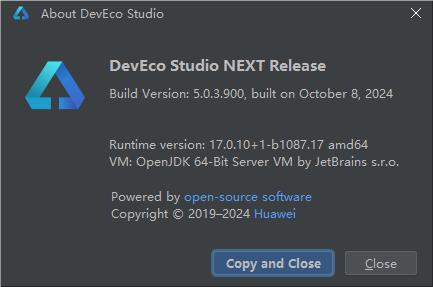
我还有个问题
你们这个
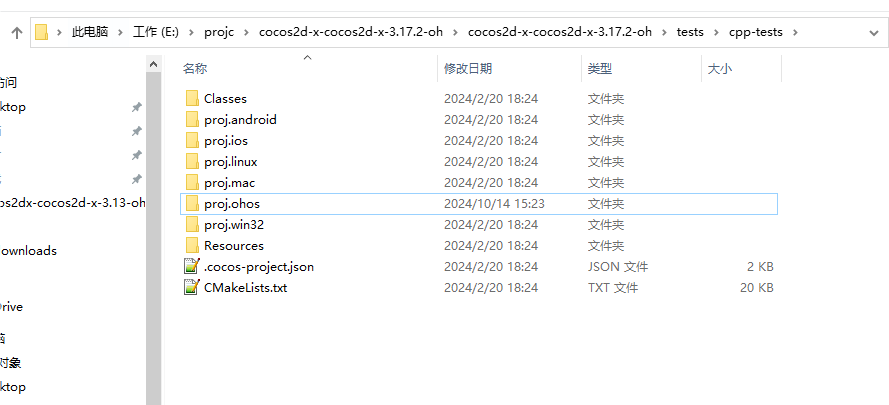
proj.ohos 工程
能不能直接移到到,我new 的新工程,frameworks\runtime 下面的proj.android-studio 同级目录使用??
你用的sdk是10吗,cmake用的是哪个版本的
hvigor ERROR: Failed :entry:default@BuildNativeWithCmake…
hvigor ERROR: Exceptions happened while executing: Not searching for unused variables given on the command line.
CMake Deprecation Warning at CMakeLists.txt:1 (cmake_minimum_required):
Compatibility with CMake < 3.5 will be removed from a future version of
CMake.
Update the VERSION argument value or use a … suffix to tell
CMake that the project does not need compatibility with older versions.
– The C compiler identification is Clang 15.0.4
– The CXX compiler identification is Clang 15.0.4
– Detecting C compiler ABI info
– Detecting C compiler ABI info - done
– Check for working C compiler: D:/DevEco Studio2/sdk/default/openharmony/native/llvm/bin/clang.exe - skipped
– Detecting C compile features
– Detecting C compile features - done
– Detecting CXX compiler ABI info
– Detecting CXX compiler ABI info - done
– Check for working CXX compiler: D:/DevEco Studio2/sdk/default/openharmony/native/llvm/bin/clang++.exe - skipped
– Detecting CXX compile features
– Detecting CXX compile features - done
– using toolchain file:D:/DevEco Studio2/sdk/default/hms/native/build/cmake/hmos.toolchain.cmake
– PROJECT_NAME:cpp-tests
– PROJECT_SOURCE_DIR:C:/Users/Administrator/Desktop/cocos2d-x/tests/cpp-tests
– COCOS2DX_ROOT_PATH:C:/Users/Administrator/Desktop/cocos2d-x/tests/cpp-tests/…/…
– CMAKE_MODULE_PATH:C:/Users/Administrator/Desktop/cocos2d-x/tests/cpp-tests/…/…/cmake/Modules/
– PROJECT_BINARY_DIR:C:/Users/Administrator/Desktop/cocos2d-x/tests/cpp-tests/proj.ohos/entry/.cxx/default/default/debug/arm64-v8a/cpp_tests
– ENGINE_BINARY_PATH:C:/Users/Administrator/Desktop/cocos2d-x/tests/cpp-tests/proj.ohos/entry/.cxx/default/default/debug/arm64-v8a/cpp_tests/engine
– PYTHON_PATH:D:/Python27/python.exe
– COCOS_COMMAND_PATH:COCOS_COMMAND-NOTFOUND
– HOST_SYSTEM:Windows
– CMAKE_GENERATOR: Ninja
CMake Error at C:/Users/Administrator/Desktop/cocos2d-x/cocos/CMakeLists.txt:113 (add_subdirectory):
The source directory
C:/Users/Administrator/Desktop/cocos2d-x/external
does not contain a CMakeLists.txt file.
CMake 3.16 target_precompile_headers
CMake 3.16 target_precompile_headers
– Configuring incomplete, errors occurred!
hvigor ERROR: BUILD FAILED in 38 s 11 ms
请问这个版本怎样构建鸿蒙工程?
好像没有构建的工程。可以参考下cpp-test中的proj.ohos修改下就可以
我用的是lua,意思是不需要通过cocos鸿蒙魔改版来新建鸿蒙工程,直接使用里面的lua-test的鸿蒙工程(参照安卓那样)就可以了?