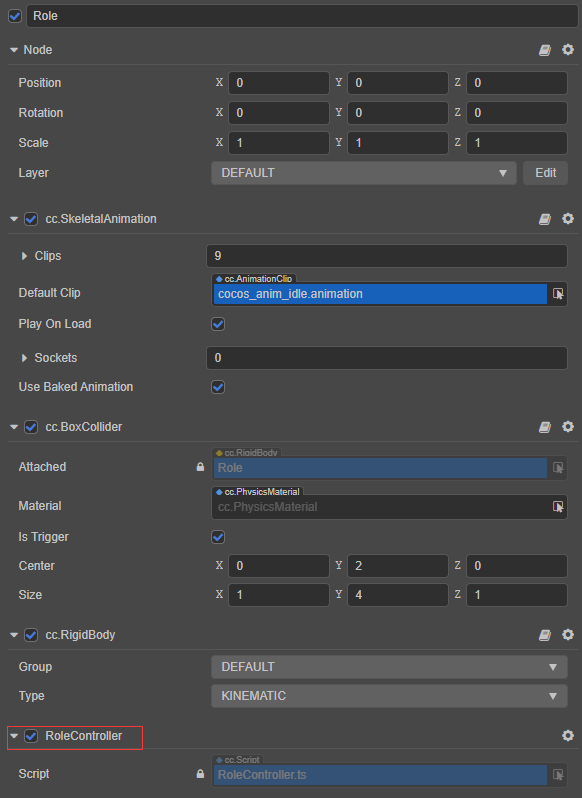
近期刚刚接触3D,想试试两个模型间的碰撞检测,在使用两个立方块时,“onTriggerEnter”事件有实现触发,于是又尝试换成了官方的cocos宇航员模型,不知为何就没有反应了,我很肯定的开启了触发器,并且在论坛里翻阅到官方人员建议说需要添加刚体组件并选择Kinematic模式,可还是不行,再此恳请各位大佬指教,先行谢过!
引擎版本:cocos creator 3.5.2
Demo:3DDemo.rar (3.6 MB)
脚本片段:
import { _decorator, Component, SkeletalAnimation, input, Input, EventKeyboard, KeyCode, Vec3, v3, ITriggerEvent, BoxCollider, } from ‘cc’;
const { ccclass, property } = _decorator;
@ccclass(‘RoleController’)
export class RoleController extends Component {
private _curKeyCodes: KeyCode[] = [];

private speed: number = 2.5;

private curPlayingAnimation: string = RoleAnimationName.IDLE;

protected onLoad() {
    input.on(Input.EventType.KEY_DOWN, this.keyDown, this);
    input.on(Input.EventType.KEY_UP, this.keyUp, this);
    this.node.getComponent(BoxCollider).on("onTriggerEnter", this.checkCollision, this);
}

private keyDown(e: EventKeyboard) {
    const code: KeyCode = e.keyCode;
    if (this.chackKeyCode(code) && this._curKeyCodes.indexOf(code) == -1)
        this._curKeyCodes.push(code);
}

private keyUp(e: EventKeyboard) {
    const index: number = this._curKeyCodes.indexOf(e.keyCode);
    if (index != -1)
        this._curKeyCodes.splice(index, 1);
}

private chackKeyCode(keyCode: KeyCode) {
    switch (keyCode) {
        case KeyCode.KEY_W:
        case KeyCode.KEY_S:
        case KeyCode.KEY_A:
        case KeyCode.KEY_D:
            return true;
        default:
            return false;
    }
}

private calcRotation() {
    if (this._curKeyCodes.length === 0 || this._curKeyCodes.length === 4) return null;
    let clone: KeyCode[] = [];
    for (const code of this._curKeyCodes)
        clone.push(code);
    let indexW: number = clone.indexOf(KeyCode.KEY_W);
    let indexS: number = clone.indexOf(KeyCode.KEY_S);
    let indexA: number = clone.indexOf(KeyCode.KEY_A);
    let indexD: number = clone.indexOf(KeyCode.KEY_D);
    if (indexW != -1 && indexS != -1) {
        clone.splice(indexW, 1);
        clone.splice(indexS, 1);
    }
    if (indexA != -1 && indexD != -1) {
        clone.splice(indexA, 1);
        clone.splice(indexD, 1);
    }
    indexW = clone.indexOf(KeyCode.KEY_W);
    indexS = clone.indexOf(KeyCode.KEY_S);
    indexA = clone.indexOf(KeyCode.KEY_A);
    indexD = clone.indexOf(KeyCode.KEY_D);

    let result: number = 0;
    if (indexW != -1 && indexA != -1)
        result = 225;
    else if (indexW != -1 && indexD != -1)
        result = 135;
    else if (indexS != -1 && indexA != -1)
        result = 315;
    else if (indexS != -1 && indexD != -1)
        result = 45;
    else if (indexW != -1)
        result = 180;
    else if (indexS != -1)
        result = 0;
    else if (indexA != -1)
        result = 270;
    else if (indexD != -1)
        result = 90;
    return result;
}

private playRoleAnimation(name: string, speed: number = 1, cb?: Function) {
    if (this.curPlayingAnimation == name) return;
    this.curPlayingAnimation = name;
    const animation: SkeletalAnimation = this.node.getComponent(SkeletalAnimation);
    const state = animation.getState(name);
    state.speed = speed;
    animation.play(name);
    this.scheduleOnce(() => !!cb && cb(), state.duration);
}

private roleMove(distance: number) {
    const rotation: number = this.calcRotation();
    let name: string = RoleAnimationName.IDLE;
    if (rotation != null) {
        let curPos: Vec3 = new Vec3();
        this.node.getPosition(curPos);
        //四舍五入是为了提高计算精度
        const x: number = Math.round(Math.sin(rotation * Math.PI / 180) * 100000) / 100000 * distance;
        const z: number = Math.round(Math.cos(rotation * Math.PI / 180) * 100000) / 100000 * distance;
        curPos = curPos.add(v3(x, 0, z));
        this.node.setPosition(curPos);
        this.node.setRotationFromEuler(v3(0, rotation, 0));
        name = RoleAnimationName.WALK;
    }
    this.playRoleAnimation(name);
}

private checkCollision(e: ITriggerEvent) {
    console.log("触发碰撞:", e)
}

protected update(dt: number) {
    this.roleMove(dt * this.speed);
}}
enum RoleAnimationName {
IDLE = “cocos_anim_idle”,
ATTACK = “cocos_anim_attack”,
DIE = “cocos_anim_die”,
DOWN = “cocos_anim_down”,
JUMP = “cocos_anim_jump”,
RUN = “cocos_anim_run”,
SHOOT = “cocos_anim_shoot”,
SQUAT = “cocos_anim_squat”,
WALK = “cocos_anim_walk”
}