
[BUG][反馈][记录] Cocos Creator 编辑器 3.4.0~3.6.0 get()/set() 的写法
已测试版本 - Windows 开发环境
 Cocos Creator 3.4.0
Cocos Creator 3.5.2
Cocos Creator 3.6.0
不知道大家在开发的时候用到 @property属性装饰器{可点击查看} 的情况多不多, 我个人对这个的 get()/set() 倒是用的蛮多的, 最近发现一个小问题, 不知道算不算 BUG, 话不多说, 上图
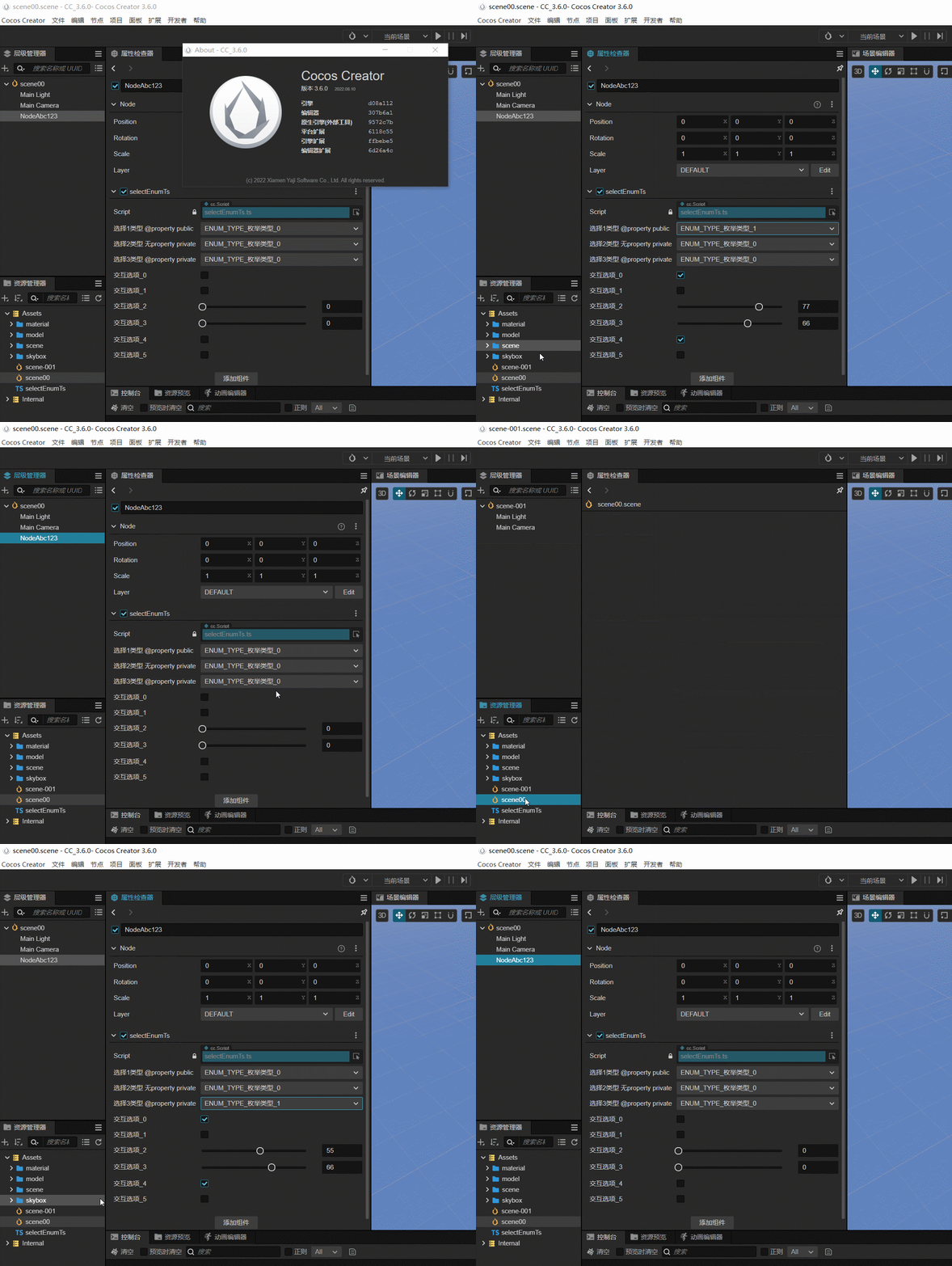
1.1 property get set 切换场景-不弹出保存提示 (Cocos Creator 3.6.0)
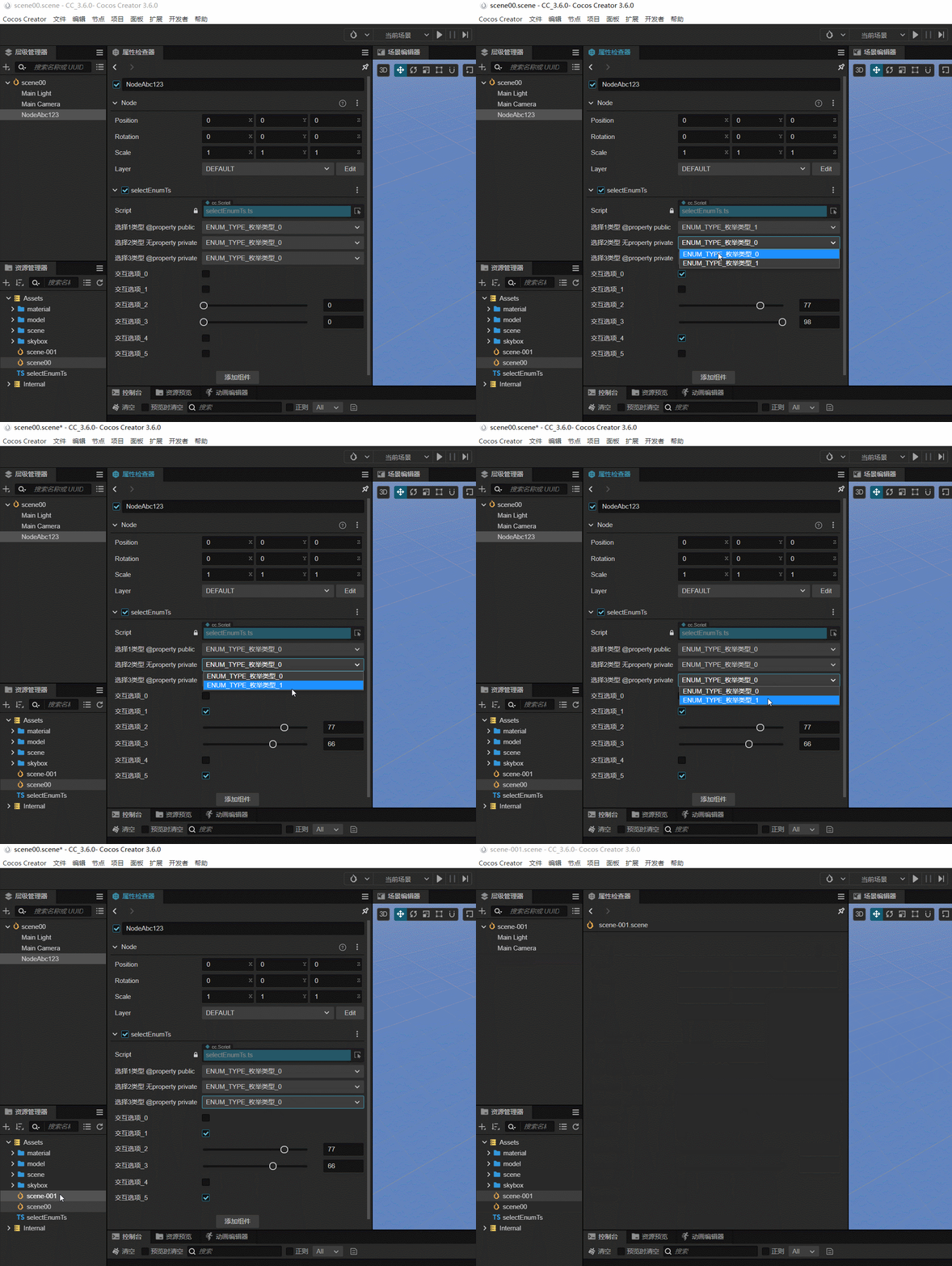
1.2 property get set 重复操作才弹出保存提示 (Cocos Creator 3.6.0)
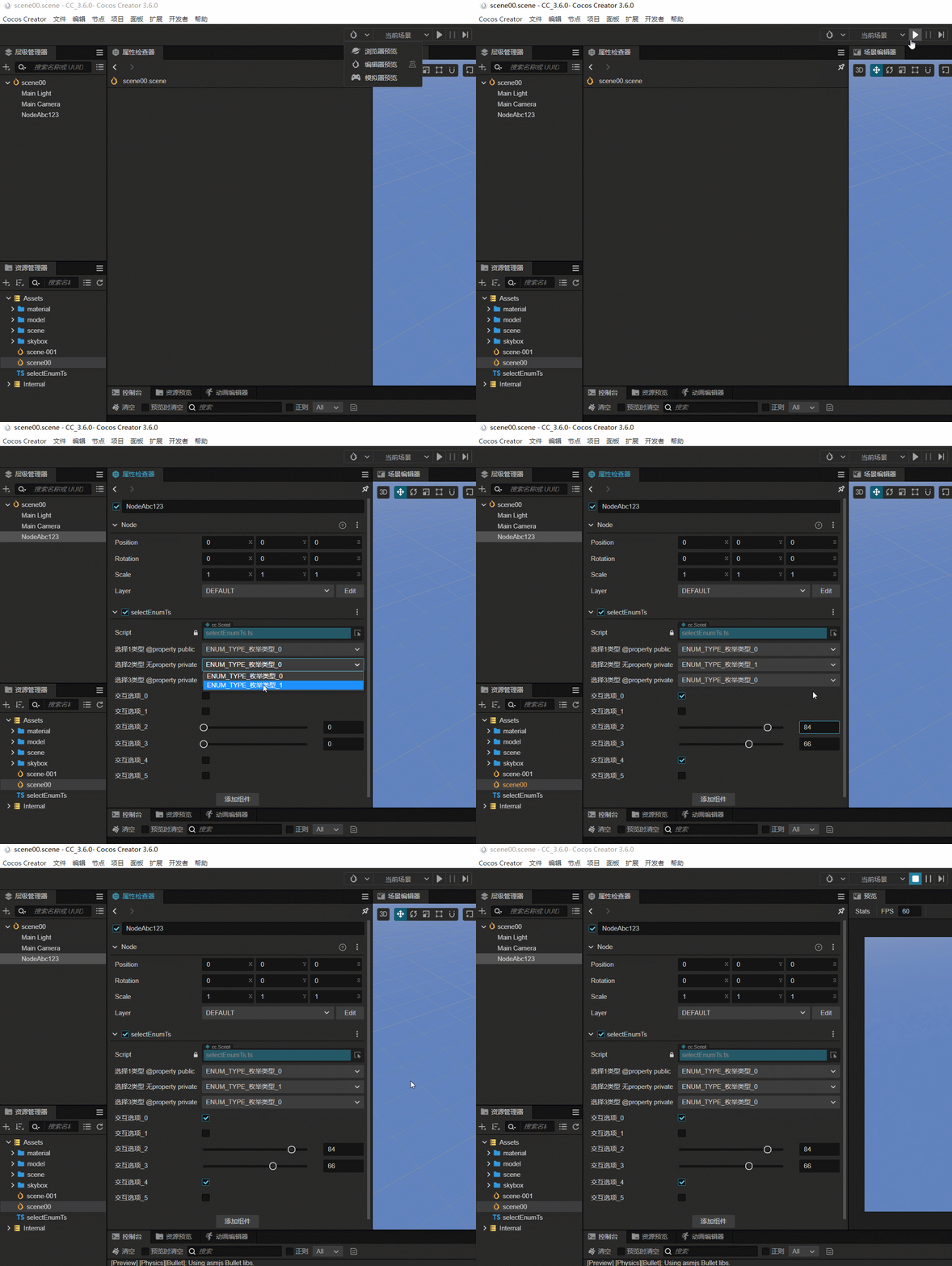
2. 运行起来后, 之前选的选项就没有了
主要是未添加
@property的情况下出现
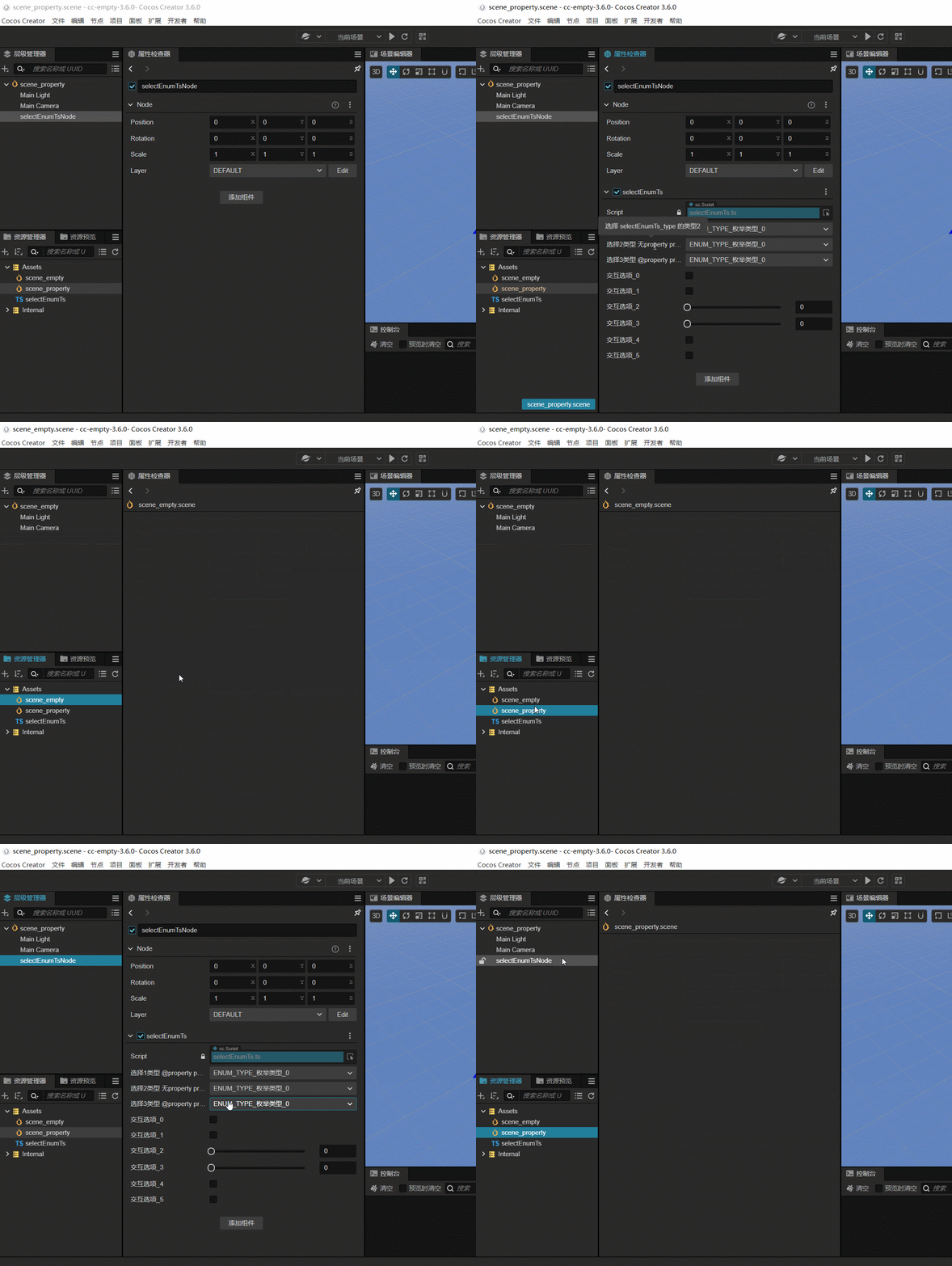
3. 重现步骤
4. 附上上文内的测试代码 - Typescript
import { _decorator, Component, Node, Enum, CCInteger } from 'cc';
const { ccclass, property } = _decorator;

export enum selectEnumTs_type {
    ENUM_TYPE_枚举类型_0 = 0,
    ENUM_TYPE_枚举类型_1 = 1
};
@ccclass('selectEnumTs')
export class selectEnumTs extends Component {
    // @property
    // public a_select_enum_type_value: selectEnumTs_type = selectEnumTs_type.ENUM_TYPE_枚举类型_0;
    // @property
    private _select2_enum_type_value: selectEnumTs_type = selectEnumTs_type.ENUM_TYPE_枚举类型_0;
    @property
    private _select3_enum_type_value: selectEnumTs_type = selectEnumTs_type.ENUM_TYPE_枚举类型_0;
    // @property({ displayName: "枚举选项", type: Enum(selectEnumTs_type) })
    @property
    public _select_enum_type_value: selectEnumTs_type = selectEnumTs_type.ENUM_TYPE_枚举类型_0;

    @property({ displayName: "选择1类型 @property public", tooltip: "选择 selectEnumTs_type 的类型1", type: Enum(selectEnumTs_type) })
    public get select_enum_type_value(): selectEnumTs_type {
        return this._select_enum_type_value;
    };
    public set select_enum_type_value(v: selectEnumTs_type) {
        this._select_enum_type_value = v;

        let chose_index_item = 2 || 3, select_bool = false;
        for (let ii = 0; ii < 5; ii++) {
            select_bool = Boolean(this._select_enum_type_value == selectEnumTs_type.ENUM_TYPE_枚举类型_1);
            if (ii % chose_index_item == 0) {
                this.select_enum_bool_0 = select_bool;
                // this.select_enum_bool_2 = select_bool ? 50 : 100;
                this.select_enum_bool_2 = this.randToMost([55, 77], 3);
                this.select_enum_bool_4 = select_bool;
            } else {
                this.select_enum_bool_1 = !select_bool;
                // this.select_enum_bool_3 = !select_bool ? 50 : 100;
                this.select_enum_bool_3 = this.randomElementByChance([66, 98], [100, 50]);
                this.select_enum_bool_5 = !select_bool;
            };
        };
    };

    @property({ displayName: "选择2类型 无property private", tooltip: "选择 selectEnumTs_type 的类型2", type: Enum(selectEnumTs_type) })
    public get select2_enum_type_value(): selectEnumTs_type {
        return this._select2_enum_type_value;
    };
    public set select2_enum_type_value(v: selectEnumTs_type) {
        this._select2_enum_type_value = v;

        let chose_index_item = 2 || 3, select_bool = false;
        for (let ii = 0; ii < 5; ii++) {
            select_bool = Boolean(this._select2_enum_type_value == selectEnumTs_type.ENUM_TYPE_枚举类型_1);
            if (ii % chose_index_item == 0) {
                this.select_enum_bool_0 = select_bool;
                // this.select_enum_bool_2 = select_bool ? 50 : 100;
                this.select_enum_bool_2 = this.randToMost([55, 77], 3);
                this.select_enum_bool_4 = select_bool;
            } else {
                this.select_enum_bool_1 = !select_bool;
                // this.select_enum_bool_3 = !select_bool ? 50 : 100;
                this.select_enum_bool_3 = this.randomElementByChance([66, 98], [100, 50]);
                this.select_enum_bool_5 = !select_bool;
            };
        };
    };

    @property({ displayName: "选择3类型 @property private", tooltip: "选择 selectEnumTs_type 的类型2", type: Enum(selectEnumTs_type) })
    public get select3_enum_type_value(): selectEnumTs_type {
        return this._select3_enum_type_value;
    };
    public set select3_enum_type_value(v: selectEnumTs_type) {
        this._select3_enum_type_value = v;

        let chose_index_item = 2 || 3, select_bool = false;
        for (let ii = 0; ii < 5; ii++) {
            select_bool = Boolean(this._select3_enum_type_value == selectEnumTs_type.ENUM_TYPE_枚举类型_1);
            if (ii % chose_index_item == 0) {
                this.select_enum_bool_0 = select_bool;
                // this.select_enum_bool_2 = select_bool ? 50 : 100;
                this.select_enum_bool_2 = this.randToMost([55, 77], 3);
                this.select_enum_bool_4 = select_bool;
            } else {
                this.select_enum_bool_1 = !select_bool;
                // this.select_enum_bool_3 = !select_bool ? 50 : 100;
                this.select_enum_bool_3 = this.randomElementByChance([66, 98], [100, 50]);
                this.select_enum_bool_5 = !select_bool;
            };
        };
    };

    @property({ displayName: "交互选项_0", tooltip: "根据上面的枚举内容, 自动选中或者取消" })
    select_enum_bool_0: boolean = false;
    @property({ displayName: "交互选项_1", tooltip: "根据上面的枚举内容, 自动选中或者取消" })
    select_enum_bool_1: boolean = false;
    @property({ displayName: "交互选项_2", tooltip: "根据上面的枚举内容, 自动设定一个滑条值", slide: true })
    select_enum_bool_2: number = 0;
    @property({ displayName: "交互选项_3", tooltip: "根据上面的枚举内容, 自动设定一个滑条值", slide: true })
    select_enum_bool_3: number = 0;
    @property({ displayName: "交互选项_4", tooltip: "根据上面的枚举内容, 自动选中或者取消" })
    select_enum_bool_4: boolean = false;
    @property({ displayName: "交互选项_5", tooltip: "根据上面的枚举内容, 自动选中或者取消" })
    select_enum_bool_5: boolean = false;


    /**
     * 大概率指定
     */
    randToMost<T>(arr: T[], randFix: number = 2): T {
        let very_luck_better = Math.floor(Math.random() * 10);
        if (very_luck_better > randFix) {
            return arr[1];
        } else {
            return arr[Math.floor(Math.random() * arr.length)];
        };
        return null;
    };
    /**
     * 按指定几率随机返回数组内一个元素
     * @param arr 数组
     * @param chanceList 几率列表
     */
    randomElementByChance<T>(arr: T[], chanceList: number[]): T {
        if (!arr || arr.length == 0 || !chanceList || chanceList.length == 0) {
            return null;
        }
        let chanceSum = chanceList.reduce((a, b) => a + b, 0);
        let rnd = Math.random() * chanceSum;
        for (let i = 0, len = chanceList.length; i < len; ++i) {
            let chance = chanceList[i] || 0;
            if (rnd < chance) {
                return arr[i];
            }
            rnd -= chance;
        }
        return null;
    };
    // start() {
    // };
    // update(deltaTime: number) {
    // };
};
5. 重现的-最小项目 cc-empty-3.6.0.zip
注
1.1 和 1.2 的情况, 仅在 3.6.0 上出现了, 3.5.2 和 3.4.0 上也会有弹窗提示保存
[END] 总结
- 如果有出现设置了 get()/set() 以后, 属性运行后失效的时候, 检查一下, 是否有加入
@property的内容 - 属性名称前加入下划线
_的话, public 也不会显示在属性面板上面的 - 设置 public get/public set 时, 可以尽量把名称统一, 比如子项用
_加名称, 后续好调试