
This is because the cache is generated in the project after a successful build, so the next build will use the cache directly. So there will be no problem.
This issue can only be solved by upgrading the editor version used by the project.
Since JENKINS also works in a Windows environment, I think it is normal to support WEBGL.
However, I am not sure how to test whether JENKINS supports WEBGL build normally.
I know there is no such issue in Unity WEBGL build.
If there’s an issue with the environment, I think the same symptom should have happened with the manual build as well.
I’d like to find out if Jenkins has WEBGL support, but I can’t find any information about it anywhere.
In order to upgrade to 3.6.1, it is impossible to modify all dozens of projects that have been made so far.
I just updated to 3.6.1 and the keyboard input event doesn’t happen.
It is very difficult to update due to stability issues.
Thank you very much for your help.
If there is no way, let’s consider another way.
Is it already 3.6.2 overseas?
mistake.
3.6.1
hello.
I updated to 3.6.1.
The above issue is gone. But there are other issues.
A normal project builds successfully.
However, it intermittently fails when building projects with large amounts of Sprite.
When I try the second build, it succeeds.
Can you solve that problem?
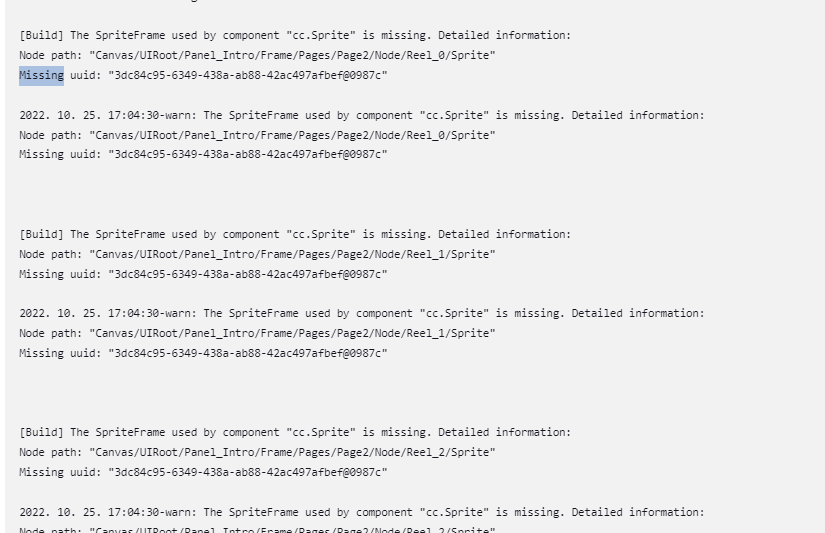
We need to confirm this
1赞