目前搜到的信息都是老版本的方案,包括官网上的例子运行也会出错
const mask = this.getComponent(Mask);
mask.type = Mask.Type.GRAPHICS_STENCIL;
const g = mask.graphics;
如这个代码里graphics TS直接就报错无了

目前搜到的信息都是老版本的方案,包括官网上的例子运行也会出错
const mask = this.getComponent(Mask);
mask.type = Mask.Type.GRAPHICS_STENCIL;
const g = mask.graphics;
如这个代码里graphics TS直接就报错无了
已解决,graphics更换为subComp,官方文档应该更新下这里
import { _decorator, Component, Mask, UITransform, Graphics } from 'cc';

const { ccclass, property } = _decorator;

@ccclass('RoundRect')
export class RoundRect extends Component {
  @property({ type: Number })
  radius = 10;

  start() {
    this.init();
  }

  onEnable() {
    this.init();
  }

  init() {
    // 不加延时对于父元素的active切换不生效
    setTimeout(() => {
      const mask = this.node.getComponent(Mask);
      mask.type = Mask.Type.GRAPHICS_RECT;

      const uiTransform = this.getComponent(UITransform);
      const { width, height, anchorX, anchorY } = uiTransform;

      const graphics = mask.subComp as Graphics;
      graphics.clear();
      const x = -width * anchorX;
      const y = -height * anchorY;
      graphics.roundRect(x, y, width, height, this.radius || 10);
      graphics.fill();
    }, 100);
  }
}
延时多少有点不优雅,而且项目拥有了魔法数字,如果在运行较慢的机器上可能还是会出错。
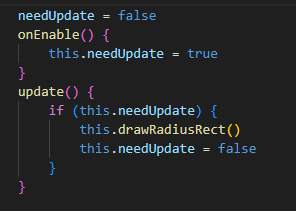
我使用了enable时标记+update时更新的方法。但是我感觉每次update过来都要判断一下还是造成了性能浪费,
难道没有更合适的方式或者时机,直接执行吗?如果没有,我认为这是框架的问题。我们需要向框架开发者反馈。
好像解决了,用这个组件代替引擎的Mask组件
/**
 * 圆角矩形遮罩
 *
 * 需要把Mask类型选为GRAPHICS_RECT
 */
@ccclass("RoundRectMask")
export class RoundRectMask extends Mask {
  @property
  radius = 10;

  protected _updateGraphics() {
    if (!this._graphics || (this._type !== Mask.Type.GRAPHICS_RECT && this._type !== Mask.Type.GRAPHICS_ELLIPSE)) {
      return;
    }

    const uiTransform = this.getComponent(UITransform);
    const { width, height, anchorX, anchorY } = uiTransform;

    const graphics = this._graphics;
    graphics.clear();
    const x = -width * anchorX;
    const y = -height * anchorY;
    graphics.roundRect(x, y, width, height, this.radius || 10);
    graphics.fill();
  }
}
因为每次切换父节点的active都会导致圆角失效,我就猜测组件内对graphics组件重置了一下,找到了这个方法,重写一下就行。