
cocos版本是3.8
自顶一下.
老哥,看了你的回答感觉这个挺有意思做了一个测试发现RGB转换成HSV后再转回去颜色不对, 结果变灰,不知道哪个地方的问题 请求老哥支援 
vec4 color = i_color; #if USE_TEXTURE color = texture(cc_spriteTexture, uv0); #endif float R=color.r; float G=color.g; float B=color.b; float v =max(max(R,G),B); float vmin=min(min(R,G),B); float diff= v-vmin; float s=0.0; if(v!=0.0) float s = diff/v; float h=0.0; if(v==R){ h=60.0*(G-B)/diff; }else if(v==G){ h=120.0+60.0*(B-R)/diff; }else if(v==B){ h=240.0+60.0*(R-G)/diff; }else if(diff==0.0){ h=0.0; } if(h < 0.0){ h += 360.0; }else if(h>360.0){ h-=360.0; } float H=h/2.0; float S=s*255.0; float V=v*255.0; //Hsv转变成RGB // H=H*2.0; // S=S/255.0; // V=V/255.0; // float h1=floor(H/60.0); // float f=H/60.0-h1; // float p=V*(1.0-S); // float q=V*(1.0-f*S); // float t=V*(1.0-(1.0-f)*S); // if(h1==0.0){ // R=V;G=t;B=p; // }else if(h1==1.0){ // R=q;G=V;B=p; // }else if(h1==2.0){ // R=p;G=V;B=t; // }else if(h1==3.0){ // R=p;G=q;B=V; // }else if(h1==4.0){ // R=t;G=p;B=V; // }else if(h1==5.0){ // R=V;G=p;B=q; // } float h1=floor(h/60.0); float C=v*s; float a= mod(4.0, 2.0); float b = abs(h/60.0); float X=C*(1.0 - abs(mod((h/60.0),2.0) - 1.0)); float m=v-C; if(h1==0.0){ R=C;G=X;B=0.0; }else if(h1==1.0){ R=X;G=C;B=0.0; }else if(h1==2.0){ R=0.0;G=C;B=X; }else if(h1==3.0){ R=0.0;G=X;B=C; }else if(h1==4.0){ R=X;G=0.0;B=C; }else if(h1==5.0){ R=C;G=0.0;B=X; } R+=m; G+=m; B+=m; color.r=R; color.g=G; color.b=B; return color;
类似这样吗?
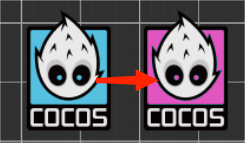
根据 这位的思路 写的
CCEffect:
properties:
        targetHue: { value: 240, editor: { tooltip: '目标色相值'} }
        hueRange: { value: 60, editor: { tooltip: '色相范围'} }
        hueRotationAngle : { value: 120, editor: { tooltip: '色相旋转角度'} }
fs:
声明部分:
  precision highp float;
  #include <legacy/output>
  #include <legacy/fog-fs>

  in vec2 v_uv;
  in vec3 v_position;

  in vec4 v_color;

  #if USE_TEXTURE
    #pragma builtin(local)
    layout(set = 2, binding = 10) uniform sampler2D cc_spriteTexture;
  #endif

  uniform Hue {
    float targetHue;
    float hueRange;
    float hueRotationAngle;
  };

  vec3 rgbToHsv(vec3 rgb);  // 将 RGB 转换为 HSV
  vec3 hsvToRgb(vec3 hsv);  // 将 HSV 转换回 RGB
入口函数:
vec4 frag () {
    vec4 o = texture(cc_spriteTexture, v_uv).rgba;

    vec3 hsv = rgbToHsv(vec3(o.r, o.g, o.b));

    float minHue = targetHue - hueRange;
    float maxHue = targetHue + hueRange;

    if (hsv.x >= minHue && hsv.x <= maxHue) {
        hsv.x += hueRotationAngle; // 色相旋转

        if (hsv.x > 360.0) {
            hsv.x -= 360.0;
        }
    }

    vec3 newColor = hsvToRgb(hsv);

    return vec4(newColor, o.a) * v_color;
  }
rgbToHsv函数:
vec3 rgbToHsv(vec3 rgb) {
    float r = rgb.r;
    float g = rgb.g;
    float b = rgb.b;

    float minVal = min(min(r, g), b);
    float maxVal = max(max(r, g), b);
    float delta = maxVal - minVal;

    float h = 0.0;
    float s = 0.0;
    float v = maxVal;

    if (delta != 0.0) {
        if (maxVal == r) {
            h = (g - b) / delta;
        } else if (maxVal == g) {
            h = 2.0 + (b - r) / delta;
        } else {
            h = 4.0 + (r - g) / delta;
        }

        h *= 60.0;
        if (h < 0.0) {
            h += 360.0;
        }

        s = delta / maxVal;
    }

    return vec3(h, s, v);
  }
hsvToRgb函数:
  vec3 hsvToRgb(vec3 hsv) {
      float h = hsv.x;
      float s = hsv.y;
      float v = hsv.z;

      float c = v * s;
      float x = c * (1.0 - abs(mod(h / 60.0, 2.0) - 1.0));
      float m = v - c;

      vec3 rgb;
      if (h >= 0.0 && h < 60.0) {
          rgb = vec3(c, x, 0.0);
      } else if (h >= 60.0 && h < 120.0) {
          rgb = vec3(x, c, 0.0);
      } else if (h >= 120.0 && h < 180.0) {
          rgb = vec3(0.0, c, x);
      } else if (h >= 180.0 && h < 240.0) {
          rgb = vec3(0.0, x, c);
      } else if (h >= 240.0 && h < 300.0) {
          rgb = vec3(x, 0.0, c);
      } else {
          rgb = vec3(c, 0.0, x);
      }

      return rgb + vec3(m);
  }
编辑器参数:
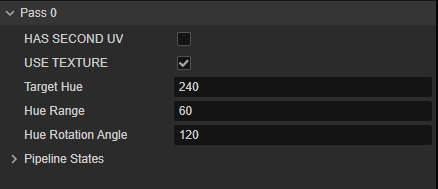
4赞
谢谢,前两天找我的TA朋友帮我写了个。 
有完整版effect吗 求
看我另一个帖子,有AI写的
你真会训练,我问了两个ai 都无法直接使用
vec4 o = texture2d(texture,v_uv0);
if( o.r == xxx && o.g == xxx && o.b == xxx){
o = vec4(a,b,c,d);//指定颜色
}
这个我AI训出来了,但是语法我不会,copy过去都能各种报错 
copy你那个也没法用,有没有现成的  我shader语法不会 能大概看懂 报错不知道怎么解决
你用的不是3.8版本吗?
肯定报错,这个是2。x版本的,晚点给你整个3.8版本的
可以了 不用了 谢谢哈,而且用==号也不合理,肯定要改成区间范围
1赞
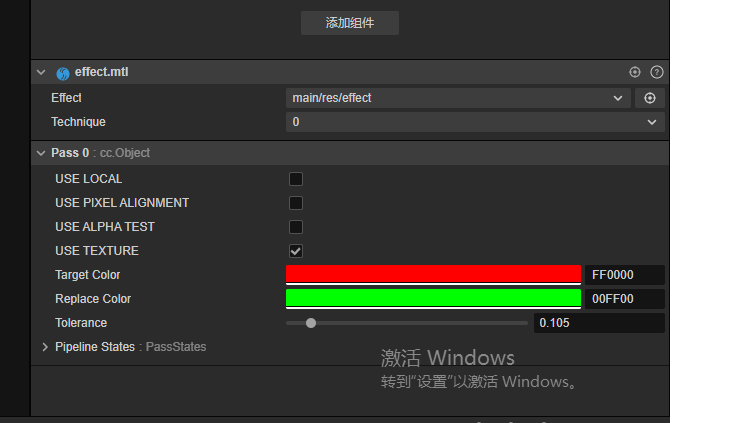
是的 == 只是方便理解,shader里浮点的比较最好是一个范围
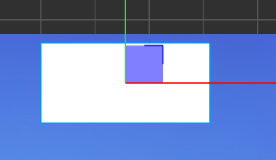
是的 方便理解,材质上有什么要求的吗,用楼主给的shader不报错可以直接用,但是材质指着这个shader放到sprite就纯白色了
测试了下新版本中确实有显示异常问题,用我朋友帮我写的吧。注意要勾选use texture。
CCEffect %{

  techniques:

  - passes:

    - vert: sprite-vs:vert

      frag: sprite-fs:frag

      depthStencilState:

        depthTest: false

        depthWrite: false

      blendState:

        targets:

        - blend: true

          blendSrc: src_alpha

          blendDst: one_minus_src_alpha

          blendDstAlpha: one_minus_src_alpha

      rasterizerState:

        cullMode: none

      properties:

        alphaThreshold: { value: 0.5 }

        SrcColor: { value: [1.0, 1.0, 1.0, 1.0], editor: {type: color} }

        ReplaceColor: { value: [1.0, 1.0, 1.0, 1.0], editor: {type: color} }

        Range: { value: 0.0 }

        Fuzziness: { value: 0.0 }

}%

CCProgram sprite-vs %{

  precision highp float;

  #include <builtin/uniforms/cc-global>

  #if USE_LOCAL

    #include <builtin/uniforms/cc-local>

  #endif

  #if SAMPLE_FROM_RT

    #include <common/common-define>

  #endif

  in vec3 a_position;

  in vec2 a_texCoord;

  in vec4 a_color;

  out vec4 color;

  out vec2 uv0;

  vec4 vert () {

    vec4 pos = vec4(a_position, 1);

    #if USE_LOCAL

      pos = cc_matWorld * pos;

    #endif

    #if USE_PIXEL_ALIGNMENT

      pos = cc_matView * pos;

      pos.xyz = floor(pos.xyz);

      pos = cc_matProj * pos;

    #else

      pos = cc_matViewProj * pos;

    #endif

    uv0 = a_texCoord;

    #if SAMPLE_FROM_RT

      CC_HANDLE_RT_SAMPLE_FLIP(uv0);

    #endif

    color = a_color;

    return pos;

  }

}%

CCProgram sprite-fs %{

  precision highp float;

  #include <builtin/internal/embedded-alpha>

  #include <builtin/internal/alpha-test>

  in vec4 color;

  #if USE_TEXTURE

    in vec2 uv0;

    #pragma builtin(local)

    layout(set = 2, binding = 12) uniform sampler2D cc_spriteTexture;

  #endif

  uniform Constant{

    vec4 SrcColor;

    vec4 ReplaceColor;

    float Range;

    float Fuzziness;

  };

  vec3 ReplaceColor1(vec3 In, vec3 From, vec3 To, float Range, float Fuzziness)

  {

    float dis = distance(From, In);

    float t = (dis - Range) / max(Fuzziness, 0.001);

    t = clamp(t, 0.0, 1.0);

    return mix(To, In, t);

  }

  vec4 frag () {

    vec4 o = vec4(1, 1, 1, 1);

    #if USE_TEXTURE

      o *= CCSampleWithAlphaSeparated(cc_spriteTexture, uv0);

      #if IS_GRAY

        float gray  = 0.2126 * o.r + 0.7152 * o.g + 0.0722 * o.b;

        o.r = o.g = o.b = gray;

      #endif

    #endif


    o.rgb = ReplaceColor1(o.rgb, SrcColor.rgb, ReplaceColor.rgb, Range, Fuzziness);

    o *= color;

    ALPHA_TEST(o);

    return o;

  }

}%
3赞
可以了 谢谢,改了一行代码 应该是透明度问题让我显示白色