虚拟列表,tabbar,切换按钮,combobox下拉列表,这些常用了为什么没有官方库呀
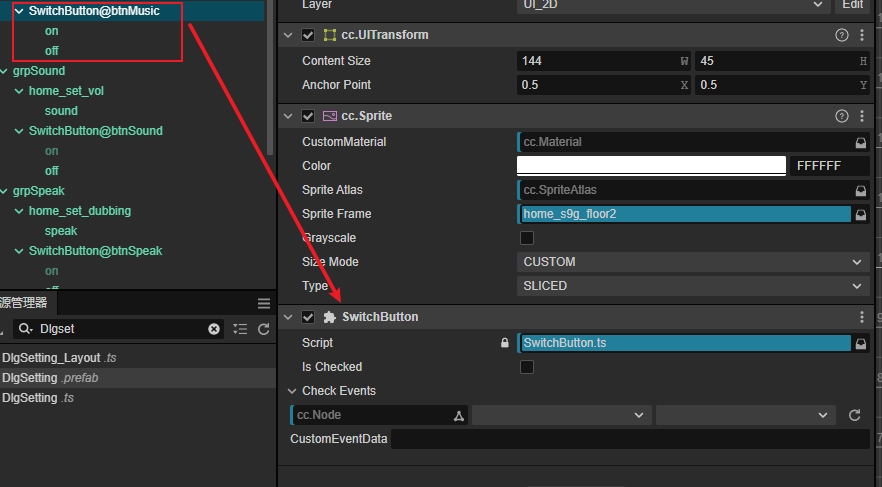
自己写了个SwitchButton的组件
import { _decorator, Component, Node, CCBoolean, EventHandler, log } from 'cc';
import { DEV } from 'cc/env';
const { ccclass, property } = _decorator;
/**
 * 用法:
 * 1.创建一个空节点(可命名为:btnSwitch),并添加SwitchButton组件
 * 2.在btnSwitch节点下添加两个子节点,并命名分别为:on、off,他们分别对应开和关状态
 * 3.在btnSwitch节点上侦听click事件,并添加事件处理函数
 */
@ccclass('SwitchButton')
export class SwitchButton extends Component {
    // @property
    private _isChecked: boolean = false;
    @property({
        type: CCBoolean,
        tooltip: DEV && '是否为开启状态'
    })
    public set isChecked(value: boolean) {
        if (value != null) this._isChecked = value;
        this._updateCheckMark();
    }
    public get isChecked() {
        return this._isChecked;
    }

    @property({
        type: EventHandler,
        tooltip: DEV && 'i18n:COMPONENT.button.click_events',
    })
    public checkEvents:EventHandler = new EventHandler();

    onLoad() {
        this._updateCheckMark();
    }

    onEnable() {
        this.node.on(Node.EventType.TOUCH_END, this.toggle, this);
    }

    onDisable() {
        this.node.off(Node.EventType.TOUCH_END, this.toggle, this);
    }

    toggle(event) {
        this.isChecked = !this.isChecked;
        this._updateCheckMark();
        if (this.checkEvents) {
            EventHandler.emitEvents([this.checkEvents], this, this.isChecked);
            this.node.emit("click", this.isChecked);
        }
    }

    _updateCheckMark() {
        let nodeON:Node = this.node.getChildByName('on');
        let nodeOFF:Node = this.node.getChildByName('off');
        if (nodeON) {
            nodeON.active = !!this.isChecked;
        }else{
            log('Node on is unexist');
        }
        if (nodeOFF) {
            nodeOFF.active = !!!this.isChecked;
        }else{
            log('Node off is unexist');
        }
    }
}