
首先感谢帖子
具体方法如下:
1.需要写一个管道,添加url地址,主要是因为4399的文件限制。
// assets/scripts/modifyUrls.ts
import { game, assetManager, sys } from “cc”;
let is4399 = true;
(function () {
if (!is4399) return;
//@ts-ignore
let selfPip = function (task: any, done: any): any {
const input = task.output = task.input;
for (let i = 0; i < input.length; i++) {
let item = input[i];
if (!item.url) continue;
let arr = item.url.split(".");
if (arr.length >= 2 && arr[arr.length - 1] == “cconb”) {
item.url = “”;
for (let index = 0; index < arr.length - 1; index++) {
const element = arr[index];
item.url += (element + “.”);
}
item.url += “_cconb.dbbin”;
}
}
return null;
}
//@ts-ignore
// if (!CC_BUILD) return;
assetManager.transformPipeline.append(selfPip);

//@ts-ignore
let dw = assetManager.downloader._downloaders;
let dbbin = dw[".dbbin"];
assetManager.downloader.register("dbbin", (url: string, options: any, onComplete: any) => {
    if (url.includes("_cconb")) {
        dw[".cconb"]()
    } else {
        dbbin();
    }
});
})();
2.在load.ts里面加载这个东西
import ‘./4399/modifyUrls’;
3.执行我做好的脚本就行了。cocosto4399py.zip (2.1 KB)
run.bat目录必须要有文件夹web-mobile
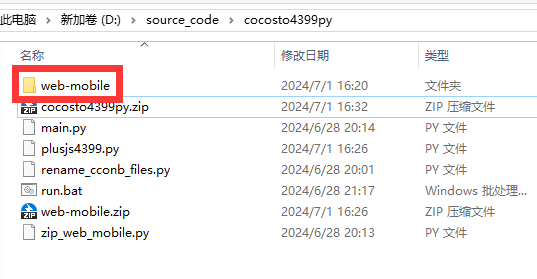
4.然后去调用我写的easysdk
https://github.com/shuishen49/easysdk
就能正常调用这个。
不想用4.自己写也行官网案例
引用/**
- 播放全屏广告
-
@param callback 播放广告时的广告状态回调函数
*/
window.h5api.playAd(callback);
/**
- 此callback回调函数的形式
-
@param obj 广告状态
*/
function callback(obj) {
console.log(“代码:” + obj.code + “,消息:” + obj.message);
if (obj.code === 10000) {
console.log(“开始播放”);
} else if (obj.code === 10001) {
console.log(“播放结束”);
} else {
console.log(“广告异常”);
}
}
分享一下自己做的小游戏

taptap地址
https://www.taptap.cn/app/626564
