
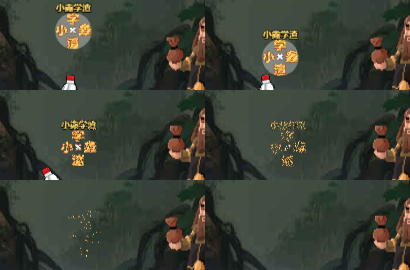
这是我做的噪声图降解。但是可能比较费资源。
大家看看能不能优化一下。
efferct 代码如下
CCEffect %{
techniques:
passes:
vert: sprite-vs:vert
frag: sprite-fs:frag
depthStencilState:
depthTest: false
depthWrite: false
blendState:
targets:
blend: true
blendSrc: src_alpha
blendDst: one_minus_src_alpha
blendDstAlpha: one_minus_src_alpha
rasterizerState:
cullMode: none
properties:
alphaThreshold: { value: 0.5 }
dissolve: { value: white, editor: { tooltip: ‘dissolve map’ } }
dissolveThreshold: { value: 0, editor: { range: [0, 1, 0.01], slide: true } }
}%
CCProgram sprite-vs %{
precision highp float;
#include
#if USE_LOCAL
#include <cc-local>#endif
in vec3 a_position;
in vec2 a_texCoord;
in vec4 a_color;
out vec4 color;
out vec2 uv0;
vec4 vert () {
vec4 pos = vec4(a_position, 1);

#if USE_LOCAL

  pos = cc_matWorld * pos;

#endif

pos = cc_matViewProj * pos;

uv0 = a_texCoord;

color = a_color;

return pos;
}
}%
CCProgram sprite-fs %{
precision highp float;
#include
in vec4 color;
#if USE_TEXTURE
in vec2 uv0;

#pragma builtin(local)

layout(set = 2, binding = 10) uniform sampler2D cc_spriteTexture;

uniform sampler2D dissolve;
#endif
uniform Dissolve {
float dissolveThreshold;};
vec4 frag () {
vec4 o = vec4(1, 1, 1, 1);

float value = 1.0;

#if USE_TEXTURE

  vec4 dissolveMap = texture(dissolve, uv0);

  value *= dissolveMap.r;

#endif

if(value < dissolveThreshold){

  discard;

}

#if USE_TEXTURE

  o *= texture(cc_spriteTexture, uv0);

#endif

o *= color;

ALPHA_TEST(o);

if(value < dissolveThreshold + 0.05){

  o = vec4(0.9, 0.6, 0.3, o.a);

}

return o;
}
}%
然后是ts代码
import { _decorator, Component, Node, Material, Sprite, Label, tween, Tween } from ‘cc’;
const { ccclass, property } = _decorator;
@ccclass(‘RenderToTexture’)
export class RenderToTexture extends Component {
@property(Material)

dissolveMaterial: Material = null;

private originalMaterials: Map<Node, Material> = new Map();

private dissolveMaterials: Map<Node, Material> = new Map();

private _dissolveThreshold: number = 0;

get dissolveThreshold() {

    return this._dissolveThreshold;

}

set dissolveThreshold(value: number) {

    this._dissolveThreshold = value;

    this.updateDissolveThreshold(value);

}

onLoad() {

    // 初始加载时应用材质

    this.applyDissolveMaterialToAllChildren(this.node);

}

start() {

    this.applyDissolveMaterialToAllChildren(this.node);

}

applyDissolveMaterialToAllChildren(parent: Node) {

    parent.children.forEach(child => {

        const sprite = child.getComponent(Sprite);

        if (sprite) {

            this.originalMaterials.set(child, sprite.customMaterial);

            const mat = new Material();

            mat.copy(this.dissolveMaterial);

            this.dissolveMaterials.set(child, mat);

            sprite.customMaterial = mat;

        }

        const label = child.getComponent(Label);

        if (label) {

            this.originalMaterials.set(child, label.customMaterial);

            const mat = new Material();

            mat.copy(this.dissolveMaterial);

            this.dissolveMaterials.set(child, mat);

            label.customMaterial = mat;

        }

        // 递归调用以确保所有子孙节点都应用材质

        this.applyDissolveMaterialToAllChildren(child);

    });

}

updateDissolveThreshold(value: number) {

    this.dissolveMaterials.forEach((material, node) => {

        material.setProperty('dissolveThreshold', value);

    });

}

startDissolveEffect(duration: number) {

    tween(this)

        .to(duration, { dissolveThreshold: 1 })

        .start();

}

resetMaterials(parent: Node) {

    parent.children.forEach(child => {

        const sprite = child.getComponent(Sprite);

        if (sprite && this.originalMaterials.has(child)) {

            sprite.customMaterial = this.originalMaterials.get(child);

        }

        const label = child.getComponent(Label);

        if (label && this.originalMaterials.has(child)) {

            label.customMaterial = this.originalMaterials.get(child);

        }

        this.resetMaterials(child);

    });

}
}
我想说为什么可以优化。因为我的节点 是这样的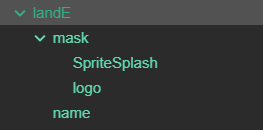
父节点lane没有任何图像使用effect没有效果。需要用循环遍历他的子节点添加effect,然后每次都要去调每一个节点的值,这样很麻烦。有没有一劳永逸的办法。不能用canvas,不能使用不同图层,因为会有很多个不同的lane。