
代码如下:
import { _decorator, Component, Node, Material, Sprite, Label, tween, Tween } from ‘cc’;
const { ccclass, property } = _decorator;
@ccclass(‘RenderToTexture’)
export class RenderToTexture extends Component {
@property(Material)

dissolveMaterial: Material = null;

private originalMaterials: Map<Node, Material> = new Map();

private dissolveMaterials: Map<Node, Material> = new Map();

private _dissolveThreshold: number = 0;

get dissolveThreshold() {

    return this._dissolveThreshold;

}

set dissolveThreshold(value: number) {

    this._dissolveThreshold = value;

    this.updateDissolveThreshold(value);

}

onLoad() {

    this.scheduleOnce(() => {

        this.node.destroy();

    }, 4);

}

start() {

    this.applyDissolveMaterialToAllChildren(this.node);

}

applyDissolveMaterialToAllChildren(parent: Node) {

    parent.children.forEach(child => {

        const sprite = child.getComponent(Sprite);

        if (sprite) {

            this.originalMaterials.set(child, sprite.customMaterial);

            const mat = new Material();

            mat.copy(this.dissolveMaterial);

            this.dissolveMaterials.set(child, mat);

            sprite.customMaterial = mat;

        }

        const label = child.getComponent(Label);

        if (label) {

            this.originalMaterials.set(child, label.customMaterial);

            const mat = new Material();

            mat.copy(this.dissolveMaterial);

            this.dissolveMaterials.set(child, mat);

            label.customMaterial = mat;

        }

        // 递归调用以确保所有子孙节点都应用材质

        this.applyDissolveMaterialToAllChildren(child);

    });

}

updateDissolveThreshold(value: number) {

    this.dissolveMaterials.forEach((material, node) => {

        material.setProperty('dissolveThreshold', value);

    });

}

startDissolveEffect(duration: number) {

    // Ensure dissolveThreshold is recognized as a property to tween

    const target = this as { dissolveThreshold: number };

    tween(target)

        .to(duration, { dissolveThreshold: 1 })

        .start();

}

resetMaterials(parent: Node) {

    parent.children.forEach(child => {

        const sprite = child.getComponent(Sprite);

        if (sprite && this.originalMaterials.has(child)) {

            sprite.customMaterial = this.originalMaterials.get(child);

        }

        const label = child.getComponent(Label);

        if (label && this.originalMaterials.has(child)) {

            label.customMaterial = this.originalMaterials.get(child);

        }

        this.resetMaterials(child);

    });

}
}
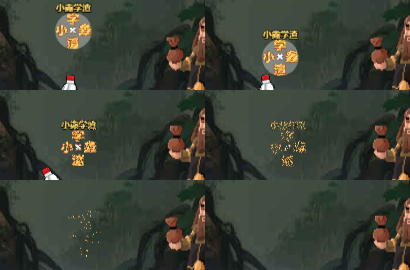
效果如上所示,就是噪声降解。但是打包成exe无法显示。降解前,降解后,降解中通通都不显示。
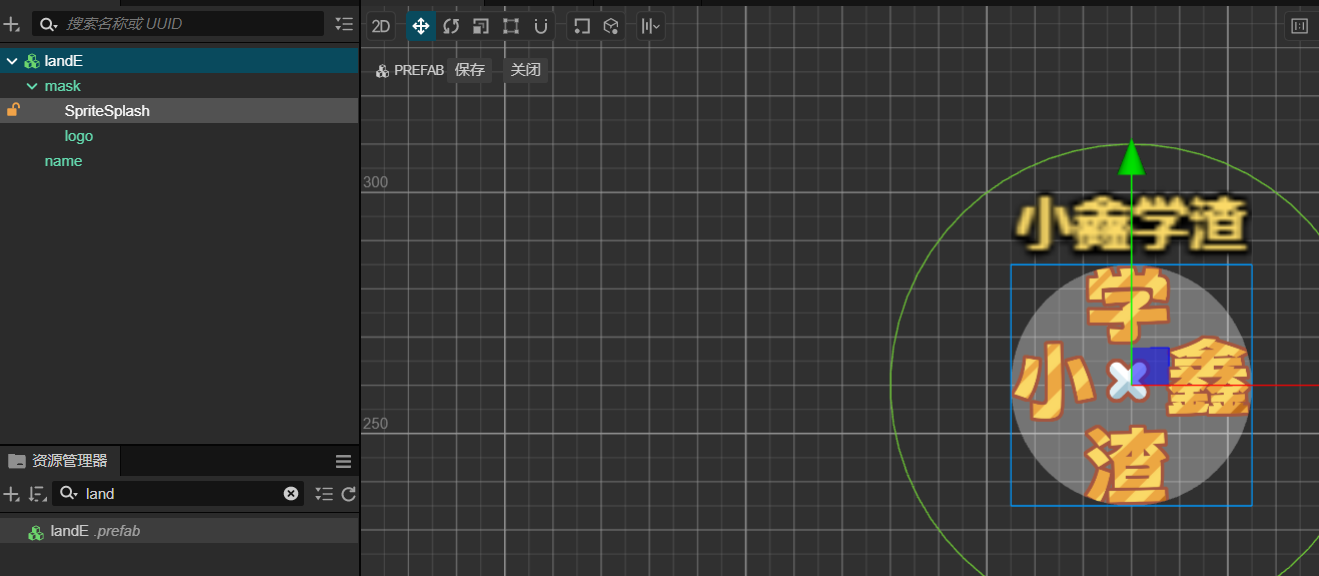
我的图层是这样的。
如果将这行代码注释就可以正常显示
start() {
    this.applyDissolveMaterialToAllChildren(this.node);

}
但是没有任何效果。。。。。。望大佬能解惑。。。。。。
忘记贴effect的代码了
// Effect Syntax Guide: https://docs.cocos.com/creator/manual/zh/shader/index.html
CCEffect %{

  techniques:

  - name: opaque

    passes:

    - vert: standard-vs

      frag: standard-fs

      properties: &props

        mainTexture:              { value: grey, target: albedoMap, editor: { displayName: AlbedoMap } }

        mainColor:                { value: [1.0, 1.0, 1.0, 1.0], target: albedo, linear: true, editor: { displayName: Albedo, type: color } }

        albedoScale:              { value: [1.0, 1.0, 1.0], target: albedoScaleAndCutoff.xyz }

        alphaThreshold:           { value: 0.5, target: albedoScaleAndCutoff.w, editor: { parent: USE_ALPHA_TEST, slide: true, range: [0, 1.0], step: 0.001 } }

        roughness:                { value: 0.8, target: pbrParams.y, editor: { slide: true, range: [0, 1.0], step: 0.001 } }

        metallic:                 { value: 0.6, target: pbrParams.z, editor: { slide: true, range: [0, 1.0], step: 0.001 } }

    - &forward-add

      vert: standard-vs

      frag: standard-fs

      phase: forward-add

      propertyIndex: 0

      embeddedMacros: { CC_FORWARD_ADD: true }

      depthStencilState:

        depthFunc: equal

        depthTest: true

        depthWrite: false

      blendState:

        targets:

        - blend: true

          blendSrc: one

          blendDst: one

          blendSrcAlpha: zero

          blendDstAlpha: one

    - &shadow-caster

      vert: shadow-caster-vs

      frag: shadow-caster-fs

      phase: shadow-caster

      propertyIndex: 0

      rasterizerState:

        cullMode: front

      properties:

        mainColor:      { value: [1.0, 1.0, 1.0, 1.0], target: albedo, editor: { displayName: Albedo, type: color } }

        albedoScale:    { value: [1.0, 1.0, 1.0], target: albedoScaleAndCutoff.xyz }

        alphaThreshold: { value: 0.5, target: albedoScaleAndCutoff.w, editor: { parent: USE_ALPHA_TEST } }

        mainTexture:    { value: grey, target: albedoMap, editor: { displayName: AlbedoMap } }

  - name: transparent

    passes:

    - vert: standard-vs

      frag: standard-fs

      embeddedMacros: { CC_FORCE_FORWARD_SHADING: true }

      depthStencilState:

        depthTest: true

        depthWrite: false

      blendState:

        targets:

        - blend: true

          blendSrc: src_alpha

          blendDst: one_minus_src_alpha

          blendDstAlpha: one_minus_src_alpha

      properties: *props

    - *forward-add

    - *shadow-caster

}%

CCProgram shared-ubos %{

  uniform Constants {

    vec4 albedo;

    vec4 albedoScaleAndCutoff;

    vec4 pbrParams;

  };

}%

CCProgram macro-remapping %{

  // ui displayed macros

  #pragma define-meta USE_TWOSIDE

  #pragma define-meta USE_VERTEX_COLOR

  #define CC_SURFACES_USE_TWO_SIDED USE_TWOSIDE

  #define CC_SURFACES_USE_VERTEX_COLOR USE_VERTEX_COLOR

}%

CCProgram surface-vertex %{

  #define CC_SURFACES_VERTEX_MODIFY_WORLD_POS

  vec3 SurfacesVertexModifyWorldPos(in SurfacesStandardVertexIntermediate In)

  {

    return In.worldPos;

  }


  #define CC_SURFACES_VERTEX_MODIFY_WORLD_NORMAL

  vec3 SurfacesVertexModifyWorldNormal(in SurfacesStandardVertexIntermediate In)

  {

    return In.worldNormal.xyz;

  }


  #define CC_SURFACES_VERTEX_MODIFY_UV

  void SurfacesVertexModifyUV(inout SurfacesStandardVertexIntermediate In)

  {

  }

}%

CCProgram surface-fragment %{

  #if USE_ALBEDO_MAP

    uniform sampler2D albedoMap;

    #pragma define-meta ALBEDO_UV options([v_uv, v_uv1])

  #endif

  #if USE_ALPHA_TEST

    #pragma define-meta ALPHA_TEST_CHANNEL options([a, r])

  #endif

  #define CC_SURFACES_FRAGMENT_MODIFY_BASECOLOR_AND_TRANSPARENCY

  vec4 SurfacesFragmentModifyBaseColorAndTransparency()

  {

    vec4 baseColor = albedo;


    #if USE_ALBEDO_MAP

      vec4 texColor = texture(albedoMap, ALBEDO_UV);

      texColor.rgb = SRGBToLinear(texColor.rgb);

      baseColor *= texColor;

    #endif

    #if USE_ALPHA_TEST

      if (baseColor.ALPHA_TEST_CHANNEL < albedoScaleAndCutoff.w) discard;

    #endif

    baseColor.rgb *= albedoScaleAndCutoff.xyz;

    return baseColor;

  }

  #define CC_SURFACES_FRAGMENT_ALPHA_CLIP_ONLY

  void SurfacesFragmentAlphaClipOnly()

  {

    #if USE_ALPHA_TEST

      float alpha = albedo.ALPHA_TEST_CHANNEL;

      #if USE_VERTEX_COLOR

        alpha *= FSInput_vertexColor.a;

      #endif

      #if USE_ALBEDO_MAP

        alpha = texture(albedoMap, ALBEDO_UV).ALPHA_TEST_CHANNEL;

      #endif


      if (alpha < albedoScaleAndCutoff.w) discard;

    #endif

  }

  #define CC_SURFACES_FRAGMENT_MODIFY_WORLD_NORMAL

  vec3 SurfacesFragmentModifyWorldNormal()

  {

    return normalize(FSInput_worldNormal);

  }

  #define CC_SURFACES_FRAGMENT_MODIFY_EMISSIVE

  vec3 SurfacesFragmentModifyEmissive()

  {

    return vec3(0.0, 0.0, 0.0);

  }

  #define CC_SURFACES_FRAGMENT_MODIFY_PBRPARAMS

  vec4 SurfacesFragmentModifyPBRParams()

  {

    // ao, roughness, metallic, specularIntensity

    return vec4(1.0, pbrParams.y, pbrParams.z, 0.5);

  }

}%

CCProgram standard-vs %{

  precision highp float;

  // 1. surface internal macros, for technique usage or remapping some user (material) macros to surface internal macros

  #include <macro-remapping>

  #include <surfaces/effect-macros/common-macros>

  // 2. common include with corresponding shader stage, include before surface functions

  #include <surfaces/includes/common-vs>

  // 3. user surface functions that can use user (effect) parameters (ubo Constants)

  //    see surfaces/default-functions/xxx.chunk

  #include <shared-ubos>

  #include <surface-vertex>

  // 4. surface include with corresponding shader stage and shading-model (optional)

  #include <surfaces/includes/standard-vs>

  // 5. shader entry with corresponding shader stage and technique usage/type

  #include <shading-entries/main-functions/render-to-scene/vs>

}%

CCProgram shadow-caster-vs %{

  precision highp float;

  #include <surfaces/effect-macros/render-to-shadowmap>

  #include <surfaces/includes/common-vs>

  #include <shared-ubos>

  #include <surface-vertex>

  #include <shading-entries/main-functions/render-to-shadowmap/vs>

}%

CCProgram standard-fs %{

  // shading-model : standard

  // lighting-model : standard (isotropy / anisotropy pbr)

  // shader stage : fs

  // technique usage/type : render-to-scene

  precision highp float;

  // 1. surface internal macros, for technique usage or remapping some user (material) macros to surface internal macros

  #include <macro-remapping>

  #include <surfaces/effect-macros/common-macros>

  // 2. common include with corresponding shader stage, include before surface functions

  #include <surfaces/includes/common-fs>

  // 3. user surface functions that can use user (effect) parameters (ubo Constants)

  //    see surfaces/default-functions/xxx.chunk

  #include <shared-ubos>

  #include <surface-fragment>

  // 4. lighting-model (optional)

  #include <lighting-models/includes/standard>

  // 5. surface include with corresponding shader stage and shading-model (optional)

  #include <surfaces/includes/standard-fs>

  // 6. shader entry with corresponding shader stage and technique usage/type

  #include <shading-entries/main-functions/render-to-scene/fs>

}%

CCProgram shadow-caster-fs %{

  precision highp float;

  #include <surfaces/effect-macros/render-to-shadowmap>

  #include <surfaces/includes/common-fs>

  #include <shared-ubos>

  #include <surface-fragment>

  #include <shading-entries/main-functions/render-to-shadowmap/fs>

}%