首先这个是TableView.ts脚本组件的代码,使用的时候创建一个ts脚本,直接把代码复制进去。
import { _decorator, CCFloat, CCInteger, Component, instantiate, Node, Prefab, ScrollView, Size, UITransform, Vec2, Vec3 } from ‘cc’;
import { TableViewCell } from ‘./TableViewCell’;
const { ccclass, property } = _decorator;
export let TableViewDirection = { //方向
none : 0,

vertical : 1,

horizontal : 2
};
export let TableViewFuncType = {
cellSize : "_cellSizeAtIndex",      //获取cell size,返回width, height

cellNum : "_numberOfCells",         //获取cell数量

cellLoad : "_loadCellAtIndex",      //加载cell,必须返回一个cell

cellUnload : "_unloadCellAtIndex",  //卸载一个cell时触发

eventListener : "_eventListener"    //滚动事件
};
export let TableViewFillOrder = {
topToBottom : 1,                            //达到顶部

bottomToTop : 2,                            //初始化在底部

leftToRight : 3,

rightToLeft : 4
};
@ccclass(‘TableView’)
export class TableView extends Component {
@property(Node)

innter:Node | null = null;

@property(ScrollView)

scrollView:ScrollView | null = null;

@property(Node)

cloneCell:Node | null = null;

public _isUsedCellsDirty:boolean = false;

public _accountNumber:number = 0;   //所有的item总数量

public _cellsPos:number[] = [1];        //记录每个cell的位置

public _cellsUsed:Node[] = [new Node()];        //记录正在使用的cell

public _cellsIndex:any = [];        //记录正在使用的cell的index

public _cellsFreed:Node[] = [];     //记录当前未使用的cell

public direction:number = TableViewDirection.none;

public fillOrder:number = TableViewFillOrder.topToBottom;

public _size:Size = new Size(0,0);              //当前tableVie的大小

public _innerSize:Size = new Size(0,0);         //当前content的大小

public _extraFunction:{[key:string]:Function} = {};     //外部函数

public _myDirection:number = 0;

onLoad(){

    this.cloneCell!.active = false;

    this.setDirection();            //设置方向

}

init(size:Size){

    this.initData(size);

    this.node!.getComponent(UITransform)!.contentSize = size.clone();

    this._updateCellsPosition();            //更新cell位置

    this._updateContentSize();             //更新content的大小

}


//滚动

scrolling(scrollView:ScrollView,eventType:any){

    if(eventType != ScrollView.EventType.SCROLL_TO_BOTTOM && eventType != ScrollView.EventType.SCROLL_TO_TOP

        && eventType != ScrollView.EventType.SCROLL_TO_LEFT && eventType != ScrollView.EventType.SCROLL_TO_RIGHT){

            this._scrollViewDidScroll();

    }

}

initData(size:Size){

    this._accountNumber = 0;                       //所有子控件数量

    this._size= (size!=undefined) ? size.clone() : new Size(0,0); //当前view的大小

    this._innerSize = this._size.clone();

}

registerFunc(type:string,func:Function){

    this._extraFunction[type] = func;

}

cellAtIndex(index:number):[Node,number] | undefined{

    if(this._cellsIndex[index]){

        for(let k:number = 1;k < this._cellsUsed.length;k++){

            let v = this._cellsUsed[k].getComponent(TableViewCell)!;

            if(v.getIndex() == index){

                return [this._cellsUsed[k],k];

            }

        }

    }

    return undefined;

}

//刷新数据,: 重新加载

reloadData(){

    this._correctFillOrder();

    this._accountNumber = this._numberOfCells();            //所有的item总数量

    this.direction = TableViewDirection.none;


    let cell = this._cellsUsed.splice(1,1)[0];

    while(cell){

        let tableViewCell = cell.getComponent(TableViewCell)!;

        this._unloadCellAtIndex(tableViewCell!.getIndex());

        cell.active = false;

        this._cellsFreed.push(cell);

        tableViewCell!.reset();

        cell = this._cellsUsed.splice(1,1)[0];

    }

    this._cellsUsed = [new Node()];

    this._cellsIndex = [];


    this._updateCellsPosition();                 //得到所有控件的加起来的宽度或者高度

    this._updateContentSize();                   //得到container总体大小尺寸

    if(this._accountNumber > 0){                //如果控件数量大于0

        this._scrollViewDidScroll();

    }

}

//在尽量不改变位置的情况下重新加载

reloadDataInPos(){

    this._correctFillOrder();

    this._accountNumber = this._numberOfCells();               //得到数量多少

    let baseSize = new Size(this._size.width,this._size.height);

    let position = this.innter!.position;

    let x = position.x;

    let y = position.y;

    let beforeSize = new Size(this._innerSize.width,this._innerSize.height);

    let cell = this._cellsUsed.splice(1,1)[0];

    while(cell){

        let tableViewCell = cell.getComponent(TableViewCell)!;

        this._unloadCellAtIndex(tableViewCell!.getIndex());

        cell.active = false;

        this._cellsFreed.push(cell);

        tableViewCell!.reset();

        cell = this._cellsUsed.splice(1,1)[0];

    }

    this._cellsUsed = [new Node()];

    this._cellsIndex = [];


    this._updateCellsPosition();

    this._updateContentSize();


    let afterSize = new Size(this._innerSize.width,this._innerSize.height);

    if(this.fillOrder == TableViewFillOrder.topToBottom){

        y = Math.max(Math.min(0, beforeSize.height - afterSize.height + y), baseSize.height - afterSize.height);

    }else if(this.fillOrder == TableViewFillOrder.bottomToTop){

        y = Math.max(Math.min(0, y), baseSize.height - afterSize.height);

    }

    if(this.fillOrder == TableViewFillOrder.rightToLeft){

        x = Math.max(Math.min(0, beforeSize.width - afterSize.width + x), baseSize.width - afterSize.width);

    }else if(this.fillOrder == TableViewFillOrder.leftToRight){

        x = Math.max(Math.min(0, x), baseSize.width - afterSize.width);

    }

    this.innter!.setPosition(new Vec3(x,y,0));


    if(this._numberOfCells() > 0){

        this._scrollViewDidScroll()

    }

}


dequeueCell():Node{

    return this._cellsFreed.splice(0,1)[0]!;

}

//设置填充方向

setFillOrder(order:number){

    if(this.fillOrder != order){

        this.fillOrder = order;

        if(this._cellsUsed.length > 1){

            this.reloadData();

        }

    }

}

updateCellAtIndex(index:number){

    if(index <=0){

        return;

    }

    let cellsCount = this._accountNumber;

    if(cellsCount == 0 || index > cellsCount){

        return;

    }

    let config = this.cellAtIndex(index)!;

    let cell:Node;

    if(config){

        cell = config[0];

        let newIndex:number = config[1];

        if(cell){

            this._moveCellOutOfSight(cell, newIndex);

        }

    }

    cell = this._loadCellAtIndex(index);

    cell.active = true;

    this._setIndexForCell(index, cell);

    this._addCellIfNecessary(cell);

}

//在指定位置插入

insertCellAtIndex(index:number){

    if(index <= 0){

        return;

    }

    let cellsCount:number = this._numberOfCells();

    if(cellsCount == 0 || index > cellsCount){

        return;

    }

    let config = this.cellAtIndex(index)!;

    let cell:Node;

    if(config){

        cell = config[0];

        let newIndex:number = config[1];

        for(let i:number = newIndex;i < this._cellsUsed.length;i++){

            cell = this._cellsUsed[i];

            let tableViewCell = cell.getComponent(TableViewCell)!;

            this._setIndexForCell(tableViewCell!.getIndex() + 1,cell);

            this._cellsIndex[tableViewCell!.getIndex()] = true;

        }

    }

    cell = this._loadCellAtIndex(index);

    cell.active = true;

    this._setIndexForCell(index,cell);

    this._addCellIfNecessary(cell);

    this._updateCellsPosition();

    this._updateContentSize();

}

//移除index位置的cell

removeCellAtIndex(index:number){

    if(index <= 0){

        return;

    }

    let cellsCount = this._numberOfCells();

    if(cellsCount == 0 || index > cellsCount){

        return;

    }

    let config = this.cellAtIndex(index)!;

    let cell:Node;

    if(config){

        cell = config[0];

        let newIndex:number = config[1];

        this._moveCellOutOfSight(cell, newIndex);

        this._updateCellsPosition();

        let cellSize = this._cellsUsed.length;

        for(let i = cellSize - 1;i >= newIndex;i--){

            cell = this._cellsUsed[i];

            let tableViewCell = cell.getComponent(TableViewCell)!;

            let index = tableViewCell!.getIndex();

            if(i == cellSize - 1){

                this._cellsIndex[index] = null;

            }

            this._setIndexForCell(index - 1,cell);

            this._cellsIndex[tableViewCell!.getIndex()] = true;

        }

    }

}

_moveCellOutOfSight(cell:Node,index:number){

    this._cellsFreed.push(this._cellsUsed.splice(index,1)[0]);

    let tableViewCell = cell.getComponent(TableViewCell)!;

    let newIndex = tableViewCell!.getIndex();

    this._cellsIndex[newIndex] = null;

    this._isUsedCellsDirty = true;

    this._unloadCellAtIndex(newIndex);

    tableViewCell!.reset();

    cell.active = false;

}

_setIndexForCell(index:number, cell:Node){

    cell.getComponent(UITransform)!.anchorPoint = new Vec2(0,0);

    cell.setPosition(this._offsetFromIndex(index));

    cell.getComponent(TableViewCell)!.setIndex(index);

}

_offsetFromIndex(index:number){

    let offset;

    if(this.direction == TableViewDirection.horizontal){

        offset = new Vec3(this._cellsPos[index],0,0);

    }else{

        offset = new Vec3(0,this._cellsPos[index],0);

    }

    let cellSize = this._cellSizeAtIndex(index);

    if(this.fillOrder == TableViewFillOrder.topToBottom){

        offset.y = this._innerSize.height - offset.y - cellSize.height;

    }else if(this.fillOrder == TableViewFillOrder.rightToLeft){

        offset.x = this._innerSize.width - offset.x - cellSize.width;

    }


    return offset;

}

_addCellIfNecessary(cell:Node){

    cell.active = true;

    if(cell.parent != this.innter){

        this.innter!.addChild(cell);

    }

    this._cellsUsed.push(cell);

    this._cellsIndex[cell.getComponent(TableViewCell)!.getIndex()] = true;

    this._isUsedCellsDirty = true;

}

//得到正确的四个方向

_correctFillOrder(){

    let dir = this._myDirection;

    this.direction = dir;

    this.fillOrder = ((this.fillOrder - 1) % 2 + 1) + 2 * (dir - 1);    //四个方向

}

//得到所有控件的加起来的宽度或者高度

_updateCellsPosition(){

    let cellsCount = this._accountNumber;                    //得到控件的数量

    this._cellsPos = [1];

    if(cellsCount > 0){

        let curPos = 0;

        let cellSize:Size;

        let dir = this._myDirection;

        for(let i = 1;i <= cellsCount;i++){

            this._cellsPos.push(curPos);

            cellSize = this._cellSizeAtIndex(i);

            if(dir == TableViewDirection.horizontal){

                curPos = curPos + cellSize.width;

            }else if(dir == TableViewDirection.vertical){

                curPos = curPos + cellSize.height;

            }

        }

        this._cellsPos.push(curPos);            //多添加一个可以用来获取最后一个cell的右侧或者底部

    }

}

//更新content的大小

_updateContentSize(){

    let baseSize = this._size;

    let size = this._innerSize;

    let cellsCount = this._accountNumber;

    let dir = this._myDirection;;

    if(cellsCount > 0){

        let maxPos = this._cellsPos[this._cellsPos.length - 1];

        if(dir == TableViewDirection.horizontal){

            size.width = Math.max(baseSize.width, maxPos);

        }else if(dir == TableViewDirection.vertical){

            size.height = Math.max(baseSize.height, maxPos);

        }

    }


     this.innter!.getComponent(UITransform)!.setContentSize(size);

     this._innerSize = size;

     this._setInnerContainerInitPos();

}

//设置到达底部或者到达顶部或者到达左边或者到达右部

_setInnerContainerInitPos(){

    let dir = this._myDirection;;

    if(this.direction != dir){

        if(dir == TableViewDirection.horizontal){

            if(this.fillOrder == TableViewFillOrder.leftToRight){

                this.innter!.setPosition(new Vec3(0,0,0));

            }else if(this.fillOrder == TableViewFillOrder.rightToLeft){

                this.innter!.setPosition(new Vec3(this._getMinContainerOffset().x,0,0));

            }

        }else if(dir == TableViewDirection.vertical){

            if(this.fillOrder == TableViewFillOrder.topToBottom){

                this.innter!.setPosition(new Vec3(0,this._getMinContainerOffset().y,0));

            }else if(this.fillOrder == TableViewFillOrder.bottomToTop){

                this.innter!.setPosition(new Vec3(0,0,0));

            }

        }

        this.direction = dir;

    }

}

//不同锚点距离底部的距离也不一样

_getMinContainerOffset(){

    let con = this.innter!;

    let ap = con.getComponent(UITransform)!.anchorPoint;

    let conSize = this._innerSize;

    let baseSize = this._size;

    return new Vec2(baseSize.width - (1 - ap.x) * conSize.width, baseSize.height - (1 - ap.y) * conSize.height)

}

_cellSizeAtIndex(index:number){

    let func = this._extraFunction[TableViewFuncType.cellSize];

    if(func){

        return func(index);

    }

    return new Size(0,0);

}

_numberOfCells():number{

    let func = this._extraFunction[TableViewFuncType.cellNum];

    if(func){

        return func();

    }

    return 0;

}

_loadCellAtIndex(index:number){

    let func = this._extraFunction[TableViewFuncType.cellLoad];

    if(func){

        return func(this,index);

    }

    let cell = this.dequeueCell();

    if(!cell){

        return instantiate(this.cloneCell!);

    }

    return cell;

}

createCell():Node{

    return instantiate(this.cloneCell!);

}

_unloadCellAtIndex(index:number){

    let func = this._extraFunction[TableViewFuncType.cellUnload];

    if(func){

        return func(this,index);

    }

}

//滚动回调

_scrollViewDidScroll(){

    let cellsCount = this._accountNumber;

    if(cellsCount <= 0){

        return;

    }

    let baseSize = this._size;

    if(this._isUsedCellsDirty){

        this._isUsedCellsDirty = false;

        this._cellsUsed.splice(0,1);

        this._cellsUsed.sort((a, b) => {        //按照从小到大的顺序排序

            if(a && b){

                return a.getComponent(TableViewCell)!.getIndex() - b.getComponent(TableViewCell)!.getIndex();

            }else{

                return -1;

            }


        });

        this._cellsUsed.unshift(new Node());

    }

    let startIdx = 0;

    let endIdx = 0;

    let idx = 0;

    let maxIdx = 0;

    let offset = this.innter!.position.clone();

    offset = new Vec3(-offset.x,-offset.y,0);

    maxIdx = Math.max(cellsCount, 1);

    if(this.fillOrder == TableViewFillOrder.topToBottom){

        offset.y = offset.y + baseSize.height;

    }else if(this.fillOrder == TableViewFillOrder.rightToLeft){

        offset.x = offset.x + baseSize.width;

    }

    startIdx = this._indexFromOffset(offset.clone()) || maxIdx;

    if(this.fillOrder == TableViewFillOrder.topToBottom){

        offset.y = offset.y - baseSize.height;

    }else if(this.fillOrder == TableViewFillOrder.bottomToTop){

        offset.y = offset.y + baseSize.height;

    }


    if(this.fillOrder == TableViewFillOrder.leftToRight){

        offset.x = offset.x + baseSize.width;

    }else if(this.fillOrder == TableViewFillOrder.rightToLeft){

        offset.x = offset.x - baseSize.width;

    }

    endIdx = this._indexFromOffset(offset.clone()) || maxIdx;

    if(this._cellsUsed.length > 1){ //移除顶部节点

        let cell = this._cellsUsed[1];

        idx = cell.getComponent(TableViewCell)!.getIndex();

        while(idx < startIdx){

            this._moveCellOutOfSight(cell, 1);

            if(this._cellsUsed.length > 1){

                cell = this._cellsUsed[1];

                idx = cell.getComponent(TableViewCell)!.getIndex();

            }else{

                break;

            }

        }

    }


    if(this._cellsUsed.length > 1){ //移除底部节点

        let cell = this._cellsUsed[this._cellsUsed.length - 1];

        idx = cell.getComponent(TableViewCell)!.getIndex();

        while(idx <= maxIdx &&idx > endIdx){

            this._moveCellOutOfSight(cell, this._cellsUsed.length - 1);

            if(this._cellsUsed.length > 1){

                cell = this._cellsUsed[this._cellsUsed.length - 1];

                idx = cell.getComponent(TableViewCell)!.getIndex();

            }else{

                break;

            }

        }

    }

    for(let i:number = startIdx;i <= endIdx;i++){  //更新节点

        if(!this._cellsIndex[i]){

            this.updateCellAtIndex(i);

        }

    }


}

_indexFromOffset(offset:Vec3):number | undefined{

    let size:Size = this._innerSize;

    if(this.fillOrder == TableViewFillOrder.topToBottom){

        offset.y = size.height - offset.y;

    }else if(this.fillOrder == TableViewFillOrder.rightToLeft){

        offset.x = size.width - offset.x;

    }

    let search;

    if(this.direction == TableViewDirection.horizontal){

        search = offset.x;

    }else{

        search = offset.y;

    }

    let low = 1;

    let high = this._accountNumber;

    while(high >= low){

        let index = Math.floor(low + (high - low) / 2);

        let cellSatrt = this._cellsPos[index];

        let cellEnd = this._cellsPos[index + 1];

        if(search >= cellSatrt && search <= cellEnd){

            return index;

        }else if(search < cellSatrt){

            high = index - 1;

        }else{

            low = index + 1;

        }

    }

    if(low <= 1){

        return 1;

    }

}

//设置方向

setDirection(){

    if(this.scrollView!.horizontal){            //如果是横向滚动

        this._myDirection = TableViewDirection.horizontal;

    }else if(this.scrollView!.vertical){        //如果是纵向滚动

        this._myDirection = TableViewDirection.vertical;

    }

}

jumpToLeft(){

    this.scrollView!.scrollToLeft();

}
}

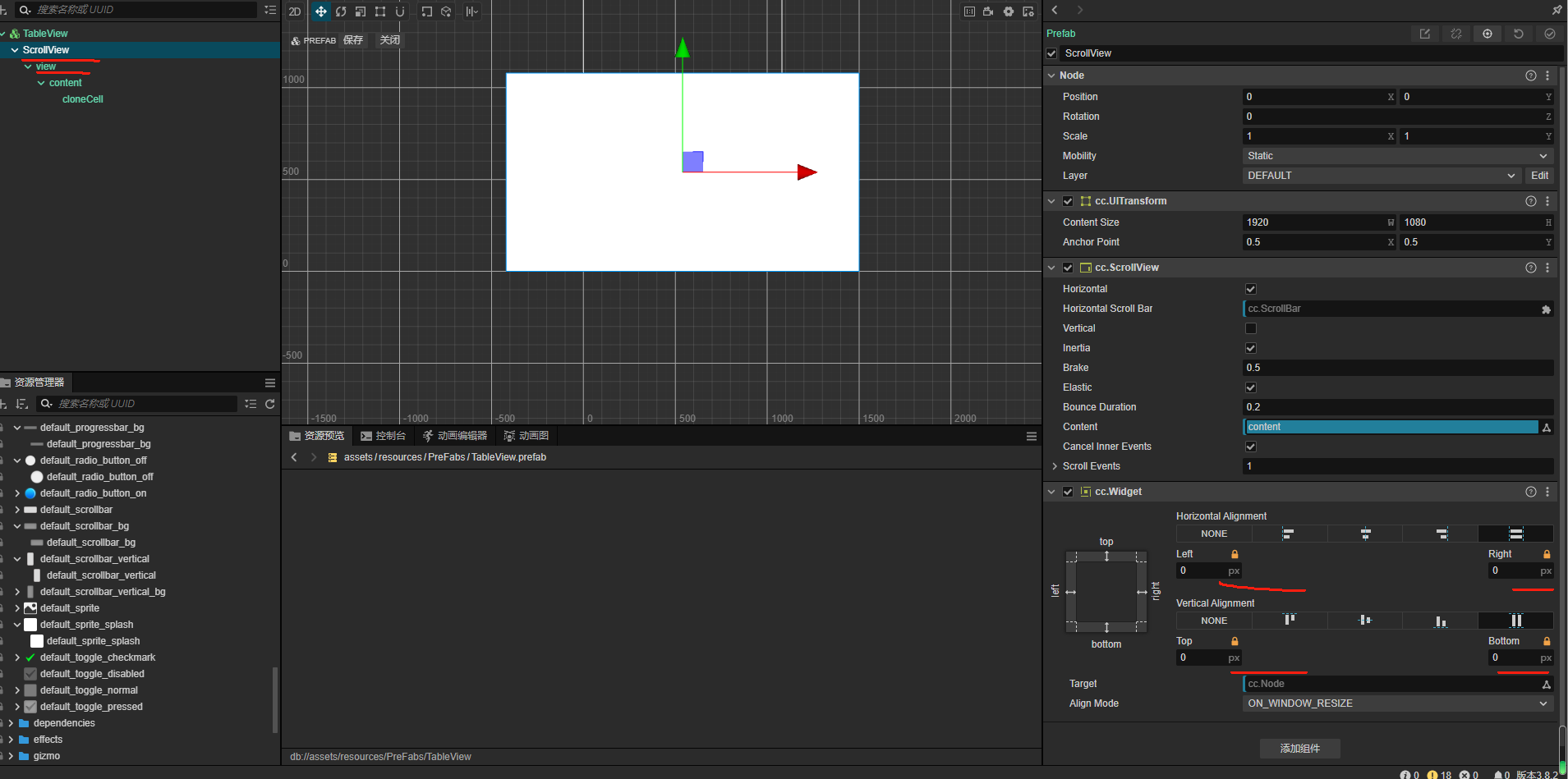
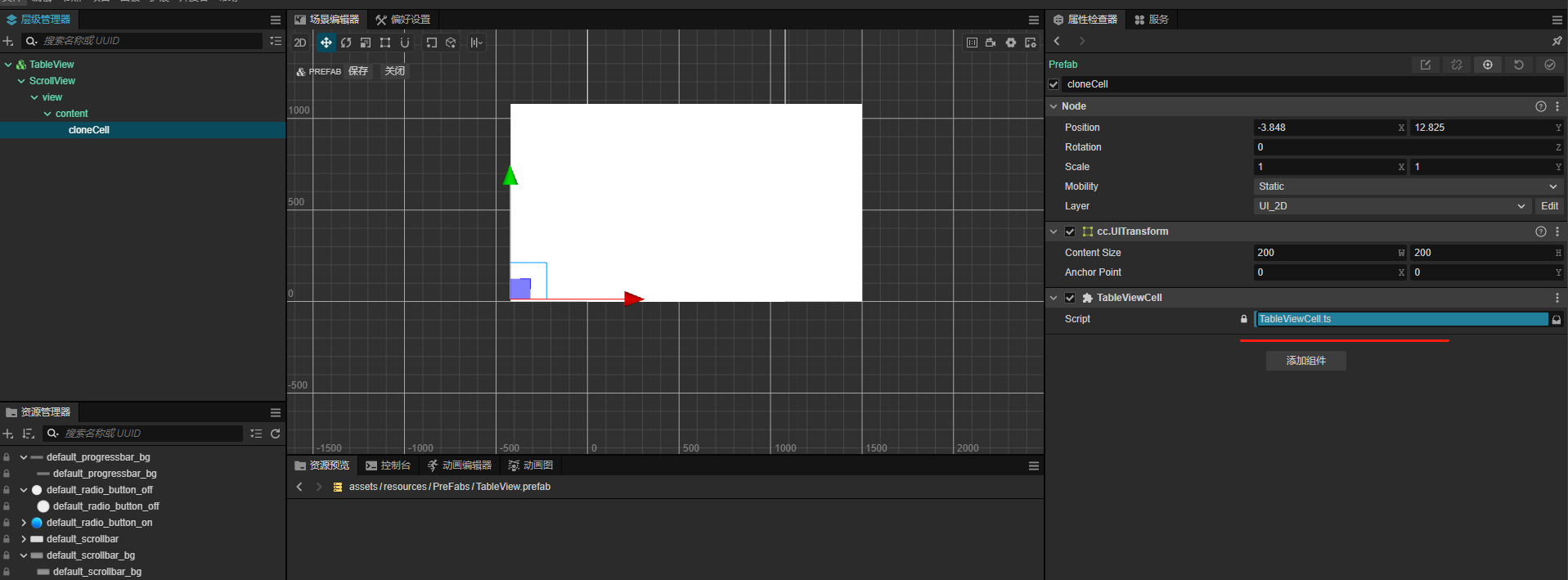
 )之前一直做cocos2d-xlua。最近学习了cocosCreator发现还是有许多坑要踩得。相信很多小伙伴遇到过使用ScrollView的时候,假如items的数量超过很多的时候,会卡顿,性能很差的问题。之前是使用TableView可以只创建当前屏幕显示的那些item,滑动的时候,会动态复用item。极大的节省性能。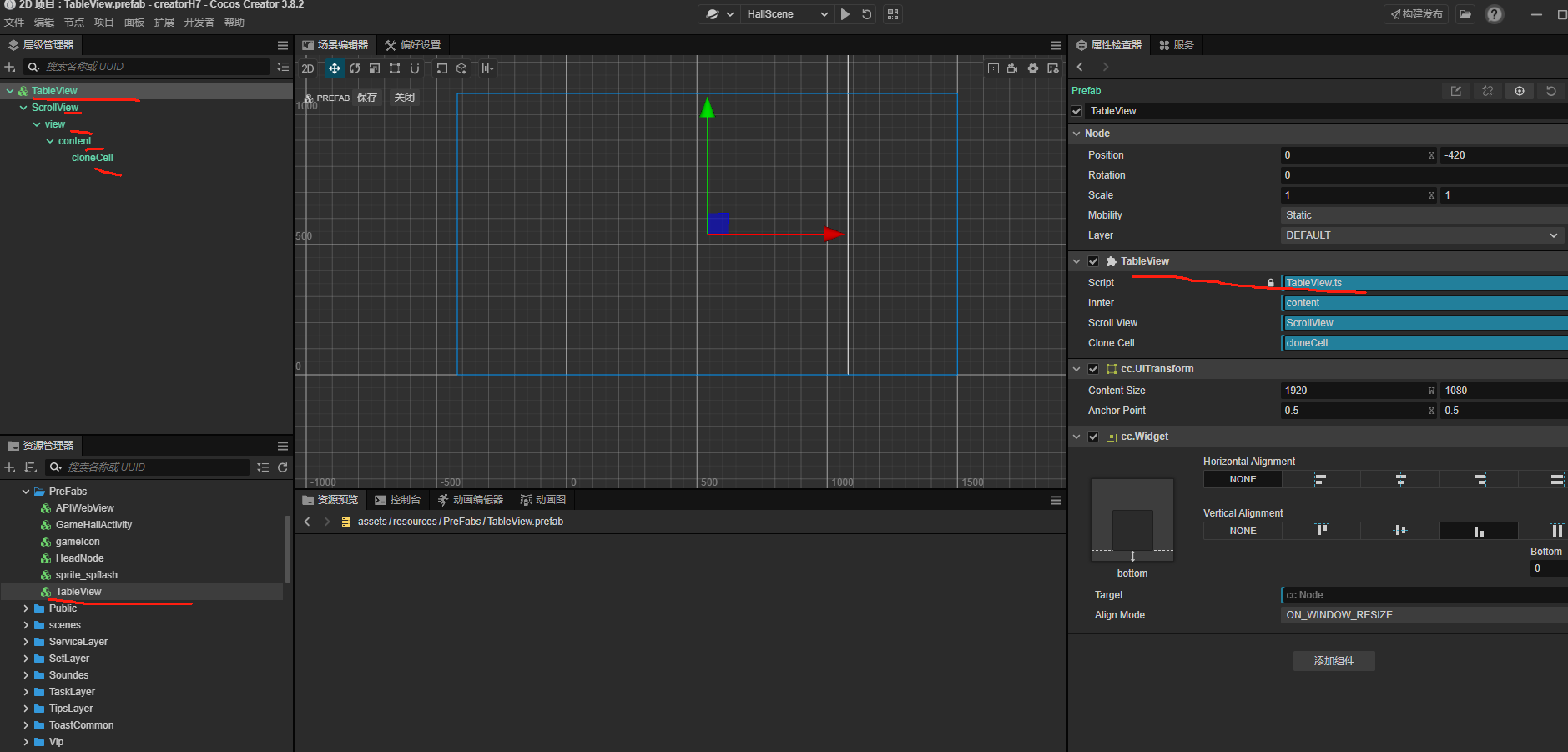
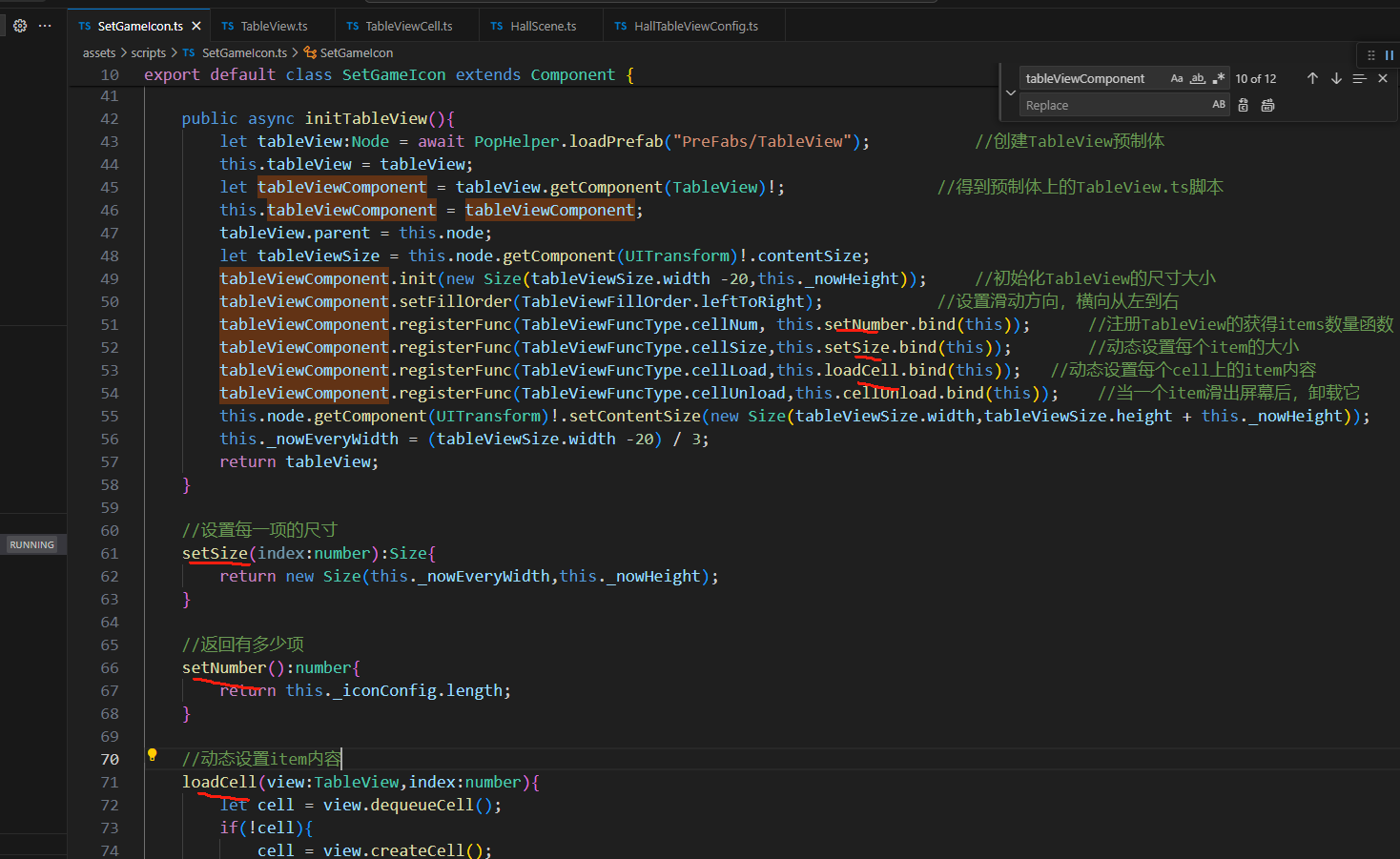


 用别人的还不如自己写一个又不难