安装编译依赖这一步
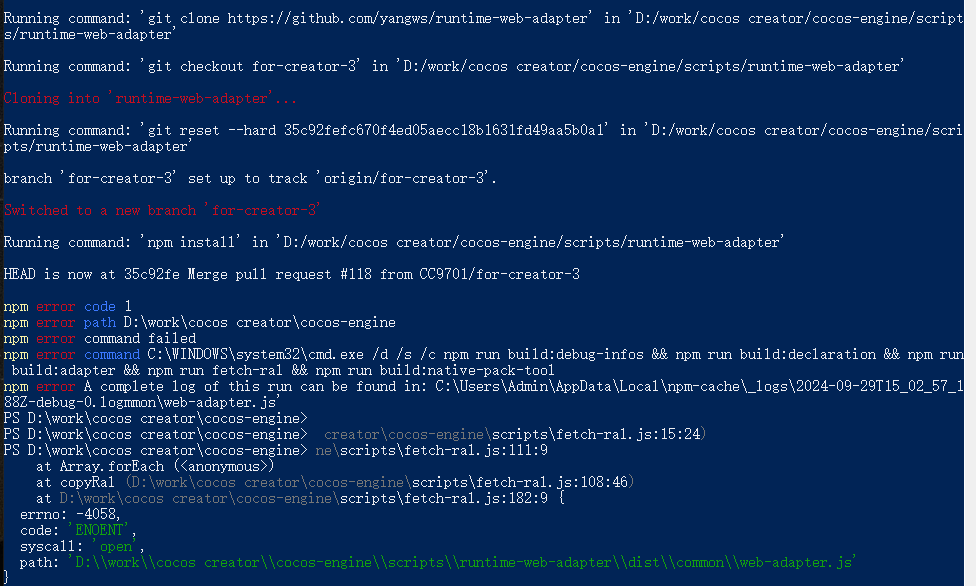
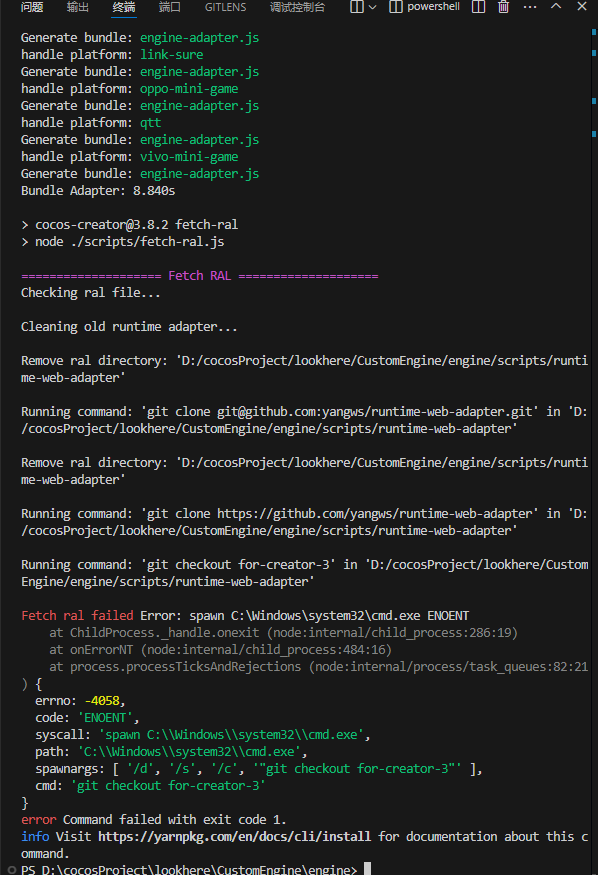
执行npm install之后,下图卡住了,要如何搞?

试了试了很多次了,每次都有奇怪的问题,这是最近一次的log
$ npm install
cocos-creator@3.8.5 postinstall
npm run build:debug-infos && npm run build:declaration && npm run build:adapter && npm run fetch-ral && npm run build:native-pack-tool
cocos-creator@3.8.5 build:debug-infos
node ./scripts/build-debug-infos
==================== Build debug infos ====================
cocos-creator@3.8.5 build:declaration
npm run build:const && node ./scripts/build-declarations
cocos-creator@3.8.5 build:const
node ./scripts/build-const.js
==================== Build const ====================
Generate consts.d.ts: D:\work\cocos creator\cocos-engine@types\consts.d.ts
==================== Build declarations ====================
Typescript version: 4.9.5
With index: true
With exports: false
With editor exports: true
Unbundled will write to: D:/work/cocos creator/cocos-engine/__dts_before_bundle
Generating…
It’s 2024/9/28 23 14, we’re still doing the hack for spine-core.d.ts
Bundling…
DeprecationWarning: ‘’ has been deprecated since v4.0.0. Use the appropriate method on ‘ts.factory’ or the ‘factory’ supplied by your transformation context instead.
Failed to resolve type import("…/foundation/node-shell").NodeInputPath, There is no symbol info.
DeprecationWarning: ‘createIndexSignature’ has been deprecated since v4.8.0. Decorators are no longer supported for this function. Callers should switch to an overload that does not accept a ‘decorators’ parameter.
Don’t know how to handle type #${string}(Syntax Kind: TemplateLiteralType)
Failed to resolve type import(‘pal/audio/type’).AudioLoadOptions, There is no symbol info.
Failed to resolve type import(‘pal/audio/type’).AudioLoadOptions, There is no symbol info.
Failed to resolve type import(‘pal/audio/type’).AudioLoadOptions, There is no symbol info.
Failed to resolve type import(‘pal/audio/type’).AudioType, There is no symbol info.
Failed to resolve type import(‘pal/audio/type’).AudioState, There is no symbol info.
Failed to resolve type import(‘pal/audio/type’).AudioPCMDataView, There is no symbol info.
Don’t know how to handle type ${x}(Syntax Kind: TemplateLiteralType)
Don’t know how to handle type ${x}(Syntax Kind: TemplateLiteralType)
Failed to resolve type import(‘pal/input/input-source’).InputSourceButton, There is no symbol info.
Failed to resolve type import(‘pal/input/input-source’).InputSourceDpad, There is no symbol info.
Failed to resolve type import(‘pal/input/input-source’).InputSourceStick, There is no symbol info.
Failed to resolve type import(‘pal/input/input-source’).InputSourcePosition, There is no symbol info.
Failed to resolve type import(‘pal/input/input-source’).InputSourceOrientation, There is no symbol info.
Don’t know how to handle element enable of interface
Don’t know how to handle element enable of interface
cocos-creator@3.8.5 build:adapter
node ./scripts/build-adapter.js
==================== Build adapter ====================
Bundling native adapter
Generate bundle: engine-adapter.js
Browserslist: caniuse-lite is outdated. Please run:
npx update-browserslist-db@latest
Why you should do it regularly: https://github.com/browserslist/update-db#readme
Generate bundle: web-adapter.js
Bundling minigame platform adapters, including: alipay,baidu,bytedance,taobao,taobao-mini-game,wechat,xiaomi
handle platform: alipay
Generate bundle: engine-adapter.js
Generate bundle: web-adapter.js
handle platform: baidu
Generate bundle: engine-adapter.js
Generate bundle: web-adapter.js
handle platform: bytedance
Generate bundle: engine-adapter.js
Generate bundle: web-adapter.js
handle platform: taobao
Generate bundle: engine-adapter.js
Generate bundle: web-adapter.js
handle platform: taobao-mini-game
Generate bundle: engine-adapter.js
Generate bundle: web-adapter.js
handle platform: wechat
Generate bundle: engine-adapter.js
Generate bundle: web-adapter.js
handle platform: xiaomi
Generate bundle: engine-adapter.js
Generate bundle: web-adapter.js
Bundling runtime platform adapters, including: cocos-play,huawei-quick-game,link-sure,oppo-mini-game,qtt,vivo-mini-game
handle platform: cocos-play
Generate bundle: engine-adapter.js
handle platform: huawei-quick-game
Generate bundle: engine-adapter.js
handle platform: link-sure
Generate bundle: engine-adapter.js
handle platform: oppo-mini-game
Generate bundle: engine-adapter.js
handle platform: qtt
Generate bundle: engine-adapter.js
handle platform: vivo-mini-game
Generate bundle: engine-adapter.js
Bundle Adapter: 10.932s
cocos-creator@3.8.5 fetch-ral
node ./scripts/fetch-ral.js
==================== Fetch RAL ====================
Checking ral file…
Cleaning old runtime adapter…
Remove ral directory: ‘D:/work/cocos creator/cocos-engine/scripts/runtime-web-adapter’
Running command: ‘git clone git@github.com:yangws/runtime-web-adapter.git’ in ‘D:/work/cocos creator/cocos-engine/scripts/runtime-web-adapter’
然后就出现上图的弹窗了