
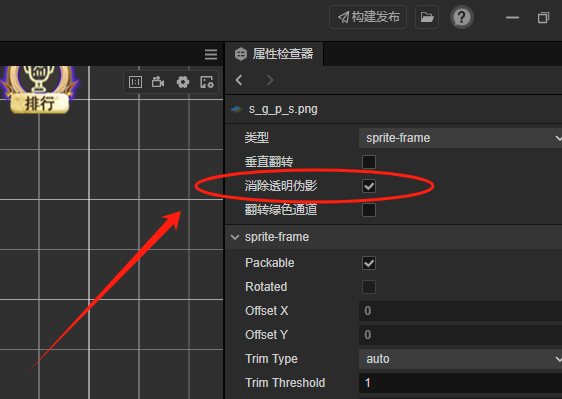
本地图片可以这样,但是远程图片呢?试了很多方法都不行。
附带自动勾选处理透明伪影的脚本。
import os
import json
用于一键消除透明伪影
def process_meta_files(directory):
# 递归遍历目录下的所有文件
for root, dirs, files in os.walk(directory):
for file in files:
# 检查是否是.meta文件
if file.endswith(’.meta’):
file_path = os.path.join(root, file)
try:
# 读取文件
with open(file_path, ‘r’, encoding=‘utf-8’) as f:
data = json.load(f)
                # 检查并修改 fixAlphaTransparencyArtifacts
                if 'userData' in data and 'fixAlphaTransparencyArtifacts' in data['userData']:
                    if data['userData']['fixAlphaTransparencyArtifacts'] == False:

                        # 判断同样名字的.webp文件,文件大小是否大于50k
                        webp_file_path = os.path.join(root, file.replace('.meta', ''))
                        if os.path.exists(webp_file_path) and os.path.getsize(webp_file_path) > 50 * 1024:
                            continue

                         # 修改值为 true
                        data['userData']['fixAlphaTransparencyArtifacts'] = True

                        # 写回文件
                        with open(file_path, 'w', encoding='utf-8') as f:
                            json.dump(data, f, indent=2, ensure_ascii=False)
                        print(f'已修改文件: {file_path}')

            except Exception as e:
                print(f'处理文件 {file_path} 时出错: {str(e)}')
def main():
# 获取当前目录
current_directory = os.getcwd()
print(f’开始处理目录: {current_directory}’)
process_meta_files(current_directory)
print(‘处理完成’)
if name == ‘main’:
main()
