
问题
版本:Cocos creator 3.8.3
打包安卓后,真机运行场景地图,发现缩放相机时,画面会闪烁随后卡住,移动相机也会偶尔掉帧卡顿。logcat会有日志:
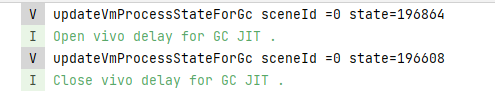
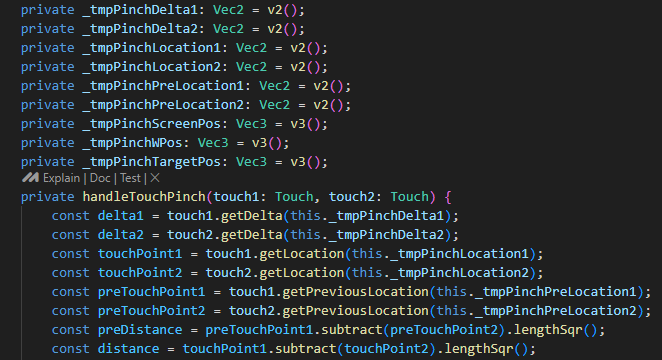
明显是有gc压力了。检查相机控制的代码,发现平移和缩放的实现都对临时对象做了缓存复用,理论上不存在频繁创建对象的操作
排查
为了排查是否是业务代码的影响,弄了一个单场景,挂上相机控制,发现还是会有上述日志。最后将平移和缩放的逻辑都去掉,只留下touchmove的回调事件,发现还是一样,那就应该是引擎层的问题了。
解决
1.临时解决:限制帧率
根据游戏类型,原生一般跑30帧就行,限制game.frameRate=30,立马就不卡了
2.优化引擎代码:
引擎对触摸的处理在touch-input.ts中,注意这里分了web,minigame,和native。核心方法在_createCallback,这个方法会频繁创建新的对象:Touch数组,EventTouch对象和Vec2对象:
private _createCallback (eventType: InputEventType) {
        return (changedTouches: TouchList, windowId: number): void => {
            // 创建了Touch数组
            const handleTouches: Touch[] = [];
            const length = changedTouches.length;
            const windowSize = this._windowManager.getWindow(windowId).getViewSize() as Size;
            for (let i = 0; i < length; ++i) {
                const changedTouch = changedTouches[i];
                const touchID = changedTouch.identifier;
                if (touchID === null) {
                    continue;
                }
                // 创建了Vec2对象
                const location = this._getLocation(changedTouch, windowSize);
                // 可能会创建Touch对象,但是有map做了缓存
                const touch = touchManager.getOrCreateTouch(touchID, location.x, location.y);
                if (!touch) {
                    continue;
                }
                if (eventType === InputEventType.TOUCH_END || eventType === InputEventType.TOUCH_CANCEL) {
                    touchManager.releaseTouch(touchID);
                }
                handleTouches.push(touch);
            }

            if (handleTouches.length > 0) {
                // 创建了EventTouch对象
                const eventTouch = new EventTouch(
                    handleTouches,
                    false,
                    eventType,
                    // // getAllTouches创建了Touch数组
                    macro.ENABLE_MULTI_TOUCH ? touchManager.getAllTouches() : handleTouches,
                );
                eventTouch.windowId = windowId;
                this._eventTarget.emit(eventType, eventTouch);
            }
        };
    }
优化后代码:
// 缓存EventTouch
private _eventTouchPool: EventTouch[] = [];
// 缓存Location
private _tmpLocation: Vec2 = new Vec2();
private _createCallback (eventType: InputEventType) {
    return (changedTouches: TouchList, windowId: number): void => {
        const length = changedTouches.length;
        const windowSize = this._windowManager.getWindow(windowId).getViewSize() as Size;

        if (length <= 0) return;

        let eventTouch: EventTouch;
        if(this._eventTouchPool.length > 0) {
            eventTouch = this._eventTouchPool.shift()!;
            eventTouch.type = eventType;
            eventTouch.bubbles = false;
        }
        else {
            eventTouch = new EventTouch([], false, eventType, []);
        }

        const handleTouches = eventTouch.getTouches();
        handleTouches.length = 0;
        let allTouches = eventTouch.getAllTouches();
        allTouches.length = 0;

        for (let i = 0; i < length; ++i) {
            const changedTouch = changedTouches[i];
            const touchID = changedTouch.identifier;
            if (touchID === null) {
                continue;
            }
            const location = this._getLocation(changedTouch, windowSize, this._tmpLocation);
            const touch = touchManager.getOrCreateTouch(touchID, location.x, location.y);
            if (!touch) {
                continue;
            }
            if (eventType === InputEventType.TOUCH_END || eventType === InputEventType.TOUCH_CANCEL) {
                touchManager.releaseTouch(touchID);
            }
            handleTouches.push(touch);
        }

        allTouches = macro.ENABLE_MULTI_TOUCH ? touchManager.getAllTouches(allTouches) : handleTouches;
        eventTouch.windowId = windowId;
        // console.error('eventTouch: ',eventType);
        this._eventTarget.emit(eventType, eventTouch);
        this._eventTouchPool.push(eventTouch);
    };
}

private _getLocation (touch: globalThis.Touch, windowSize: Size, out?: Vec2): Vec2 {
    const dpr = screenAdapter.devicePixelRatio;
    const x = touch.clientX * dpr;
    const y = windowSize.height - touch.clientY * dpr;

    const ret = out || new Vec2();
    ret.set(x, y);
    return ret;
}

// touch-manager.ts
public getAllTouches (out?: Touch[]): Touch[] {
    const touches: Touch[] = out || [];
    this._touchMap.forEach((touch) => {
        if (touch) {
            touches.push(touch);
        }
    });
    return touches;
}
优化后注意:由于回传出去的eventTouch变成了池化对象,上层使用时必须保证同步消费完,如果要缓存,需要进行深拷贝