
-
Creator 版本: 3.8.2
-
目标平台: 网页
着色器代码:
// Copyright © 2017-2020 Xiamen Yaji Software Co., Ltd.
CCEffect %{
techniques:
-
name: opaque
passes:- vert: sprite-vs:vert
frag: sprite-fs:frag
depthStencilState:
depthTest: false
depthWrite: false
blendState:
targets:- blend: true
blendSrc: src_alpha
blendDst: one_minus_src_alpha
blendDstAlpha: one_minus_src_alpha
rasterizerState:
cullMode: none
properties: &props
alphaThreshold: { value: 0.5 }
center1: { value: [0.5,0.5,0,0], editor: { tooltip: ‘中心点 (左上角为原点)’, type: vector}}
radius1: { value: [0.2,0.2,0,0],editor: { tooltip: ‘半径 (目标宽度 / 节点宽度)’ , type: [vector]} }
center2: { value: [0.5,0.5,0,0], editor: { tooltip: ‘中心点 (左上角为原点)’, type: vector}}
radius2: { value: [0.2,0.2,0,0],editor: { tooltip: ‘半径 (目标宽度 / 节点宽度)’ , type: [vector]} }
- blend: true
- vert: sprite-vs:vert
-
name: transparent
passes:- vert: sprite-vs:vert
frag: sprite-fs:frag
depthStencilState: &d1
depthTest: true
depthWrite: false
blendState:
targets:- blend: true
blendSrc: src_alpha
blendDst: one_minus_src_alpha
blendDstAlpha: one_minus_src_alpha
properties: *props
}%
- blend: true
- vert: sprite-vs:vert
CCProgram sprite-vs %{
precision highp float;
#include <builtin/uniforms/cc-global>
#if USE_LOCAL
#include <builtin/uniforms/cc-local>
#endif
#if SAMPLE_FROM_RT
#include <common/common-define>
#endif
in vec3 a_position;
in vec2 a_texCoord;
in vec4 a_color;
out vec4 color;
out vec2 uv0;
out vec2 v_screenPos;
vec4 vert () {
vec4 pos = vec4(a_position, 1);
#if USE_LOCAL
  pos = cc_matWorld * pos;
#endif

#if USE_PIXEL_ALIGNMENT
  pos = cc_matView * pos;
  pos.xyz = floor(pos.xyz);
  pos = cc_matProj * pos;
#else
  pos = cc_matViewProj * pos;
#endif

uv0 = a_texCoord;
#if SAMPLE_FROM_RT
  CC_HANDLE_RT_SAMPLE_FLIP(uv0);
#endif
color = a_color;
v_screenPos = pos.xy / pos.w;

return pos;
}
}%
CCProgram sprite-fs %{
precision highp float;
#include <builtin/internal/embedded-alpha>
#include <builtin/internal/alpha-test>
#include <builtin/uniforms/cc-global>
in vec4 color;
in vec2 v_screenPos;
#if USE_TEXTURE
in vec2 uv0;
#pragma builtin(local)
layout(set = 2, binding = 12) uniform sampler2D cc_spriteTexture;
uniform ARGS {
    vec4 center1;
    vec4 radius1;
    vec4 center2;
    vec4 radius2;
};
#endif
vec4 frag () {
vec4 o = vec4(1, 1, 1, 1);
#if USE_TEXTURE
  o *= CCSampleWithAlphaSeparated(cc_spriteTexture, uv0);
  float v_alpha = o.a;
  float ratio = cc_screenSize.x / cc_screenSize.y;
  // 第一个
  float dis = distance(vec2(uv0.x, uv0.y / ratio), vec2(center1.x, center1.y / ratio));
  float a_alpha = smoothstep(radius1.x - radius1.y, radius1.x, dis);
  v_alpha = min(v_alpha, a_alpha);


  // 第二个
  dis = distance(vec2(uv0.x, uv0.y / ratio), vec2(center2.x, center2.y / ratio));
  a_alpha = smoothstep(radius2.x - radius2.y, radius2.x, dis);
  v_alpha = min(v_alpha, a_alpha);

  o.a = v_alpha;

#endif

o *= color;
ALPHA_TEST(o);
return o;
}
}%
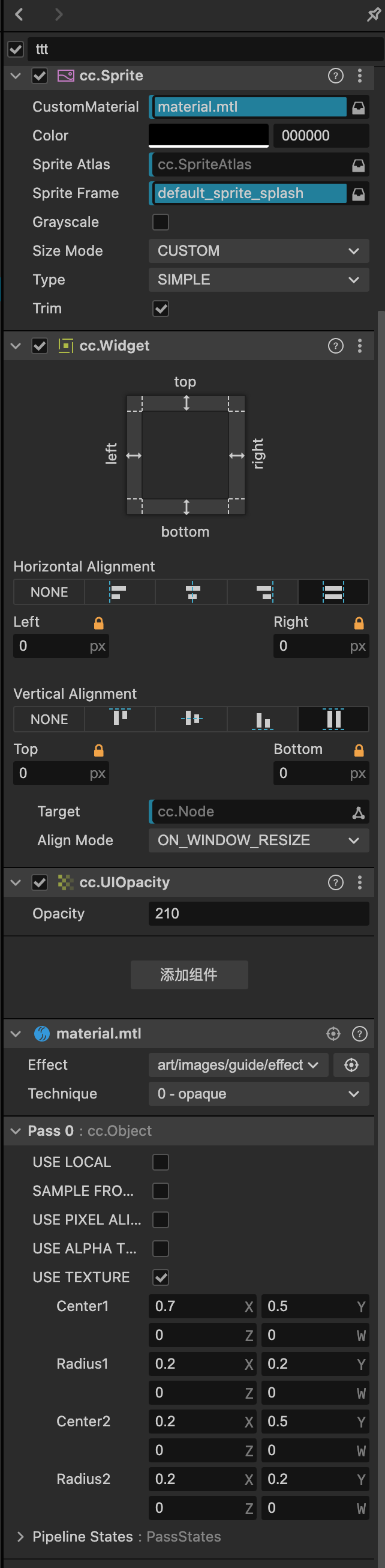
属性页面设置
在编辑器效果
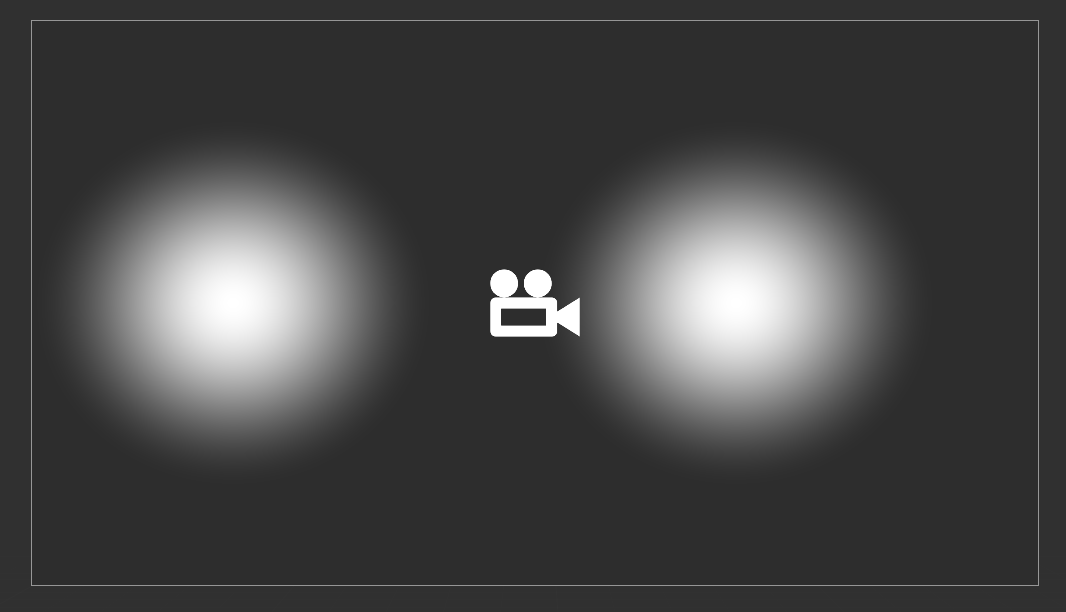
浏览器运行效果

有大佬可以指点一下为什么有这种情况吗?