
目前使用的是98k大佬的碰撞检测系统,没有使用碰撞体,也就没有射线,那如何实现这条线碰撞到障碍物会发生反射呢
我现在想预测球的运动轨迹,碰到障碍物会反射的那种。

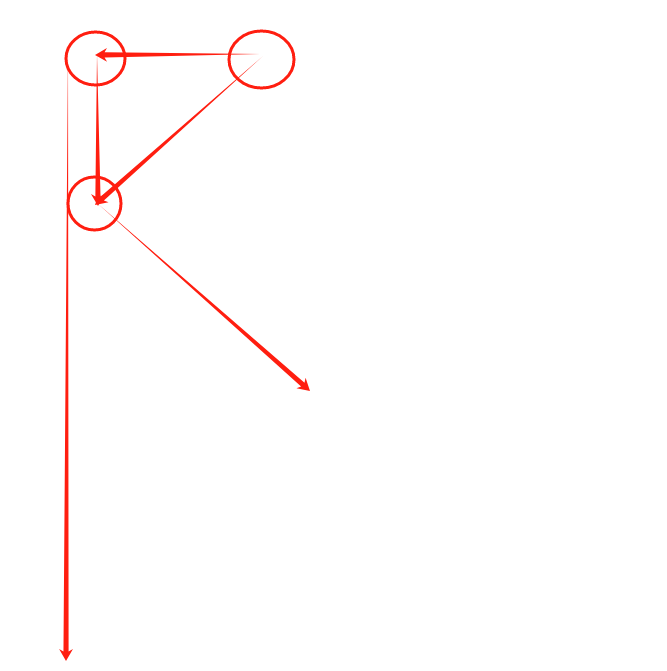
45度角射入墙角会有惊喜
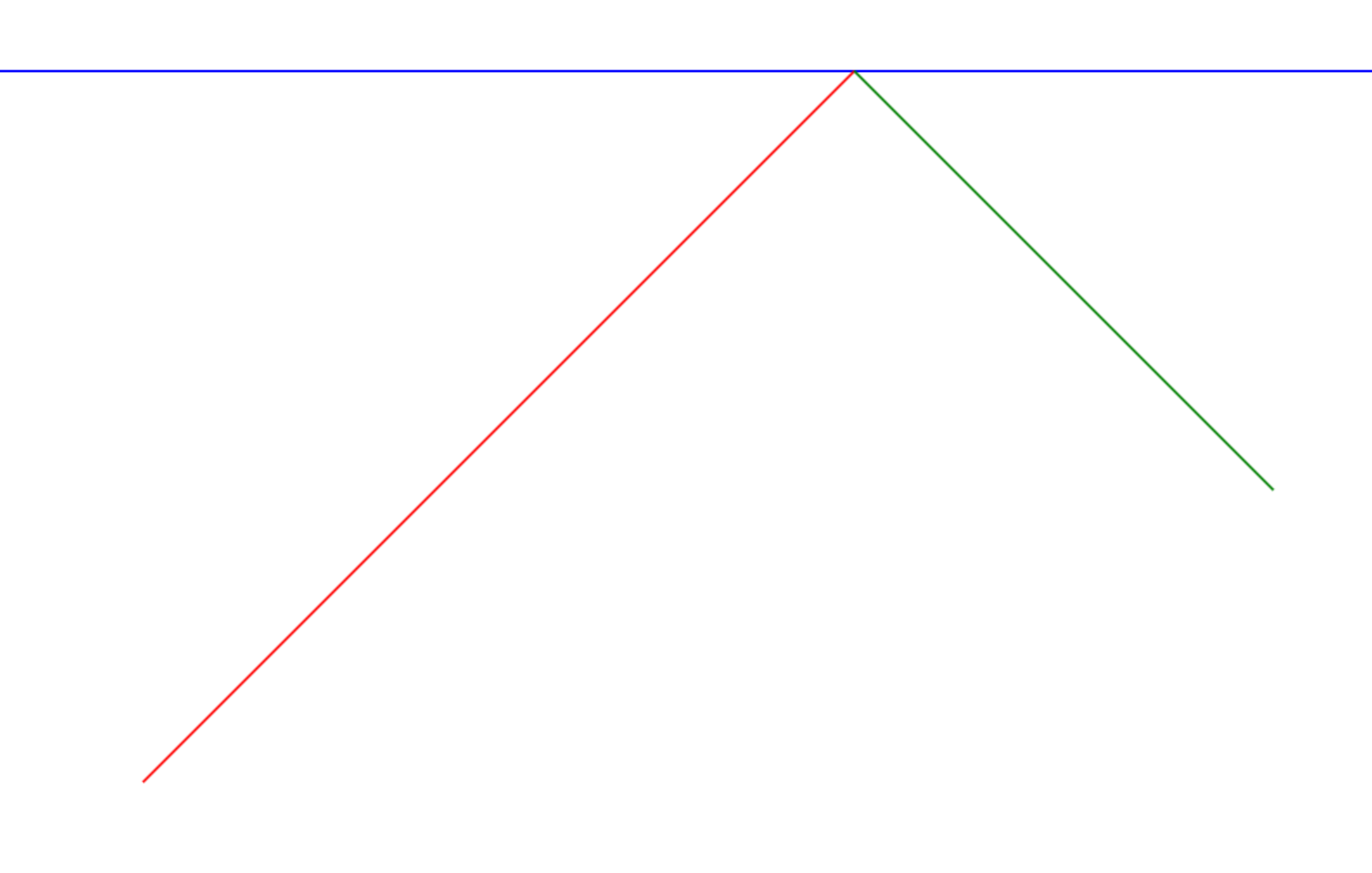
<!DOCTYPE html>
<html lang="en">

<head>
	<meta charset="UTF-8">
	<meta name="viewport" content="width=device-width, initial-scale=1.0">
	<title>Light Reflection</title>
	<style>
		canvas {
			border: 1px solid black;
		}
	</style>
</head>

<body>
	<canvas id="canvas" width="1280" height="960"></canvas>
	<script>
		const canvas = document.getElementById('canvas');
		const ctx = canvas.getContext('2d');

		// 将左下角设为原点
		ctx.translate(0, canvas.height);
		ctx.scale(1, -1);

		// 光线的起点和方向
		const startX = 200;
		const startY = 200;
		const angle = Math.PI / 2/2; // 45度
		const directionX = Math.cos(angle);
		const directionY = Math.sin(angle);

		// 镜面的位置
		const mirrorY = 800;

		// 计算碰撞点
		const t = (mirrorY - startY) / directionY;
		const collisionX = startX + t * directionX;
		const collisionY = mirrorY;

		// 法线向量
		const normalX = 0;
		const normalY = 1;

		// 计算反射方向
		const dotProduct = directionX * normalX + directionY * normalY;
		const reflectX = directionX - 2 * dotProduct * normalX;
		const reflectY = directionY - 2 * dotProduct * normalY;
		// console.log("计算反射方向", dotProduct, reflectX, reflectY);

		// 绘制函数
		function draw() {
			ctx.clearRect(0, 0, canvas.width, canvas.height);

			// 绘制坐标系
			drawAxis();

			// 绘制镜面
			ctx.beginPath();
			ctx.moveTo(0, mirrorY);
			ctx.lineTo(canvas.width, mirrorY);
			ctx.strokeStyle = 'blue';
			ctx.lineWidth = 2;
			ctx.stroke();

			// 绘制入射光线
			ctx.beginPath();
			ctx.moveTo(startX, startY);
			ctx.lineTo(collisionX, collisionY);
			ctx.strokeStyle = 'red';
			ctx.lineWidth = 2;
			ctx.stroke();

			// 绘制反射光线
			ctx.beginPath();
			ctx.moveTo(collisionX, collisionY);
			ctx.lineTo(collisionX + reflectX * 500, collisionY + reflectY * 500); // 延长反射光线
			ctx.strokeStyle = 'green';
			ctx.lineWidth = 2;
			ctx.stroke();
		}

		// 绘制坐标系
		function drawAxis() {
			// 绘制 X 轴
			ctx.beginPath();
			ctx.moveTo(0, 0);
			ctx.lineTo(canvas.width, 0);
			ctx.strokeStyle = 'black';
			ctx.lineWidth = 1;
			ctx.stroke();

			// 绘制 Y 轴
			ctx.beginPath();
			ctx.moveTo(0, 0);
			ctx.lineTo(0, canvas.height);
			ctx.strokeStyle = 'black';
			ctx.lineWidth = 1;
			ctx.stroke();

			// 绘制刻度
			const step = 50;
			ctx.font = '12px Arial';
			ctx.fillStyle = 'black';

			for (let i = step; i < canvas.width; i += step) {
				ctx.beginPath();
				ctx.moveTo(i, -5);
				ctx.lineTo(i, 5);
				ctx.stroke();
				ctx.fillText(i, i - 10, -10);
			}

			for (let i = step; i < canvas.height; i += step) {
				ctx.beginPath();
				ctx.moveTo(-5, i);
				ctx.lineTo(5, i);
				ctx.stroke();
				ctx.fillText(i, 10, i + 5);
			}
		}

		// 初始化绘制
		draw();

		function asyncOperation() {
			return new Promise((resolve, reject) => {
				setTimeout(() => {
					const success = Math.random() > 0.5;
					if (success) {
						resolve('操作成功11111111');
					} else {
						reject('操作失败000000000');
					}
				}, 1000);
			});
		}

		asyncOperation().then((res) => {
			// console.log(res)
		}, (res) => {
			// console.log(res)
		})
		// reportError("D")
		const myPromise = new Promise((resolve, reject) => {
			console.log('A');

			for (let index = 0; index < 100; index++) {
				const element = Math.random()
				if (element === 0) {
					console.log("D")
					resolve('B');
				}

			}
			// reject("H")
			reject(new Error('操作失败'));

		});

		console.log('C');

		myPromise.then(result => {
			console.log(result); // 输出 resolve
		}, (result) => {
			console.log(result);
		}).catch(error => {
			console.error(error);
		});

		const worker = new Worker('worker.js');


		// function print(delay, message) {
		// 	return new Promise(function (resolve, reject) {
		// 		setTimeout(function () {
		// 			console.log(message);
		// 			resolve();
		// 		}, delay);
		// 	});
		// }

		// async function asyncFunc() {
		// 	await print(1000, "First");
		// 	await print(4000, "Second");
		// 	await print(3000, "Third");
		// }
		// asyncFunc();
	</script>
</body>

</html>
1赞
你发一个透明球,和那个真球一样的逻辑,但是一帧内就完成了n个 update 逻辑,碰撞时跳出循环,或者经过固定长度的路程就跳出循环。记录下路径,然后去渲染各个点。完全复用了之前的逻辑,计算结果和你碰撞一致,省时省力。
1赞
用射线拿法线,
或者碰撞位置修正方向做法线,你才能做反弹,
反射延长线,通常都是用时间去切片模拟位置,又或者射线连续反射
最后:万事有AI,这类问题, 它非常懂行,无论是修改或者扩展都能搞
射线检测加绘制组件来搞,
45度角入射,临界值处理好,就等于原路返回,应该没什么太大问题吧,
射入90度夹角 有可能会变成乒乓球