
-
Creator 版本: 2.4.15;3.8.7
-
目标平台: harmony next
-
重现方式:使用鸿蒙模拟器运行空包失败;尝试了两个版本的引擎都不行
20:38:04.514: hdc shell aa force-stop org.cocos2d.demo 20:38:04.684: hdc shell mkdir data/local/tmp/4c3073d020184eefa749c2dc40820d91
20:38:05.295: hdc file send C:\Users\Administrator\Desktop\harmony\NewProject2\build\jsb-link\frameworks\runtime-src\proj.harmonyos-next\entry\build\default\outputs\default\entry-default-unsigned.hap "data/local/tmp/4c3073d020184eefa749c2dc40820d91" in 611 ms 20:38:05.411: hdc shell bm install -p data/local/tmp/4c3073d020184eefa749c2dc40820d91 in 116 ms
Install Failed: error: failed to install bundle.
code:9568347
error: install parse native so failed.
View detailed instructions.
20:38:05.458: $ hdc shell rm -rf data/local/tmp/4c3073d020184eefa749c2dc40820d91
20:38:05.459: Launch org.cocos2d.demo failed, starting handle failure progress
Error while Deploy Hap
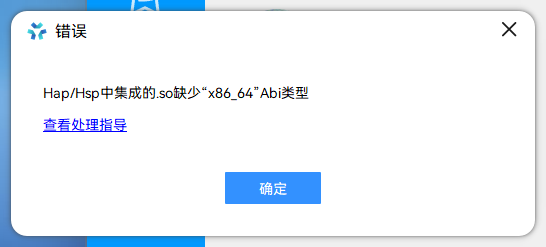
似乎原因是模拟器只支持x86,而打包是arm64!
截图是直接将hap拖到模拟器报错
官方错误码说明:文档中心
有解决办法吗
打包时可以把x86加上
1赞
算了,官方说不支持,只能用真机
看下置顶的活动,里面有运真机 走remote ip
你好,你解决了吗