
比如一个设置一个property(Map<int,SpriteFrame>)
就可以直接在editor里直接编辑属性
1赞
@ccclass
export default class Test {
@property

public key1: string = '';

@property(Sprite)

public spr: Sprite = null;
}
@ccclass
export default class TestComponent extends Component {
@property(Test)

test: Test = null;
}
可以这样子,不过Test必须单独一个文件,因为Cocos不允许同个文件里面有多个类使用@ccclass
import { _decorator, Asset, CCBoolean, CCString, Component, Enum, Node, sp } from 'cc';
const { ccclass, property, menu, executeInEditMode } = _decorator;
enum MyMapType {
String = “string”,
Node = “node”,
Asset = “asset”
}
@ccclass(‘MyMapValueType’)
class MyMapValueType {
@property({ type: Enum(MyMapType), displayName: “类型” })
Type: MyMapType = MyMapType.String;
@property({ displayName: “string值”, visible() { return this.Type === MyMapType.String } })
string: string = “”;
@property({ type: Node, displayName: “Node值”, visible() { return this.Type === MyMapType.Node } })
node: Node = null
@property({ type: Asset, displayName: “Asset值”, visible() { return this.Type === MyMapType.Asset } })
asset: Asset = null
}
@ccclass(‘MyMap’)
class MyMap {
@property({ displayName: “key”, tooltip: “键” })
Key: string = “”;
@property({ displayName: “value”, tooltip: “值” })
Value: MyMapValueType = null;
}
@ccclass(‘aaa’)
@executeInEditMode
export class aaa extends Component {
/**编辑器序列化配置的动画数据(用做配表的) */
@property(MyMap)
map: MyMap[] = [];

/**
 * 重置编辑器序列化数据
 * @param didResetToDefault
 */
resetInEditor(didResetToDefault?: boolean): void {
    this.init();
}

init() {
    this.map = [];
    for (let i = 0; i < 3; i++) {
        let playSpineData = new MyMap();
        playSpineData.Key = "key" + i;
        playSpineData.Value = new MyMapValueType();
        playSpineData.Value.Type = MyMapType.String;
        playSpineData.Value.string = "string" + i;
        this.map.push(playSpineData);
    }
}
}
自己修改MyMapType 枚举类型就可以了
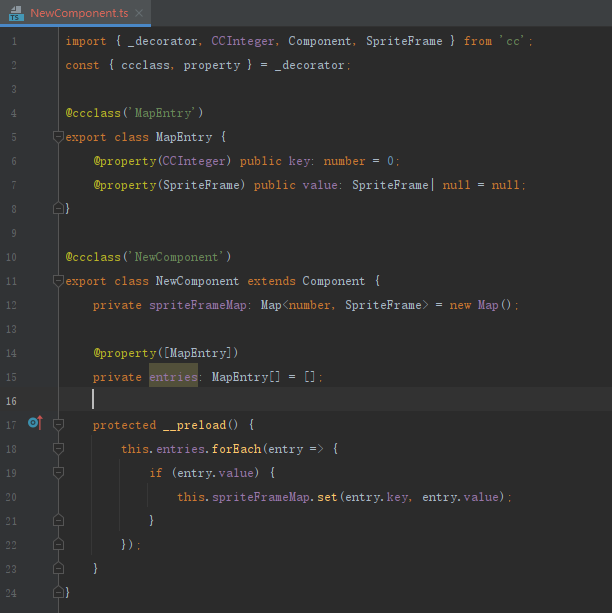
import { _decorator, CCInteger, Component, SpriteFrame } from 'cc';
const { ccclass, property } = _decorator;
@ccclass('MapEntry')
export class MapEntry {
    @property(CCInteger) public key: number = 0;
    @property(SpriteFrame) public value: SpriteFrame| null = null;
}
@ccclass('NewComponent')
export class NewComponent extends Component {
    private spriteFrameMap: Map<number, SpriteFrame> = new Map();
    @property([MapEntry])
    private entries: MapEntry[] = [];
    protected __preload() {
        this.entries.forEach(entry => {
            if (entry.value) {
                this.spriteFrameMap.set(entry.key, entry.value);
            }
        });
    }
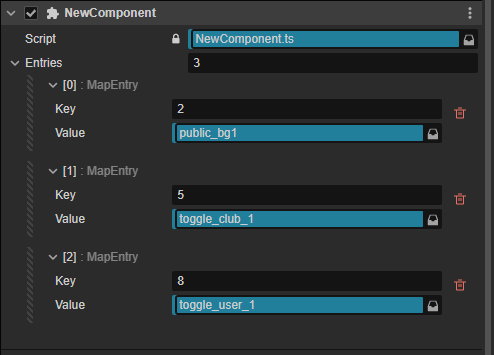
}这个代码块怎么输入的啊
import { _decorator, Asset, Component, Enum, Node, Prefab, SpriteFrame } from 'cc';
const { ccclass, property, executeInEditMode } = _decorator;

enum MType {
    String = "string",
    SpriteFrame = "spriteFrame",
    Node = "node",
    Prefab = "prefab",
    Asset = "asset",
}

@ccclass('MValue')
class MValue {
    @property({ type: Enum(MType), displayName: "类型" })
    Type: MType = MType.String;

    @property({ displayName: "字符串", visible() { return this.Type === MType.String } })
    set string(value: string) { this.value = value; }
    get string() { return this.value as string || ""; }

    @property({ type: SpriteFrame, displayName: "图片", visible() { return this.Type === MType.SpriteFrame } })
    set spriteFrame(value: SpriteFrame) { this.value = value; }
    get spriteFrame() { return this.value as SpriteFrame || null; }

    @property({ type: Node, displayName: "节点", visible() { return this.Type === MType.Node } })
    set node(value: Node) { this.value = value; }
    get node() { return this.value as Node || null; }

    @property({ type: Prefab, displayName: "预制体", visible() { return this.Type === MType.Prefab } })
    set prefab(value: Prefab) { this.value = value; }
    get prefab() { return this.value as Prefab || null; }

    @property({ type: Asset, displayName: "资源", visible() { return this.Type === MType.Asset } })
    set asset(value: Asset) { this.value = value; }
    get asset() { return this.value as Asset || null; }

    value: string | SpriteFrame | Node | Asset | Prefab | null = null;
}

@ccclass('MMap')
class MMap {
    @property({ displayName: "key", tooltip: "键" })
    Key: string = "";

    @property({ displayName: "value", tooltip: "值" })
    Value: MValue = new MValue();
}

@ccclass('MEditorMap')
@executeInEditMode
export class MEditorMap extends Component {
    @property(MMap)
    map: MMap[] = [];

    resetInEditor(didResetToDefault?: boolean): void {
        this.init();
    }

    init() {
        this.map = [];
        for (let i = 0; i < 1; i++) {
            let item = new MMap();
            this.map.push(item);
        }
    }

    private valueMap: Map<string, MValue> = new Map();

    protected __preload() {
        this.map.forEach(c => {
            if (c.Value) {
                this.valueMap.set(c.Key, c.Value);
            }
        });
    }

    /**获取值 */
    getValue<T>(key: string): T | null {
        if (!this.valueMap.has(key)) return null;
        let value = this.valueMap.get(key);
        if (value === null) return null;
        return value.value as T || null;
    }
}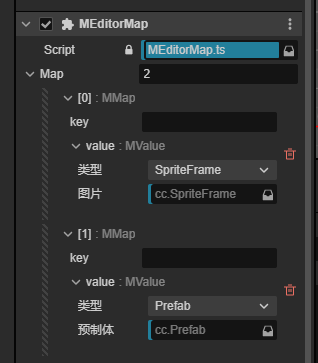
借鉴你的我完善了一下,做成了通用的组件,可以实现在编辑器序列化任何资源成map使用