
目前需要节点从手机的右侧移动到左侧,但是存在一个问题就是移动的过程中会出现轻微抖动的情况,这是为什么呢?之前移动使用的scrollView,这次是类似于弹幕的情况,使用的sprite节点,然后就出现这个抖动的情况。
declare const ks: any;
@ccclass(“comment”)
export class comment extends Component {
@property(Node)
private commentNode: Node = null;
@property(Node)
private firstNode: Node = null;
@property(Node)
private secondNode: Node = null;
@property(Node)
private thirdNode: Node = null;
@property(Node)
private fourthNode: Node = null;
// 统一移动速度(像素/秒)
@property
private moveSpeed: number = 30;
// 固定时间步长(秒),用于补帧,保证移动速度恒定
// 设置为 1/60 秒,相当于 60fps 的更新频率
private readonly FIXED_TIME_STEP: number = 1 / 60;
// 累积的时间,用于固定时间步长更新
private accumulatedTime: number = 0;
private exampleNode: Node = null;
// 当前在屏幕上移动的评论节点
private runningComments: CommentState[] = [];
// 缓存已加载的图片,避免重复请求
private imageCache: Map<string, SpriteFrame> = new Map();
start() {}
/**
-
创建一条从右到左移动的评论节点
-
@param data 评论数据,包含用户信息和幸运值
*/
addComment(data?: CommentData) {
if (!this.commentNode) return;

console.log("添加评论");

const key = this.getCurrentRuleList(data.typeName);

console.log("key", key);

if (key) {

  switch (key) {

    case "firstRule":

      this.exampleNode = this.firstNode;

      break;

    case "secondRule":

      this.exampleNode = this.secondNode;

      break;

    case "thirdRule":

      this.exampleNode = this.thirdNode;

      break;

    case "fourthRule":

      this.exampleNode = this.fourthNode;

      break;

    default:

      this.exampleNode = this.firstNode;

      break;

  }

}

const node = instantiate(this.exampleNode);

node.active = true;

node.parent = this.commentNode;

// y 在 -70 ~ 70 之间随机一个位置

const randomY = -70 + Math.random() * 140;

// 初始位置:x 在 320 ~ 350 之间随机,y = randomY

const randomX = 320 + Math.random() * 30; // 320 ~ 350

node.setPosition(new Vec3(randomX, randomY, 0));

// 如果有数据,更新节点内容

if (data) {

  this.updateCommentNode(node, data);

}

this.runningComments.push({ node });
}
/**
- 更新评论节点的内容(头像、昵称、幸运值等)
*/
private updateCommentNode(node: Node, data: CommentData) {
这里是添加文字的多余代码
}
/**
- 动态加载网络图片到Sprite组件
*/
private loadNetworkImage(url: string, sprite: Sprite) {
}
update(deltaTime: number) {
if (!this.commentNode) return;

// 限制 deltaTime 最大值,防止卡顿导致的大幅跳跃

const clampedDeltaTime = Math.min(deltaTime, 0.1);


// 累积时间,用于固定时间步长更新

this.accumulatedTime += clampedDeltaTime;

// 固定时间步长更新:当累积时间达到固定步长时执行更新

// 这样可以保证无论帧率如何,移动速度都是恒定的

while (this.accumulatedTime >= this.FIXED_TIME_STEP) {

  this.accumulatedTime -= this.FIXED_TIME_STEP;

  this.fixedUpdate(this.FIXED_TIME_STEP);

}
}
/**
- 固定时间步长更新,保证移动速度恒定
*/
private fixedUpdate(fixedDeltaTime: number) {
// 从后往前遍历,方便移除已经离开屏幕的节点

for (let i = this.runningComments.length - 1; i >= 0; i--) {

  const state = this.runningComments[i];

  const node = state.node;

  if (!node || !node.isValid) {

    this.runningComments.splice(i, 1);

    continue;

  }

  // 获取当前位置,创建新的 Vec3 避免引用问题

  const pos = node.getPosition();

  // 使用固定时间步长计算新位置,保证移动速度恒定

  const newX = pos.x - this.moveSpeed * fixedDeltaTime;

  // 像素对齐:将位置对齐到整数像素,减少高分屏上的抖动

  const snappedX = Math.round(newX);


  // 使用 setPosition 设置新位置,传入新 Vec3 避免引用问题

  node.setPosition(new Vec3(snappedX, pos.y, pos.z));

  // 当移动到 x <= -350 时,销毁或停用

  if (snappedX <= -350) {

    node.destroy(); // 如果后面需要复用,可以改成 node.active = false;

    this.runningComments.splice(i, 1);

  }

}
}
// 获取当前的位置
getCurrentRuleList(text) {
}
}
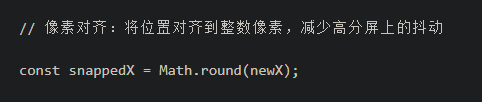 你将这个Math.round去掉试试看