
使用 物理 RopeJoint 实现了简单的绳索效果,在此记录一下。
原理
创建多个关节节点来模拟绳子,用 Graphics 绘制绳索的路径。
RopeSegment
关节节点,作为一小绳段
const {ccclass, property} = cc._decorator;
@ccclass
export default class RopeSegment extends cc.Component {
    @property(cc.RigidBody) public rigidBody: cc.RigidBody = null;
    @property(cc.RopeJoint) public joint: cc.RopeJoint = null;
}
RopeGenerator
生成绳段,组成长绳
import RopeSegment from "./RopeSegment";
const {ccclass, property} = cc._decorator;
@ccclass
export default class RopeGenerator extends cc.Component {
    @property(cc.Prefab) ropeSegmentPrefab: cc.Prefab = null!;  // 绳子段的预制体
    @property(cc.Node) startNode: cc.Node = null!;  // 起点(如钉子)
    @property(cc.Node) endNode: cc.Node = null!;    // 终点(如悬挂的重物)
    @property segmentLength: number = 10; // 每段长度
    @property useGraphics: boolean = true; // 是否使用Graphics绘制
    @property lineWidth: number = 10; // 绘制线条宽度
    @property drawPoints: boolean = false; // 绘制节点(可选)

    private segments: cc.Node[] = [];
    private graphics: cc.Graphics = null!;

    onLoad() {
        // 创建Graphics用于绘制绳子
        if (this.useGraphics) {
            this.graphics = this.node.getComponent(cc.Graphics);
            if (!this.graphics) {
                this.graphics = this.node.addComponent(cc.Graphics);
            }
        }
    }

    start() {
        this.generateRope();
    }

    generateRope() {
        // 清空现有绳子
        this.segments.forEach(seg => seg.destroy());
        this.segments = [];

        // 计算起点和终点位置
        const startPos = this.startNode.convertToWorldSpaceAR(cc.Vec3.ZERO);
        const endPos = this.endNode.convertToWorldSpaceAR(cc.Vec3.ZERO);

        // 计算方向向量
        const direction = new cc.Vec3();
        cc.Vec3.subtract(direction, endPos, startPos);
        const totalLength = direction.len();

        // 调整段数以匹配实际距离
        const actualSegmentCount = Math.max(2, Math.floor(totalLength / this.segmentLength));
        const step = direction.clone().multiplyScalar(1 / actualSegmentCount);

        console.log("actualSegmentCount", actualSegmentCount);


        // 创建绳子段
        for (let i = 0; i <= actualSegmentCount; i++) {
            // 计算当前段位置
            const pos = startPos.clone().add(step.clone().multiplyScalar(i));

            // 实例化绳子段
            const segmentNode = cc.instantiate(this.ropeSegmentPrefab);
            segmentNode.parent = this.node;
            segmentNode.position = segmentNode.parent.convertToNodeSpaceAR(pos);

            const segment = segmentNode.getComponent(RopeSegment);

            // 连接到上一段(除了第一段)
            if (i > 0) {
                const prevSegment = this.segments[i - 1].getComponent(RopeSegment);

                // 配置距离关节
                if (segment && segment.joint) {
                    segment.joint.connectedBody = prevSegment.rigidBody;
                    segment.joint.anchor = cc.Vec2.ZERO.clone();
                    segment.joint.connectedAnchor = cc.Vec2.ZERO.clone();
                    segment.joint.maxLength = this.segmentLength;
                    segment.joint.collideConnected = false; // 防止绳子段相互碰撞
                }
            } else {
                // 第一段连接到起点
                if (segment && segment.joint) {
                    const startRigidBody = this.startNode.getComponent(cc.RigidBody);
                    segment.joint.connectedBody = startRigidBody;
                }
            }

            this.segments.push(segmentNode);
        }

        // 最后一段连接到终点
        if (this.segments.length > 0) {
            const lastSegment = this.segments[this.segments.length - 1].getComponent(RopeSegment);
            if (lastSegment && lastSegment.joint) {
                const joint = this.endNode.getComponent(cc.RopeJoint) || this.endNode.addComponent(cc.RopeJoint);
                joint.connectedBody = lastSegment.rigidBody;
                joint.maxLength = this.segmentLength;
                joint.anchor = cc.Vec2.ZERO.clone();
                joint.connectedAnchor = cc.Vec2.ZERO.clone();
                joint.collideConnected = false;
            }
        }
    }

    update() {
        if (
            this.startNode &&
            this.endNode &&
            this.useGraphics &&
            this.graphics
        ) {
            this.drawRope();
        }
    }

    drawRope() {
        this.graphics.clear();

        if (this.segments.length === 0) return;

        // 绘制绳子线条
        this.graphics.lineWidth = this.lineWidth;
        this.graphics.strokeColor.fromHEX('#000000');

        // 从起点开始画线
        const startPos = this.startNode.position;
        this.graphics.moveTo(startPos.x, startPos.y);

        // 经过每个绳子段
        this.segments.forEach(seg => {
            const pos = seg.position;
            this.graphics.lineTo(pos.x, pos.y);
        });

        // 画到终点
        const endPos = this.endNode.position;
        this.graphics.lineTo(endPos.x, endPos.y);

        this.graphics.stroke();

        // 画节点(可选)
        if (this.drawPoints) {
            this.graphics.fillColor.fromHEX('#ffffff');
            this.segments.forEach(seg => {
                const pos = seg.position;
                this.graphics.circle(pos.x, pos.y, this.lineWidth/2);
                this.graphics.fill();
            });
        }
    }
}
效果 & 问题
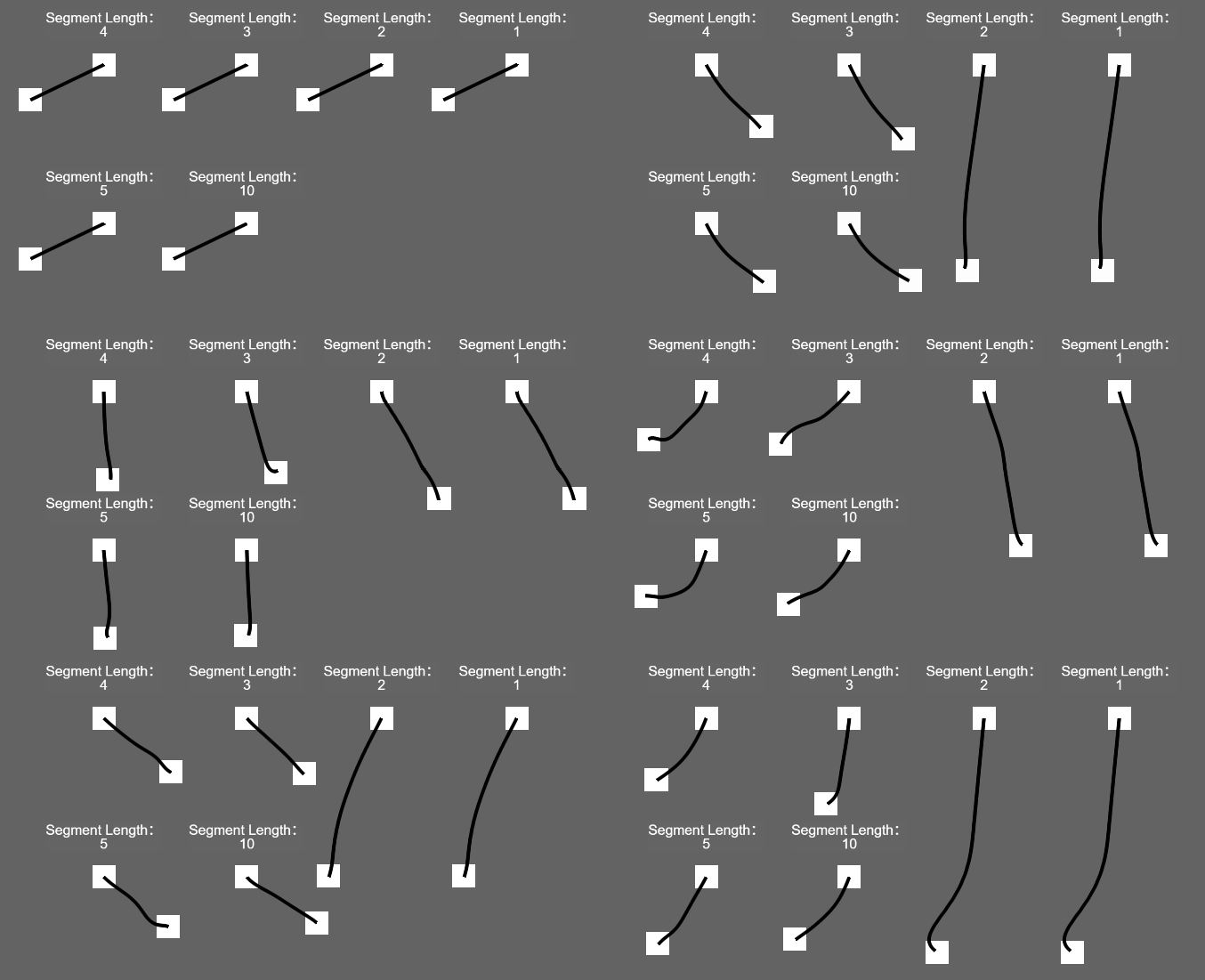
当绳段长度的值过小时,例如1、2,明显出现很强的弹性的感觉,长度也失控了,不知道是什么原因导致的。