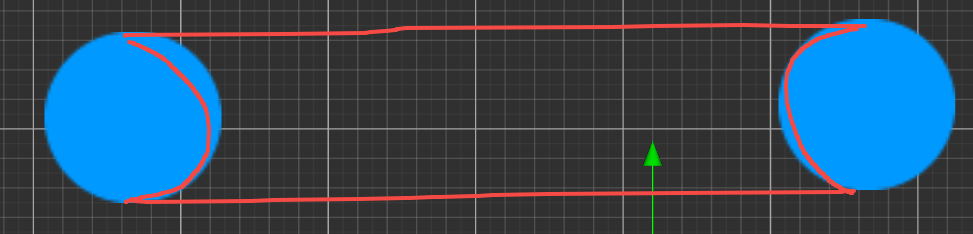
-
Creator 版本:3.8.4
-
目标平台: 网页、安卓原生、小游戏
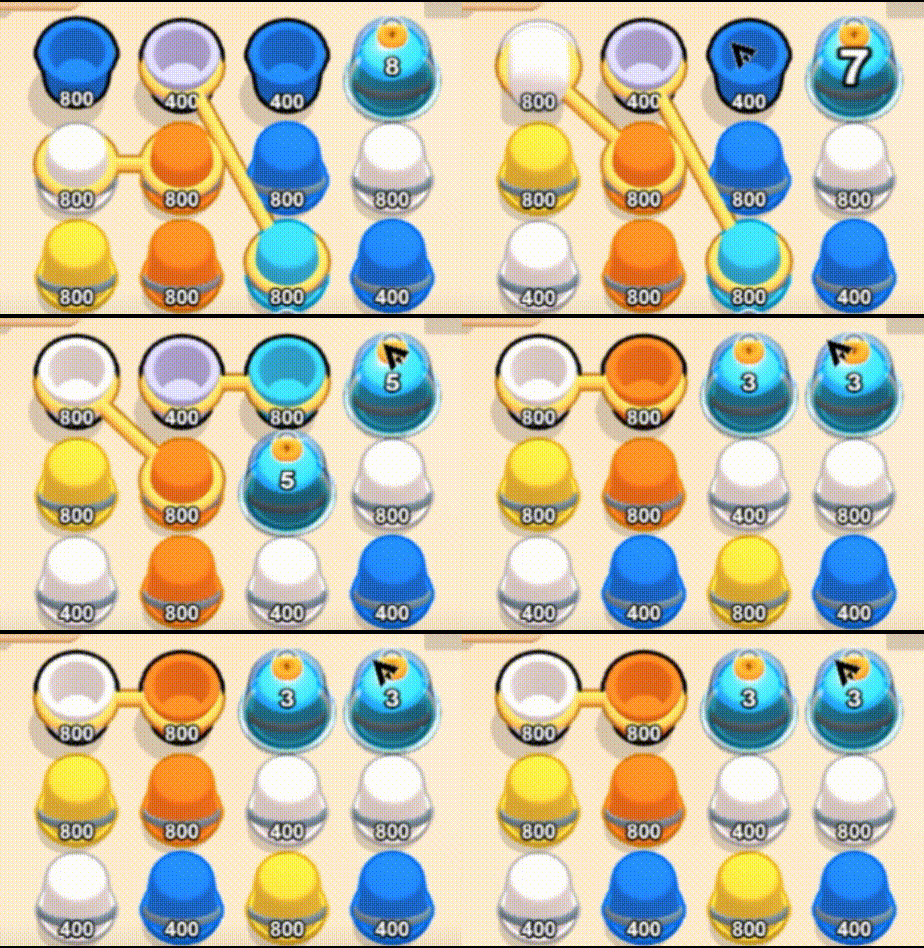
在2D项目下,怎么可以实现用一根线连接两个或两个以上的节点呢?如图:
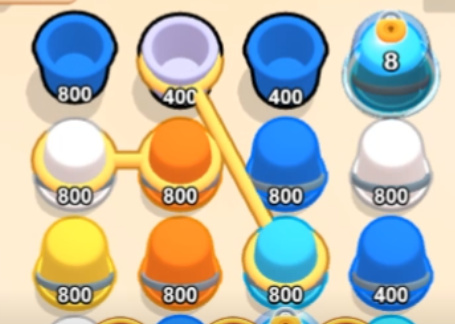
这个线还会根据节点的位置调整首尾和距离
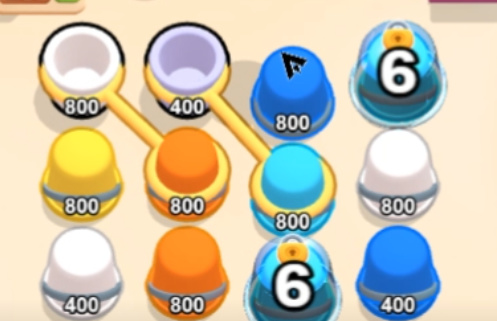
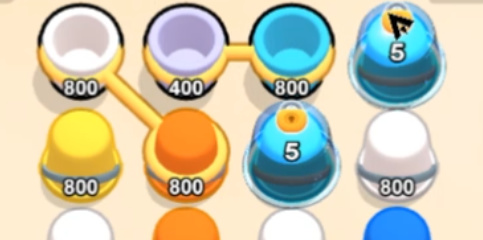
另外,这种仿3D的效果是怎么实现的?两个线圈套住了两个桶,中间的链接线根据线圈的位置调整首尾和距离

Creator 版本:3.8.4
目标平台: 网页、安卓原生、小游戏
在2D项目下,怎么可以实现用一根线连接两个或两个以上的节点呢?如图:
这个线还会根据节点的位置调整首尾和距离
另外,这种仿3D的效果是怎么实现的?两个线圈套住了两个桶,中间的链接线根据线圈的位置调整首尾和距离
就是个平铺的黄色图片吧,直接覆盖上去的。写个脚本控制就可以了。记录两个点的连接圆心,连接,然后圈内不渲染。就可以达到这个效果了吧
但节点不是只有一个坐标吗,没有首尾坐标的概念啊,如果要实现控制首尾和长度,我目前想到的是,读取需要链接的两个节点坐标,然后获取设置链接线的坐标为两点中间,然后设置长度和角度来实现首尾链接,但感觉好麻烦啊,而且圈内不渲染这个是怎么弄的?图片还能控制部分渲染吗?
用Graphics画线,然后给它加个渐变的shader
这个线的遮挡关系可以给桶加个Mask,遮挡的区域就是半个绳圈
不过这个桶的描边和绳子的描边,可能需要给camera加一个renderTexture后处理
写个shader,控制首尾空白的圆大小不就好了
看得我头都大了
我还只会一些简单的shader,还是在G老师的帮助下实现的 
2Dshader不难。AI都可以写,准确率还可以
好的,回头我研究研究
也只能多试试看了,目前也没其他的现成方案了
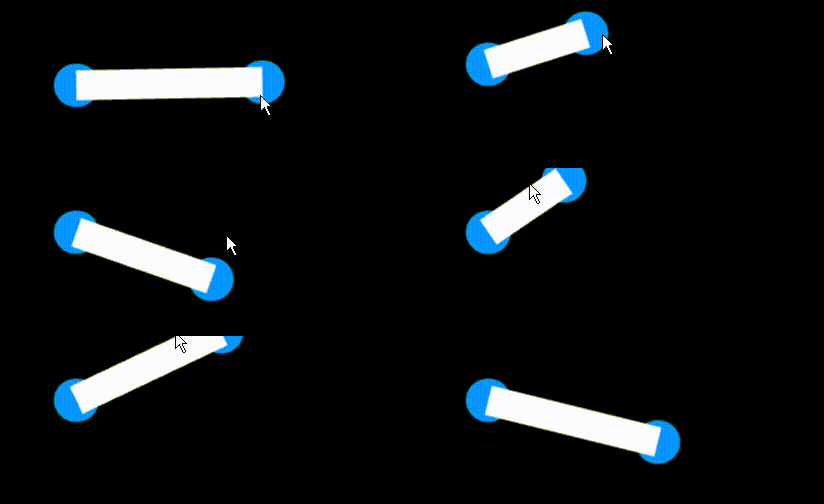
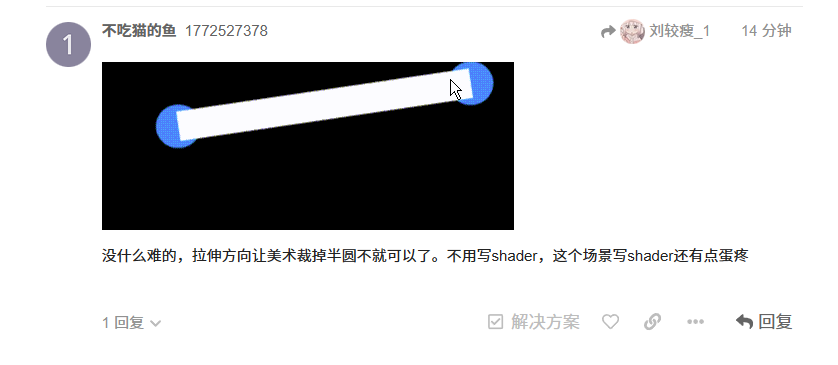
没什么难的,拉伸方向让美术裁掉半圆不就可以了。不用写shader,这个场景写shader还有点蛋疼
这是怎么实现的?不用shader的话?
你说的哪个怎么实现的
编写sz脚本。要求:这是个杆子组件,设置A、B两个节点。每帧判断AB两个节点是否有位移。移动的话杆子自动调节。调节要求:x方向是长,y方向是宽。计算AB两点距离。然后用杆子连接他们。连接方式按AB两点中心。 AI提示词  ,手写也不难,主要不想写
import { _decorator, Component, Node, Vec3, UITransform, EventTouch, input, Input } from ‘cc’;
const { ccclass, property } = _decorator;
@ccclass(‘sz’)
export class sz extends Component {
@property({ type: Node, tooltip: “节点A” })
nodeA: Node = null;
@property({ type: Node, tooltip: "节点B" })
nodeB: Node = null;

@property({ tooltip: "杆子的宽度(Y方向)" })
rodWidth: number = 10;

// 记录上一帧的位置,用于判断是否移动
private lastPosA: Vec3 = new Vec3();
private lastPosB: Vec3 = new Vec3();

// 杆子的UITransform组件
private uiTransform: UITransform = null;

// 拖拽相关变量
private isDraggingA: boolean = false;
private isDraggingB: boolean = false;
private dragStartPos: Vec3 = new Vec3();
private nodeStartPos: Vec3 = new Vec3();

start() {
    // 获取杆子自身的UITransform组件
    this.uiTransform = this.node.getComponent(UITransform);
    if (!this.uiTransform) {
        console.error("杆子节点缺少UITransform组件,请添加UITransform组件");
        return;
    }

    // 初始化杆子宽度
    this.uiTransform.height = this.rodWidth;

    // 检查节点是否存在
    if (!this.nodeA || !this.nodeB) {
        console.error("请设置节点A和节点B");
        return;
    }

    // 初始化记录上一帧位置
    this.lastPosA.set(this.nodeA.position);
    this.lastPosB.set(this.nodeB.position);

    // 为A、B节点添加拖拽事件监听
    this.setupDragEvents();

    // 初始时计算一次杆子状态
    this.updateRod();
}

/**
 * 设置拖拽事件
 */
private setupDragEvents() {
    // 为节点A添加拖拽监听
    if (this.nodeA) {
        this.nodeA.on(Input.EventType.TOUCH_START, this.onTouchStartA, this);
        this.nodeA.on(Input.EventType.TOUCH_MOVE, this.onTouchMoveA, this);
        this.nodeA.on(Input.EventType.TOUCH_END, this.onTouchEndA, this);
        this.nodeA.on(Input.EventType.TOUCH_CANCEL, this.onTouchEndA, this);
    }

    // 为节点B添加拖拽监听
    if (this.nodeB) {
        this.nodeB.on(Input.EventType.TOUCH_START, this.onTouchStartB, this);
        this.nodeB.on(Input.EventType.TOUCH_MOVE, this.onTouchMoveB, this);
        this.nodeB.on(Input.EventType.TOUCH_END, this.onTouchEndB, this);
        this.nodeB.on(Input.EventType.TOUCH_CANCEL, this.onTouchEndB, this);
    }
}

/**
 * 节点A拖拽开始
 */
private onTouchStartA(event: EventTouch) {
    this.isDraggingA = true;
    this.dragStartPos.set(event.getUILocation().x, event.getUILocation().y, 0);
    this.nodeStartPos.set(this.nodeA.position);
    event.propagationStopped = true;
}

/**
 * 节点A拖拽移动
 */
private onTouchMoveA(event: EventTouch) {
    if (!this.isDraggingA) return;

    const currentTouchPos = event.getUILocation();
    const deltaX = currentTouchPos.x - this.dragStartPos.x;
    const deltaY = currentTouchPos.y - this.dragStartPos.y;

    // 计算新位置(考虑父节点的缩放和旋转)
    const newPos = new Vec3(
        this.nodeStartPos.x + deltaX,
        this.nodeStartPos.y + deltaY,
        this.nodeStartPos.z
    );

    this.nodeA.setPosition(newPos);
    event.propagationStopped = true;
}

/**
 * 节点A拖拽结束
 */
private onTouchEndA(event: EventTouch) {
    this.isDraggingA = false;
    event.propagationStopped = true;
}

/**
 * 节点B拖拽开始
 */
private onTouchStartB(event: EventTouch) {
    this.isDraggingB = true;
    this.dragStartPos.set(event.getUILocation().x, event.getUILocation().y, 0);
    this.nodeStartPos.set(this.nodeB.position);
    event.propagationStopped = true;
}

/**
 * 节点B拖拽移动
 */
private onTouchMoveB(event: EventTouch) {
    if (!this.isDraggingB) return;

    const currentTouchPos = event.getUILocation();
    const deltaX = currentTouchPos.x - this.dragStartPos.x;
    const deltaY = currentTouchPos.y - this.dragStartPos.y;

    // 计算新位置
    const newPos = new Vec3(
        this.nodeStartPos.x + deltaX,
        this.nodeStartPos.y + deltaY,
        this.nodeStartPos.z
    );

    this.nodeB.setPosition(newPos);
    event.propagationStopped = true;
}

/**
 * 节点B拖拽结束
 */
private onTouchEndB(event: EventTouch) {
    this.isDraggingB = false;
    event.propagationStopped = true;
}

update(deltaTime: number) {
    // 检查A、B节点是否存在
    if (!this.nodeA || !this.nodeB) {
        return;
    }

    // 获取当前位置
    const currentPosA = this.nodeA.position;
    const currentPosB = this.nodeB.position;

    // 判断是否有位移(位置发生变化)
    const isAMoved = !currentPosA.equals(this.lastPosA);
    const isBMoved = !currentPosB.equals(this.lastPosB);

    if (isAMoved || isBMoved) {
        // 更新记录的位置
        this.lastPosA.set(currentPosA);
        this.lastPosB.set(currentPosB);
        // 重新计算杆子状态
        this.updateRod();
    }
}

/**
 * 更新杆子的长度、宽度和位置
 */
private updateRod() {
    if (!this.uiTransform) return;

    // 获取A、B两点在父节点坐标系下的位置
    const parent = this.node.parent;
    const posA = parent ? parent.inverseTransformPoint(new Vec3(), this.nodeA.worldPosition) : this.nodeA.position;
    const posB = parent ? parent.inverseTransformPoint(new Vec3(), this.nodeB.worldPosition) : this.nodeB.position;

    // 计算AB两点之间的距离(作为杆子的长度)
    const dx = posB.x - posA.x;
    const dy = posB.y - posA.y;
    const distance = Math.hypot(dx, dy);

    // 如果两点重合,避免无效操作
    if (distance < 0.0001) {
        return;
    }

    // 计算杆子的旋转角度(弧度转角度)
    const angle = Math.atan2(dy, dx) * 180 / Math.PI;

    // 计算AB两点的中心坐标
    const centerX = (posA.x + posB.x) / 2;
    const centerY = (posA.y + posB.y) / 2;

    // 更新杆子的变换:
    // 设置杆子大小为 (长度, 宽度)
    this.uiTransform.setContentSize(distance, this.rodWidth);

    // 设置杆子位置为中心点
    this.node.setPosition(centerX, centerY, 0);

    // 设置杆子旋转角度
    this.node.setRotationFromEuler(0, 0, angle);
}

/**
 * 设置杆子宽度
 * @param width 宽度值
 */
public setRodWidth(width: number) {
    this.rodWidth = width;
    if (this.uiTransform) {
        this.uiTransform.height = width;
    }
    this.updateRod();
}

onDestroy() {
    // 清理事件监听
    if (this.nodeA) {
        this.nodeA.off(Input.EventType.TOUCH_START, this.onTouchStartA, this);
        this.nodeA.off(Input.EventType.TOUCH_MOVE, this.onTouchMoveA, this);
        this.nodeA.off(Input.EventType.TOUCH_END, this.onTouchEndA, this);
        this.nodeA.off(Input.EventType.TOUCH_CANCEL, this.onTouchEndA, this);
    }

    if (this.nodeB) {
        this.nodeB.off(Input.EventType.TOUCH_START, this.onTouchStartB, this);
        this.nodeB.off(Input.EventType.TOUCH_MOVE, this.onTouchMoveB, this);
        this.nodeB.off(Input.EventType.TOUCH_END, this.onTouchEndB, this);
        this.nodeB.off(Input.EventType.TOUCH_CANCEL, this.onTouchEndB, this);
    }
}
}
所以还是我之前想到的方法,获取两点之间的距离和角度,动态调整链接线的坐标、长度和旋转角度
那不然呢?这样实现有啥问题