
最近在开发中经常碰到一个弹窗或者一个页面根据点击页签按钮来切换内容显示的功能,切换的时候要求页签按钮可能变化选中状态,字体颜色改变什么的,自己用ai写了个通用的组件但是又感觉有点鸡肋,只涉及到ui方面的作用,查看项目里其他同事用了toggleContainer组件,我几乎没用过这个组件,有大佬说说封装按钮切换和使用这个组件切换有什么区别吗。另外有没有更全面高效的类似这种组件大佬可以分享一下。
没区别,只是toggle组件可以让你少写切换状态的代码
为啥会鸡肋呐,目前我都不用toggle组件了,都是用的button,整个项目统一好管理。
就是我弄的这个组件它挂到按钮上还得绑一大堆东西,好像实际上写代码去切换按钮状态其实也就一小段,想过扩展一下逻辑层面的通用方法又不知道怎么下手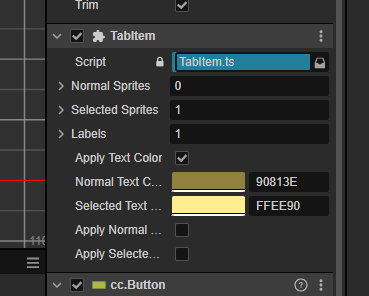
一般是通过配置来设置的,不会在编辑器上编辑,每一个页签一个id,对应一个配置
涨姿势了。
const { ccclass, property } = cc._decorator;
@ccclass
export default class TabCom extends cc.Component {
@property({ tooltip: “是否重复响应” })
isRePet: boolean = false;
/** 默认排序的 childrn name */
private _defNames: string[] = [];
/** 索引位置是否显示 {index, isShow} */
private _defPos: Map<number, boolean> = new Map();
/** 当前索引 */
private _curIndex: number = -1;


/**页签选中前的检查逻辑,返回true直接切换页签,返回false不切换 */
public onSelectCheckCb: (index: number) => boolean;
/** 选中页签后的逻辑 */
public onSelectCb: (index: number) => void;
/** 锁定页签后的逻辑  需要有onSelectCheckCb 才可以有onLockCb */
public onLockCb: (index: number) => void;

private _toggleHandlers: Function[] = [];
onLoad() {
    for (var i = 0; i < this.node.children.length; i++) {
        let toggle: cc.Toggle = this.node.children[i].getComponent(cc.Toggle);
        if (toggle == null) {
            continue;
        }
        if (this._defPos.get(i) == undefined) {
            this._defPos.set(i, true);
        }
        this._defNames.push(toggle.node.name);
        toggle.node.targetOff(toggle.node);
        // 修复:缓存回调句柄,便于后续解绑
        const handler = this.onClick.bind(this, i);
        this._toggleHandlers[i] = handler;
        toggle.node.on(cc.Node.EventType.TOUCH_START, handler);
    }
}

onDestroy() {
    for (var i = 0; i < this.node.children.length; i++) {
        let toggle: cc.Node = this.node.children[i];
        if (toggle && this._toggleHandlers[i]) {
            toggle.off(cc.Node.EventType.TOUCH_START, this._toggleHandlers[i]);
        }
    }
    this._toggleHandlers = [];
    this.onLockCb = null;
    this.onSelectCb = null;
    this.onSelectCheckCb = null;
}


private onClick(index: number) {
    this.selectIndex = index;
}

/**
 * 设置某个选项不可点击
 * @param index
 * @param bl
 */
public setToggleEnableByIndex(index: number = -1, bl: boolean = true): void {
    let toggle: cc.Toggle = this._getNodeByIndex(index, cc.Toggle)
    if (toggle) {
        toggle.interactable = bl
    }
}

public set selectIndex(value: number) {
    if (this._curIndex == value) {
        if (this.isRePet) {
            if (this.onSelectCb) {
                this.onSelectCb.call(null, this._curIndex);
            }
        }
        return;
    }

    let toggle: cc.Toggle = this._getNodeByIndex(value, cc.Toggle)

    if (toggle) {
        if (this.onSelectCheckCb !== undefined) {
            const result = this.onSelectCheckCb(value);
            if (result === false) {
                this.onLockCb && this.onLockCb(value);
                // toggle['_pressed'] = false;
                this.setToggleEnableByIndex(value, false)
                return;
            }
        }
        this.setToggleEnableByIndex(value, true)
        this._curIndex = value;
        toggle.isChecked = true;
        if (this.onSelectCb) {
            this.onSelectCb.call(null, this._curIndex);
        }
    }
}

public get selectIndex(): number {
    return this._curIndex;
}

/**
 * 设置 Toggle Label
 * @param index
 * @param text
 */
setToggleLabel(index: number, text: string): void {
    if (index >= 0 && index < this.node.children.length) {
        let toggle: cc.Node = this._getNodeByIndex(index)
        if (toggle) {
            let label: cc.Label = null
            if (cc.find("Normal/LabelComp", toggle)) {
                label = cc.find("Normal/LabelComp", toggle).getComponent(cc.Label);
            }

            let selectLabel: cc.Label = null
            if (cc.find("Checkmark/LabelComp", toggle)) {
                selectLabel = cc.find("Checkmark/LabelComp", toggle).getComponent(cc.Label);
            }

            let lockLabel: cc.Label = null
            if (cc.find("Lock/LabelComp", toggle)) {
                lockLabel = cc.find("Lock/LabelComp", toggle).getComponent(cc.Label);
            }

            if (label) { label.string = text; }
            if (selectLabel) { selectLabel.string = text; }
            if (lockLabel) { lockLabel.string = text; }
        }
    }
}

refreshOpenStatus() {
    if (!this.onSelectCheckCb) return;
    for (var i = 0; i < this.node.children.length; i++) {
        let toggle: cc.Node = this.node.children[i];
        if (toggle == null) {
            continue;
        }
        let lock: cc.Node = cc.find("Lock", toggle);
        let normal: cc.Node = cc.find("Normal", toggle);
        lock.active = this.onSelectCheckCb(i) === false;
        normal.active = !lock.active;
    }
}

/**
 * 获取第一个active的索引
 */
public getFirstActiveIndex(): number {
    for (let i = 0; i < this.node.children.length; i++) {
        //this.node.children.length - 1 - i 初始化页签层级被改变,与设计时相反, i=0是最后一个
        const node = this.node.children[this.node.children.length - 1 - i];
        if (node.active) {
            return i;
        }
    }
    return 0;
}

// 选中第一个显示的菜单项
public selectedFirstActive() {
    this.selectIndex = this.getFirstActiveIndex();
}

/**
 * 根据索引取 toggle
 */
public getToggleNodeByIndex(index: number): cc.Node | null {
    return this._getNodeByIndex(index) ?? null;
}

/** 根据索引取 toggle */
private _getNodeByIndex<T extends cc.Component>(index: number, nodeType = null): any {
    let node: cc.Node;
    if (index >= 0 && index < this.node.children.length) {
        node = this.node.children[index]
    }

    if (nodeType && node) {
        return node.getComponent(nodeType);
    } else {
        return node;
    }
}
}
拿走不谢~
1赞